Blog

  • Blubrry Will Implement Apple Podcasts Delegated Delivery

    Blubrry Will Implement Apple Podcasts Delegated Delivery

    This fall, podcasters can submit new shows and premium episodes to Apple Podcasts through Blubrry
    Apple Podcasts Logo

    Blubrry Podcasting is delighted to announce support for Apple Podcasts Delegated Delivery, to be released later this fall. Delegated Delivery will allow podcast creators to submit, manage and distribute their free/premium episodes all directly through Blubrry.


    Apple Podcasts Delegated Delivery Benefits and Features

    • Authorize Blubrry to deliver free and premium content to Apple Podcasts
    • Upload and distribute premium content through Blubrry to Apple
      • Using MP3, WAV, and FLAC files
    • Available to all creators for free through Apple Podcasts Connect
      • Apple Podcasters Program membership is required for premium content distribution
    • Overall, easily and quickly distribute free and/or premium content shows to Apple Podcasts from your hosting partner, Blubrry

    How Will it Work

    Podcasters will authorize Blubrry to distribute their podcast episodes directly to Apple via the Blubrry podcaster dashboard. There will be a few simple steps creators will take connecting Blubrry to Apple Podcasts, but after that it is smooth sailing for submission and publication. 

    Who Should Be Utilizing Delegated Delivery

    • Those submitting a completely new show to Apple Podcasts
    • Anyone releasing premium podcast content
    • New podcasters will benefit from the ease of use and time saving capabilities
    • Non-premium shows already submitted and listed on Apple Podcasts do not need to use this feature

    When Will it Be Released

    Apple has announced Delegated Delivery for podcasts will be available in fall of 2022. As we get closer to the launch of Delegated Delivery, Blubrry will be releasing instructions, documentation and a video or two on how to submit directly through Blubrry’s podcaster dashboard. This will be exclusively for Blubrry hosting customers and found in the destinations section of the podcaster dashboard, not in PowerPress (but, never say never).

    _______________________________________________________________________________________________________________

    As always, our support team will be ready to help with any issues that arise using this new feature; however we expect a smooth process from Blubrry to Apple, as this will be even easier than the current submission process to the Apple Podcasts directory.

    Check back here regularly for more details about the process after the launch this fall. We’re a provider partner with Apple Podcasts, which means all of our services are guaranteed to work smoothly with their platform. We look forward to seeing just how easy this will make it for creators to Publish, Analyze and Grow their show with Blubrry’s integrations.
  • Podfaded at Podfest

    Podfaded at Podfest

    Podfest ExpoI’m going to Podfest even though I haven’t posted a podcast episode since last year.

    Yes, I podfaded – I stopped podcasting without wrapping up my podcast. I’ve never posted a “thanks for following me” episode. I just… quit. My most recent show was based on a huge topic pivot, but I used the same feed for the show, Toastmasters 101.

    People podfade for many reasons: interests wane, developing content becomes a drag, circumstances change, your boss decides it doesn’t have enough listeners. Some podcasters put a pin in their podcast and wrap it up with a final goodbye. I haven’t done so and, after eight years, I hope someone at the Toastmasters organization will pick it up instead.

    Podcasting is an emotional medium and I still love my topic, but I am ready for something new. Which brings me to why I will still be attending Podfest in 2022.

    Going to Podfest Anyway

    Yes, I’m going to Podfest anyway for three reasons.

    Getting Started?

    First, I’ve been to a few podcasting events. I won’t say anything negative about the others, but I will say this: Podfest is the most friendly and newbie-supporting podcast conference that you can attend. The amount of attention that the conference hosts – Chris Krimitsos and Andrew Weiss – put into making a Getting Started track for new podcasters is staggering. Every year, we see leading podcasting teachers speak to minimize the lead time to get a podcast launched. That commitment to new podcasters is unmatched.

    I want to start a new podcast. I may know the tech, but I don’t know the techniques of this new podcast field. Podfest has an entire track dedicated to my new interest with smart and talented speakers who will help me get going.

    Making Connections

    I love my Podfest family. Podfest is my family reunion. I’ve met people who have become good friends. I volunteer at Podfest to help with registration because I know that I’ll meet up with those people as soon as they arrive. And the new people who I help during registration will get to know me. I become a reference person who helps them get started not just at registration, but for the rest of the conference.

    Podfest may not be the biggest podcasting conference, yet it’s been building every year. But just like big doesn’t mean successful for the attendees, small doesn’t always mean intimate and personal. Podfest works to make every person’s attendance exceptional. You’ll find people who want to find you and hear your story and your voice. Seriously, you may think it’s so 20th century to have actual paper business cards, but you’ll want to bring them to Podfest. (We also like stickers. Just saying.)

    Vendors

    If you’re just getting started, let me warn you: There are “experts” out there who will want you to spend $1,000 or more for your equipment. Don’t believe it. You can get started far cheaper and still produce quality sound and content for far less. How do you know what you really need? By going to Podfest, you can attend one of the Get Started sessions and then take a stroll through the vendors hall. You can experiment with the equipment that interests you there.

    Experienced and Experience

    If you use basic equipment, you’re going to love the vendors hall. Every year, I’ve tried out new equipment that I’d otherwise continue to wish for but never would attain. If you use an ATR 2100 microphone, you’ll know what I mean when I talk about how low it sounds in recording. But when I spent an hour in the vendors hall, I got to try out different microphones, pre-amps, and gadgets that I never would have known. Because I was there and able to try out equipment, I made smart purchases that upped my podcasting game within my budget.

    It’s not just about equipment. If you’re looking to join a network, those networks who are looking for you are there. Can’t decide which host to pick? Of course, after almost a decade, I’m going to tell you that Blubrry is the best choice, but in the vendor’s hall, you can meet several and make your own choice. (And say hi to Mike Dell at the Blubrry booth.) Check out Todd and Mike speaking there: 17 Years of Podcasting Success & Strategies to Succeed Today and Podcast Rebranding 101.

    Podfaded at Podfest? Yes!

    This year, I may be in-between podcasts. But I’m going because I podfaded.

    I want to try something. I’m in that “new circumstances” point in my life. I don’t want to spend my time flailing, trying to find out what works in this new space that I want to explore. In years past, I’ve spent most of my time learning about marketing. This year, I want to find out about audio drama. I plan to attend as many of the audio drama sessions that I can to speed up my trek.

    Just because one part of my podcasting journey is ending, that doesn’t mean there isn’t more to come. And that’s why I’ll be attending Podfest on May 26 – 29 in Orlando (And I’m bringing friends!).

    If you come to Podfest, look for me. I’ll be the one in the hat, welcoming people at the registration desk. You may not be in my part of the alphabet, but make sure you say hello.

    ____________

    Kim KrajciKim Krajci, host of Toastmasters 101 podcast, has been podcasting for 7 years and writing since the creation of the stylus and clay tablets. She also teaches speech and debate and works as a social media manager.

  • Analyze Your Stats – STAT!

    Analyze Your Stats – STAT!

    Blubrry StatsYour brilliant podcast is up and running; you’ve converted casual listeners into outright fans; but the number of downloads you’re getting per episode has plateaued. What else can your show do to get its numbers up? You can take the time to get to know your listeners on an intimate, radical, numerical level!

    Forget impersonal email blasts or begging for feedback on social media. Get to know your audience by focusing on the data about their listening habits via Blubrry’s hosting service. Once you know who, where and how people listen to your show, you can tailor your show’s marketing with targeted information that you can’t get anywhere else.

    WHO

    Blubrry offers the most comprehensive listener statistics of any podcasting hosting service. We’re also IAB certified, meaning advertisers and organizations you may deal with, such as your brand sponsors, can trust that the statistics you’re getting are accurate and comply with ethical standards.

    You might assume that you already know who listens to your show based on your social media interactions, or the subscribers to your Patreon. But what about the people who listen regularly, yet don’t interact directly with your show? There can be more listeners that don’t take that extra step, than the ones that you hear from all the time.

    On the Blubrry podcasting dashboard, you can find multitudes of information with “Listener Statistics.” This feature breaks down the details for your listeners in a variety of ways. You can break down your listeners’ data by episode, show (if you have more than one), and you can even find out how long people are listening to each episode.

    Couple this information with your Blubrry listener survey (more on that below) and you can paint a very accurate picture of your listening audience.

    WHERE

    One of the more innovative features of the advanced statistics is the listener location breakdown. This feature uses geolocations to track listeners’ locations in countries all over the world. You might have fans in a country you’ve only dreamed of visiting!

    You can also track this data for specific time periods. Maybe a new sponsor wants to confirm that your show has a broad appeal. You can share where people listened in the last month, six months, two years, however long your show has been with Blubrry. These stats can help you hone in on the most active places people are listening. Heck, this might even give you a great, tax deductable reason to visit that dream country.           

    HOW

    Another very helpful piece of data that can help you not only promote your show, but also produce your show, is to find out how people listen to your show. Whether it’s on a laptop, on their phone or tablet, it’s valuable to know how most people are consuming your content. You might want to change up the length or format of your show based on the devices people are using to listen. If content is king, then how content is consumed is definitely it’s crown.

    SURVEY SAYS

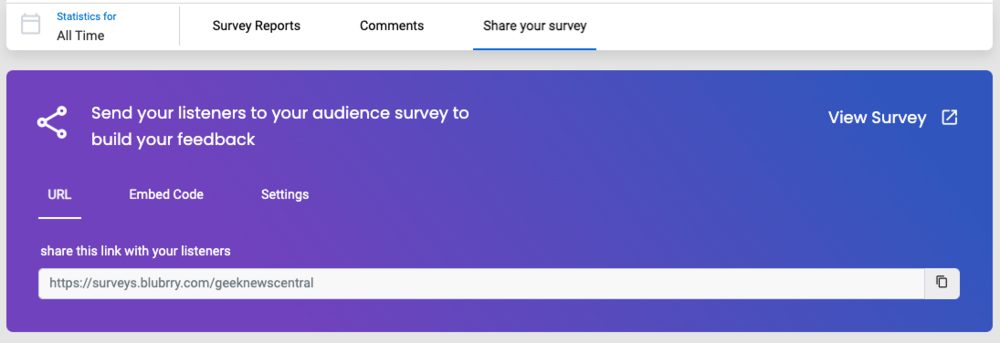
    A very unique feature available on Blubrry hosting is an audience survey. Sending out this survey, or posting it on your own website, could not be easier. This tool could quite possibly be the biggest, most targeted means to help you grow your show’s audience.

    With just a few clicks, you can send out an audience survey to your listeners. The survey asks specific demographic questions such as age, household income and what kinds of things the audience does or does not like about your podcast. The respondents do not have to identify themselves, hopefully encouraging your listeners to feel more comfortable giving authentic responses.

    ADD IT UP

    Compiling and examining this data as a whole, you can begin to analyze trends in your show’s popularity and reach. Perhaps a certain format or guest was more popular than others. Maybe longer, shorter or more frequent, episodes do better at grabbing new listeners. The only way to take your show to the next level is to apply the information you’ve gathered from this data, and use it to your advantage. Take what works and leave behind what doesn’t.

    Now, you no longer have to wonder, “Who’s listening to my show?” Instead wonder, “Why did it take me so long to host my podcast on Blubrry?”

    Written by: Tara Jean O’Brien

    Tara Jean O'BrienTara Jean O’Brien has been a writer, actor, improviser, podcaster, and stand-up for nearly 800 years. When not producing, editing, and hosting her podcast, Single Vs. Married, or co-hosting, Cinema Craptaculus Presents: B-sides, she also writers on Medium and recently found a floor safe hidden in her coat closet.

  • Podcaster of the Month: Liz Brunner

    Podcaster of the Month: Liz Brunner

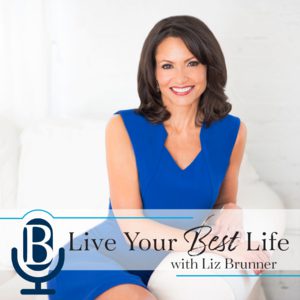
    General – Live Your Best Life by Liz Brunner

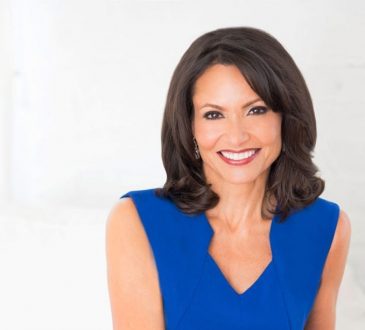
    A television pro, among many other things, is also a diligent and professional podcaster now. A master of episode preparation, she prides herself on making sure the podcast is about the guest and not herself. We were even impressed with the speed that she got back to us when we asked if she’d like to be featured. We’re lucky to have her as part of the Blubrry community and we hope you enjoy learning more about Liz and her podcasting journey so far.
    Tell us about yourself!

    I’ve been called an expert communications coach, a motivational speaker, podcast host and now a best-selling author of Dare to Own You: Taking Your Authenticity and Dreams into Your Next Chapter, and I answer to all of them. I was an award winning television journalist for 28-years before leaving the industry and launching my business, Brunner Communications in 2013. Since then, I’ve been blessed to criss-cross the country working with wonderful clients on everything from executive presence, leadership, presentation skills, public speaking, storytelling and media training as well. And when the pandemic hit, and many were forced to go “virtual,” my television experience became invaluable in teaching people how to communicate, connect and engage their audience, whether they were clients or colleagues. I also launched my online learning platform, BrunnerAcademy.com in 2020, which offers people self-paced learning courses. 

    What inspired you to do your own podcast? 

    I started my podcast because one of the favorite parts of my job as a TV journalist for nearly three decades was interviewing people. I love storytelling. And now, having my own show, I don’t have anyone telling me how many minutes my story needs to be to fit into a newscast! The theme of my show was also important to me. My vision for my life is to teach, motivate and inspire people to live their best life, whatever that means for them. I’ve “recreated” my life many times and had a number of career next chapters—from High School Music teacher, to working in retail, to becoming an award-winning TV journalist, to now an entrepreneur with my communications company. The impetus for my book was a quote from my grandmother, “no knowledge is ever wasted,” and I want listeners to know that too. My intention with my show is for people to hear stories of other people who have also transformed their lives in some way, or risen above challenges. They are all taking all of their experiences—good or bad—and using that knowledge to create their next chapter. If I did it, so can they, and when listeners hear my guests’ stories, I believe they can be inspired to transform their life as well.

    How do you prepare for an episode?

    I do a lot of prep for my shows! Probably more than most, and the reason I feel I can say that is because of the number of times my guests have said to me how prepared I was, how much they appreciated it, and how that is often not their usual experience when being a guest on other people’s shows. I think it goes back to my decades as a TV journalist and news anchor. I did A LOT of prep for my interviews. I carry the same principles forward with my podcast. I learn as much as I can about my guests, I read their books, if they have a new one, which means I usually read about one book a week right now. I will also sometimes do a pre-interview call with a guest, but not always. It depends on the guest, and how much I already know about them, but I don’t like to ask too many questions in the pre-interview call. I want our conversation on the actual show to be as natural and unrehearsed as possible. And yes, the interview is always a conversation and it’s important to remember that. I think it’s also important that my questions not be too long winded. I want my guest to do more of the talking, not me. So, I don’t take too much time to set up the question, but just enough to set the intention and then offer the guest the opportunity to add more to the story. The show is about them, not about me.

    What advice do you have for someone just starting out?

    This is a hard one for me to answer because I was initially resistant to starting my own podcast. Not because I wouldn’t love it, but because of my TV background. I knew the expectation I would have of myself and the time commitment it would take. Not everyone will want to “prep,” for example, as much as I do, but I think it’s just in my DNA now! But I do think each person needs to assess for themselves 1) Why do they want to do a podcast? In other words, what is your intention behind the show? What do you want your audience to take away from the show while listening to it? 2) What kind of a time commitment are they willing to put into it? It’s not just the recording of the show, it’s finding the right guests, doing whatever prep you deem is right for you, promoting the show, getting it onto the right platforms, etc. There’s a lot to it. 3) Who is going to help you or are you going to do it all yourself? How often do you want your show to be published? And finally, 4) What’s going to be YOUR style? Listen to other shows and discover for yourself what style is authentically you. These are just some of the questions I think should be asked before launching a podcast. I’m so proud of the show my Digital Recording Producer, Dan Thibeault from Fast Twitch Media, and I publish almost weekly. Dan was the one who pushed me to seriously consider doing a show. My podcast is now heard in more than 140 countries and we’re about to cross over 30K downloads. And to think I almost didn’t do it! So glad I listened to Dan and did it.

    Connect with Liz here…

  • Tips For Using Discord As A Podcaster

    Tips For Using Discord As A Podcaster

    Using ‘Discord’ to Connect Fans with Fans 

    Discord logoYou probably have Twitter and Facebook accounts for your podcast. Some podcasters also use Instagram or Mastodon. Those are all great ways to let listeners know when your newest episode is up. That said, sometimes the social media algorithms will make it difficult for new people to find your show. One way around that is to make a Discord channel that is dedicated to your podcast and its fans.
    Discord gives fans of a podcast a way to meet and get to know each other. It also gives those fans a connection to the host (or hosts) of the show. Include a link to your channel on your website (like Blubrry’s free site), mention it in your podcast; give people a call-to-action to get started.

    What is Discord?

    Discord https://discord.com has a very welcoming description of itself:

    “Imagine a place where you can belong to a social club, a gaming group, or a worldwide art community. Where just you and a handful of friends can spend time together. A place that makes it easy to talk every day and hang out more often.”

    Each Discord is unique. Podcasters can set up the Discord for their show as they like. You can choose to make your Discord invite-only if your community wants to feel safe. Or, you can let anyone join in without vetting. Either way, it is a good idea to make someone a moderator, or to have several moderators. Removing the bad actors is important because they are the ones who tend to come in and try to undermine things. Don’t let them destroy a healthy community!

    The majority of Discords have topic-based channels where people can add things or make comments. There can also be channels where only the admins can add to it. The most important channel topics you need to create are ones that match the topic of your podcast. 

    A News channel can be used to post recent information that directly relates to the topic of your podcast. A gaming podcast will add news about the game (or games) that their podcast focuses on. A podcast that has guests in every show can post about who the next guest is.

    Make a channel where you post a link to the newest episode that has been released. This helps people who aren’t on social media and who won’t see tweets or posts about it. Doing this also reminds people who frequent the Discord about the new episode. 

    A Community channel can be used by anyone who joined your Discord. Typically, people tend to stick to topics that match the main focus of the podcast. If that channel gets too cluttered, you can make new channels where people can chat about random or unrelated things. I’ve seen Discords with channels such as “cute,” “general,” “food” and “Discord suggestions.” 

    It is also possible to have voice channels where people can talk to each other directly, without using text. Gaming podcasts often have one of these because it makes it easier for people to communicate in the game they are playing together. Another great use of the voice channels is to keep your community up to date on the conference that you are attending.

    Some podcasters like to record their episodes directly into Discord, where the community can listen to it live and post chat comments. Others prefer to record it first and then add a link to the show notes in the Discord. Either way can work well.

    Be Present

    Discord is a very social experience. People who join a Discord are either doing it because some of their friends are in it, or because they are big fans of the podcast. For best results, you need to make an effort to pop into the Discord and say hello or join in a conversation. People like it when the host of the podcast shows up and makes themselves accessible for conversation.

    Another great way to use Discord is to connect with other Discords that match your show’s topic. Recently, I participated in a “campfire” conversation that was recorded on someone else’s Discord. A person from that Discord invited me to join the campfire and asked permission to post a recording of it on my podcast’s server after it was finished. It was fun! Sharing exclusive content like that can benefit both Discords, as people who are on one might decide to join the other.

    Podcasters should check in on what’s happening in their Discord often. Take a second to “wave hi” to people in the Welcome channel who recently joined. Make a post in the Community channel to announce new channels you have added (and why they are useful). Watch for the little red circle that appears next to your Discord’s icon and pop in and respond to it. 

    In short, the best thing about Discord is the connectivity between fans and even the host (or hosts) of the show in a way that cannot be replicated on other types of social media.

    ____________

    Jen Thorpe wearing glasses, hat and face maskJen Thorpe has been podcasting since 2005. They are the host of the Shattered Soulstone podcast, which releases new episodes every week. When they aren’t podcasting, they are playing video games or Dungeons & Dragons.
  • Blubrry Introduces New Account Sharing for Podcasters

    Blubrry Introduces New Account Sharing for Podcasters

    Share your podcast account publishing/stats access with team members

    Remote team onlineBlubrry Podcasting introduces account sharing. One of our most requested features is now available: allowing for additional users and permissions for each show. The ability to share publishing or stats access with other team members, co-hosts, and sponsors is now live. This new feature is handy to podcasters, and now anyone with a Blubrry account and podcast can add additional users to their show. In the past, we’ve recommended using a shared email account for the Blubrry login, but we’re happy to have remedied that situation with a more sophisticated solution.

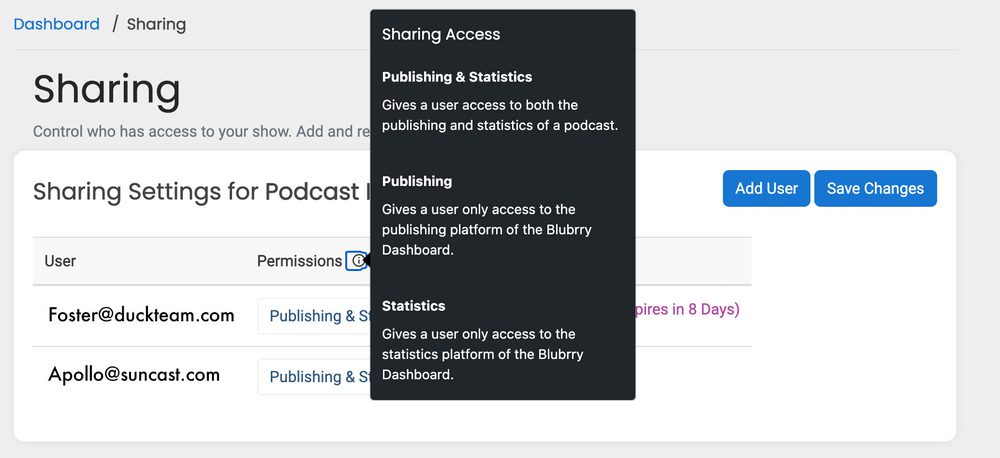
    Podcasters can share their podcast with anyone they’d like with a simple email invitation. For example, if you have a podcast editor that you want to allow to upload the finalized episodes, you can add Publishing permissions and exclude the statistics. On the other hand, if you have a sponsor that wants to be able to view the statistics regularly but keep away from the episode files, set them to Statistics only. There are easy-to-manage scenarios in which our three permissions settings can benefit you and your team.

    Each user must create a Blubrry account but doesn’t need to sign up for any services. Once accepted, the shared podcast will be added to their account with permissions set by the podcast account owner.

    Where to Find Sharing

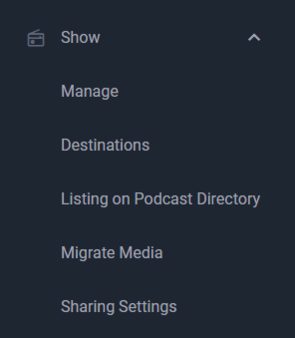
    You can find the account sharing in the sidebar when logged into the dashboard. Head to ‘Show’ and then ‘Sharing’ to manage your users and permissions. You can manage users and their permissions from the same menu.

    Permissions

    Publishing and Statistics
    Full access. Users can publish your episode files and access the statistics, including exporting data.

    Publishing
    They can publish your episodes but not access the statistics section of the Blubrry dashboard.

    Statistics
    They can only access the statistics section of the Blubrry dashboard.

    Invites

    Invitations are sent via email and expire after 10 days; a new invite must be sent if expiration occurs. If the invitee does not yet have a Blubrry account, they’ll be prompted to create one (using the same email address as the invite). They can then follow the prompts to accept or decline the invitation.

    If a user has declined, modifying the permissions will not send a new invitation. It’s best to remove them and send a new invitation. There is no need to send a new invite if you change permissions.

    Professional hosting customers have no limit on the number of users they can share per show or the overall network. All other account owners are capped at five additional users per show. 

    Again, this is free and available to any Blubrry user. Even if you’re using our statistics, you can now share them with whomever you want.

    Blubrry podcasters can now quickly and securely share their podcast service with their chosen team members. Just another way we’re letting you be in control of your podcast; grow your team and delegate those podcast-related tasks. If you have any questions or issues, don’t hesitate to contact Blubrry support.

  • Audience Survey Results Added to Blubrry Podcast Stats

    Audience Survey Results Added to Blubrry Podcast Stats

    Audience demographics graphically available in podcaster dashboard.

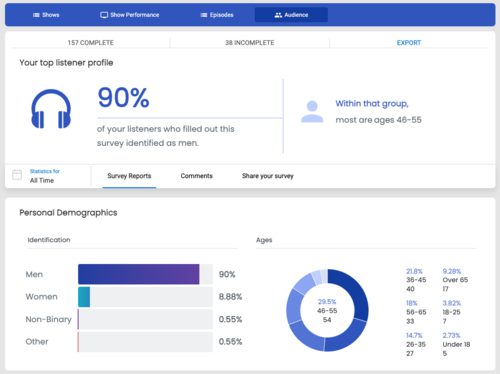
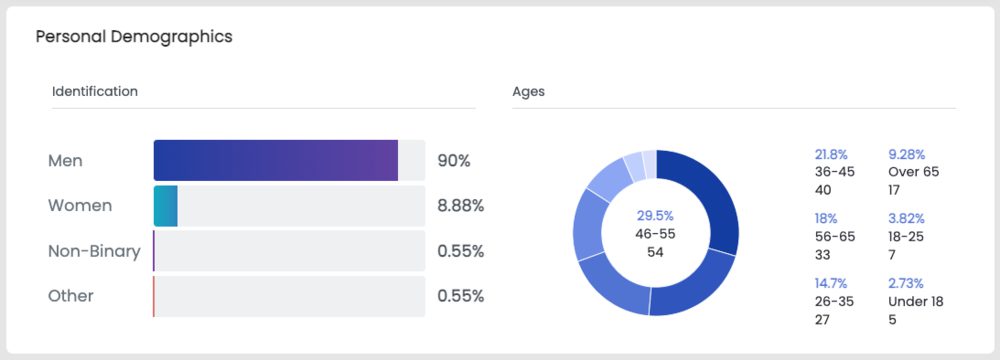
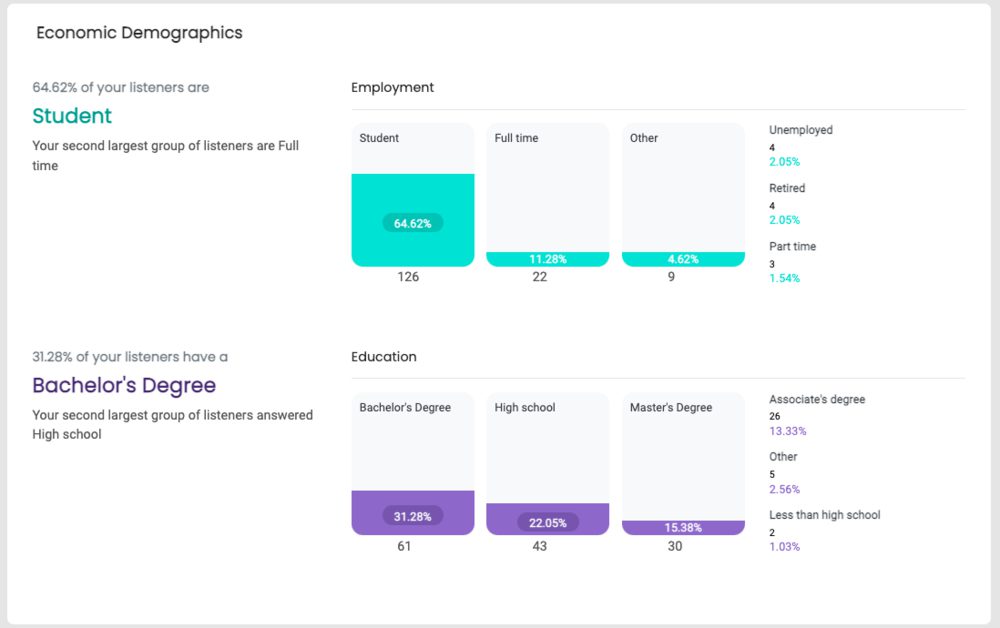
    Last month we updated our audience survey and promised an audience survey results section within our podcast statistics. You can now check your results with beautiful charts and graphs that look into the type of listeners listening to your podcast. If you’re curious about your potential audience results but want to learn more about audiences for the industry, check out the latest from Edison Research’s 2022 Infinite Dial Report, where they provide podcasting data.

    Where to Find Audience Survey Results

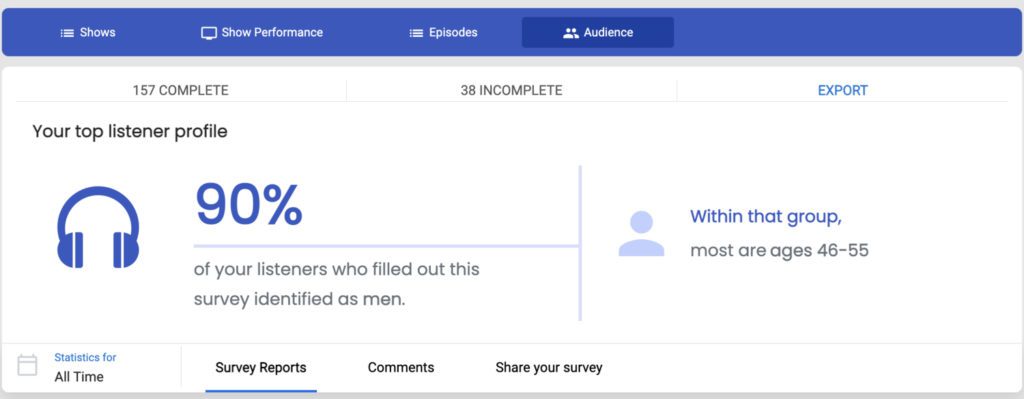
    A newly updated tab in the podcast statistics section is called audience. From there, you’ll see new charts and graphs representing the results, and you can download a CSV of your results overall.

    How to Use This Data

    • Add it to your media kit.
    • Back up your podcast stats info with relevant info about your listeners.
    • Make strategic marketing decisions, such as connecting more with your younger Gen Z audience and their interests.
    • Take it to heart, and by that, we mean sit back and reflect on your results and how they connect to your Impactful Play and Retention data.

    Focus your efforts on pleasing your audience with more curated content and working better to fit your listeners’ habits, lifestyles, and preferences. This reliable demographic data is in demand all over the podcasting industry, and you have the power to get it directly from your listeners. 

    One of the most exciting parts of the new survey data is that those surveyed can leave you a comment, which they can keep private or be shared publicly on Twitter. If a listener left you a positive comment and clicked ‘public,’ you can share that with your Twitter audience directly through Blubrry.

    If you’re not already using our audience survey, it’s incredibly easy to get started. We provided some ideas on how to do that here. An audience survey can help you grow your audience. This is one of many tools we’ve refined and re-released to assist podcasters in publishing their show and continuously analyzing and learning how to best grow their show. 

    Those who have used the audience survey previously will see their past results already implemented. Those not utilizing the audience survey will see results after one completed survey.

    Lastly, our audience survey is available to anyone with a Blubrry account. You’ll find the best use case for the survey results is when you’re also using our hosting and have access to the Impactful Play and Retention data from our stats. Standard stats users receive the visual results, but free stats users do not and can download the raw data in a CSV.

    A visual representation of collected data is now easier to comprehend and view changes over time. We hope you find the visual results compelling and helpful in addressing your audience and podcast content in the future. Read here and get started with yours, found under Audience in Blubrry’s podcaster dashboard, to learn more about audience surveys.

  • New, Easy PowerPress 9.0 Onboarding

    New, Easy PowerPress 9.0 Onboarding

    Refinements made to the onboarding process within PowerPress makes starting a podcast easier.

    PowerPress logoHaving a website can be critical for your podcast, especially to ensure audience growth. We’re reminding you of this to also tell you that we’ve updated our onboarding process for PowerPress, our publishing podcast plugin for WordPress. By the end of the process, you’ll be publishing your first episode and on your way to submitting to numerous podcast directories. Talk about efficiency.
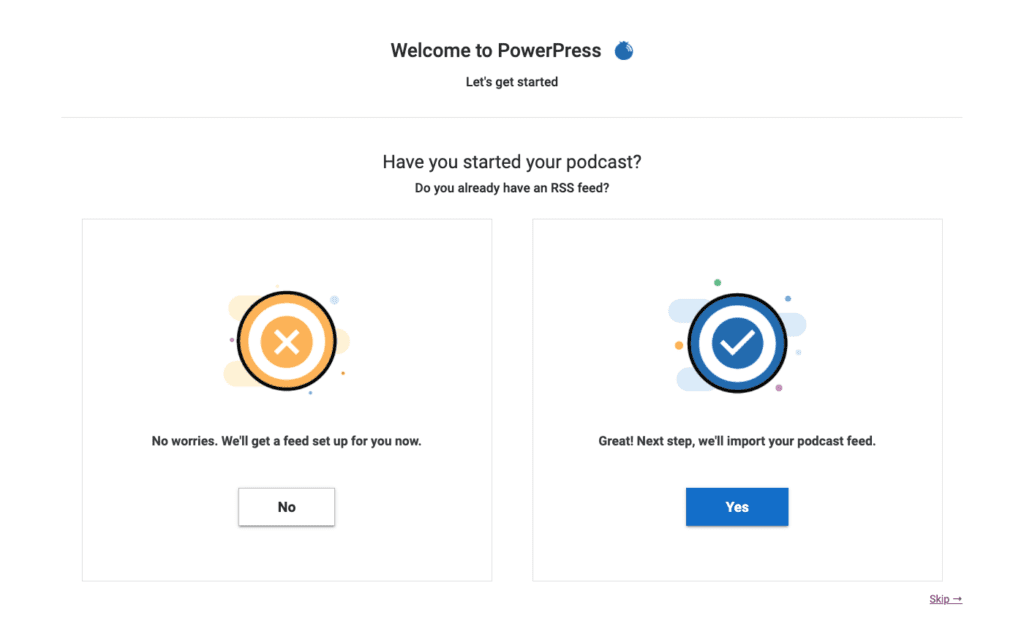
    PowerPress 9.0 onboarding screen

    You can go one of two ways: starting a podcast or moving a podcast. Starting is a quicker process than moving, however, you’ll be able to complete the desired goal either way.

    Starting a Podcast with PowerPress

    You create your podcast within the onboarding process. Add your title, artwork, some finer details, and, lastly, you’ll receive an auto-generated RSS feed from WordPress. Those who are not yet a member of the Blubrry family can sign up for podcast hosting through their WordPress website and use our one-month free trial to try us out. Got hosting taken care of already? That’s ok, just go ahead to the next step. You’ll be all set within a few minutes.

    Anyone with a WordPress site can try podcasting out for free within a few clicks, and all without leaving WordPress.

    Importing and Switching a Podcast to PowerPress

    Using Blubrry’s podcast hosting is not a requirement of PowerPress. Anyone can import their podcast to PowerPress, and those beginning to use Blubrry hosting can move their media episode posts (including show notes). The steps are easy: sign up for hosting, then Blubrry automatically imports your media, and then we import your episode posts (show notes). We move your existing show’s title, RSS feed and artwork, so it’s a complete transfer for the podcast.

    The import and migration time length depends on how many past episodes you have, as well as their file size. Luckily, you’re able to get it started and then come back later to check on the progress. We always recommend you reach out to our support team and review the full steps when leaving other hosts.

    We recommend you have the following ready:

    • Title: Well researched and something you won’t feel the need to reassess in the near future
    • Artwork: Eye-catching and properly sized (3000×3000 or 1400×1400), 72 dpi in JPEG or PNG
    • Log-ins: Your Blubrry login information to link the account

    We’ve tweaked the onboarding process for all new users in the onboarding process for PowerPress, with an emphasis on reaching the end goal of being able to easily publish an episode at the end of the process.

    Since day one we’ve developed our tools to help you own your brand and control your show, nowadays with a bigger emphasis on the growth of your show. By the end of the PowerPress onboarding process, you’ll be set to easily manage your podcast within your own website; and focus on tools that will help you market your show.

    Learn more about PowerPress here. Give it a shot yourself and get your podcast started today.

  • Delegate It or Ditch It

    Delegate It or Ditch It

    DelegateSuccessful podcasts do not become that way by chance. They are the result of the efforts of many talented and dedicated people working together toward the same goal (and partnering with helpful companies such as Blubrry to accomplish those goals). Figuring out effective ways to work with your team is not only important in making your content shine, but it’s the most important element to nurture if you want your show to have a long lifespan.

    Podcasts require more than just a mic, a host and an idea. There’s prepping with writers, pre-interviewing guests, setting up a recording studio, figuring out where to host your content, post-production, not to mention marketing the show, creating a website, artwork, music licensing — the long and the short — there are many people that are involved in bringing a show to life.

    If you begin your show having made a list of tasks to be completed for each episode, split up your show’s tasks fairly among your team, then you’re off to a great start. But that’s often easier said than done.

    ASSESS AND ADDRESS

    What happens if you’re up and running and suddenly you feel like you’re doing the lion’s share of the work and your collaborators are just along for the ride? Address it head on. Communicate to your team what you’re doing and what you need help with. If you’ve started this journey together, the only way to move forward together is to be honest about your feelings and what you want your workload to be.

    DELEGATE

    The worst thing to do if you’re feeling overworked and under-appreciated is to sit on those feelings. If you don’t reach out for help, or don’t communicate to your team what you’d like them to do, there is more room for resentment to grow. More often than not, your team may want to take on more responsibilities. Try delegating one task and build from there. Not only will this take things off your plate, but it will also give everyone else more of a stake in the success of the show.

    GO DEEP

    If you’ve delegated tasks to your team and the tasks aren’t being completed, it could be time to consider what is most important to you. You might be head over heels in love with your show, but is the show worth losing friendships or burning bridges with coworkers over? No matter how hard you try, the inner battles will make their way into your content in some form or another.

    Even if you end a show sooner than you had anticipated, the content you’ve created is still out there. No one can take that away from you! Who knows — ending a podcast that’s burning you out, could be making room for another, even BETTER podcast, to come into your life.

    TEAM UP!

    Cultivating healthy working relationships with podcast team members is crucial to any show’s success. But cultivating a healthy relationship with your own boundaries is equally as important for the future of your podcast.

    Be sure to check out all the resources Blubrry offers to help every person on your team!

    Written by: Tara Jean O’Brien

    Tara Jean O'BrienTara Jean O’Brien has been a writer, actor, improviser, podcaster, and stand-up for nearly 800 years. When not producing, editing, and hosting her podcast, Single Vs. Married, or co-hosting, Cinema Craptaculus Presents: B-sides, she also writers on Medium and recently found a floor safe hidden in her coat closet.

  • How to Build a Podcast Buffer

    How to Build a Podcast Buffer

    CalendarPodcasting offers a beautiful, creative outlet that can turn into a real side hustle if pursued with vigor. One thing that successful podcasts always do is release with regularity. Sure, there are big podcasts that don’t have a dedicated release schedule, but they are releasing at least one episode a week. So, how do top podcasters ensure they never let their audience down?

    Never Miss a Scheduled Episode Release and Never Disappoint Your Audience

    Your podcast can be replaced. No one likes to hear this, but it’s important to hear. Listeners want something to get them through the day, and if they’ve got your podcast in their queue every week, they depend on you for that time.

    If your podcast doesn’t release for even one week, they will try to fill that time with something else, and they may end up liking that as much or more than your show. So please don’t allow them to replace you.

    Podcast Buffer Replacement

    It’s great to have a buffer episode to use in a pinch, but using it will exact a toll. After you use a buffer episode, you should consider replacing it when you have some time to do so. This will mean recording a new buffer episode.

    It can be exhausting to record an extra episode, but the benefits far outweigh the drawbacks.

    Ways to Build a Podcast Buffer

    Having a few episodes sitting in the wings is critical to the long-term success of your podcast. If you need to take a week off from recording because of sickness or complications in your personal life, you can rest easy knowing you have a few episodes ready to be released.

    Build a Buffer Before Podcast Launch

    This is the ideal way to give yourself some padding, and the way I have done it on my second and third podcasts. Recording a bunch of episodes before you release your first episode requires a lot of forethought and strategy, but it pays off big time!

    By recording podcast episodes before your podcast launches, you can record with no pressure from a release schedule. If you have enough patience, you can build such an incredible buffer that you won’t have to worry about backlog replacement for years.

    Double Your Recording Schedule Temporarily

    My co-host and I just took a vacation for a few weeks. During that time, we used a few of our buffer episodes, and now we need to restock them. To do so, we will be recording two episodes whenever we would typically have recorded one episode.

    Alter Your Normal Show Format

    Your show format is a great way to keep the quality consistently high. It also gives listeners the comfort of knowing what to expect, but switching up your normal format can make it much easier for you to replace your episode buffer.

    On my show, we review one movie. This includes a synopsis, review, our thoughts and an in-depth spoiler section where we go over the beats of the movie. That format is great for us, but it requires a lot of prep on our part. We have to watch the movie, take notes, build a show script, record the episode together, and more.

    But if we record an episode where we simply watch a movie with the mics running to get our reactions to the movie and whatever fun quips we can come up with (similar to RiffTrax) we cut down on prep time.

    There are lots of ways to alter your format to achieve an easy-to-record show that will spice up your normal feed. Who knows, your listeners could really love the occasional change of pace!
    How do you keep your buffer episodes stocked? Let us know any tips you have in the comments section. And for more tricks of the trade, be sure to refer to Blubrry’s free, online Podcast Manual.

    ____________

    David DayDavid Day is the co-founder and co-host of Horror Movie Talk Podcast. When he isn’t watching horror movies he is focused on growing the podcast. Listen to his show Horror Movie Talk here.