Category: Tools

  • Media Mastering by Auphonic Available with Blubrry

    Media Mastering by Auphonic Available with Blubrry

    Process your podcast episodes easily with Auphonic.

    There are countless steps involved in creating a podcast, yet with Media Mastering by Auphonic there is now one less to worry about. We’re pleased to announce that we have integrated Auphonic’s impressive automated mastering processing into our publishing system. It’s available in both our Podcaster Dashboard and PowerPress.

    Now all of our hosting customers can easily conquer post production, with the use of Media Mastering with an additional monthly fee. Some standout features of this new tool include:

    • -16 LUFS set for optimal post-production
    • Intelligent audio processing, designed to meet today’s podcast audio standards
    • Extremely useful options for those who record separately, in different locations, on different microphones, guests, etc.
    • Starting with what we consider to be the best-in-class setting that you can modify.

    Not everyone can afford to have an editor to master their media. Auphonic, a trusted name in audio processing used by many members of our team for years, was the only choice and one that we fully endorse.

    Our CEO, Todd Cochrane, has mastered well over 2,000 podcast episodes with Auphonic and attests, “It is a service I cannot live without.”

    How to Get Started with Media Mastering

    Media Mastering is available for free until Feb. 17. We’ve made it accessible for 30 days since its launch for any hosting customer to try out. During that time period, you’ll find it as part of the publishing process where you upload your media file. After that, you’ll find it on the Create Episode page within our publisher and within the upload episode section of PowerPress.

    Learn more about Media Mastering by Auphonic from Blubrry on our website, and listen to the audio differences in our examples. Find more details about Media Mastering by Auphonic on our website. Any questions? Reach out to our support team seven days a week.

  • What to Consider When Choosing a Length for Your Podcast

    What to Consider When Choosing a Length for Your Podcast

    Timer sitting on tableOne thing that podcasters need to consider is a question that will take some thought and planning. How long should a podcast be? There is no “one-size fits all” answer to that question, and this can cause your decision making about the length of your show to be complicated.

    A good way to sort out this problem is to consider some variables. Are the majority of your episodes approximately the same length of time? How often do you release your podcast? Is the cost of hosting manageable, or has the price gone higher than you would like? Do you take the time to consider the space the ads in your show will take up? 

    Consistency is key

    Fans of your podcast are expecting consistency. They trust that a new episode will regularly appear. This is true whether you release a new episode once a week, once every two weeks, or once a month. If your current schedule works for you, and your listeners keep downloading new episodes – keep doing what you do!

    What if you feel that your podcast isn’t going very well? Now might be a good time to make a change. Keep the topic and format you have been using. Let your listeners know ahead of time that you want to switch from a weekly podcast to one with longer episodes. Make it clear that the new episodes will be released every other week. Your audience will likely be willing to stick around to hear them.

    How long should your podcast episodes be?

    This question requires some context. Your podcast should be as long as it needs to be. 

    That might not sound very helpful, at first glance. Every podcast is different and unique, so there is no simple answer about exactly how long your episodes run.

    Here are some things to consider:

    What does your audience say? Your audience is your best indicator as to how long your show could or should be. By using the Audience Survey and the Advanced Statistics on the Blubrry Dashboard, you’ll definitely know when/if they start to lose interest in your show as the minutes roll past – and whether they are craving more!

    How much time do you have to record your podcast? Podcasters who make their living from their “day job” will have limited time to podcast. You might need to record your show on your days off. Podcasters who are parents of small children could potentially record their podcast while the kids are at daycare or school. Edit the audio after the kids go to bed.

    Do you have disabilities or chronic illnesses? As a person who has chronic illnesses that can hit at any moment and completely ruin my day, I sometimes lack the energy it takes to record a good episode. This is especially true for people who have illnesses that include “brain fog.” My solution to this problem is to keep the episodes to around 30 minutes.

    How much time is allotted to the ads in your podcast? There are a variety of ways to include advertisements in your episodes. Some are host-read, others are automatically placed within episodes, like with Blubrry’s Programmatic Advertising. Podcasters who include ads in their shows often are hoping to make money from those ads and will need to take heed of the length and placement of the add as they’re determining the perfect show length. And for podcasters who choose not to include ads, that’s easy! No time allotment needed.

    How high are your hosting fees? Every podcast episode needs to be on a platform that will distribute the show to the people who want to listen to it. This is going to cost the podcaster some money. If you are comfortably able to afford your hosting fees, you have nothing to worry about. However, if your income has changed or dropped, you might need to consider a smaller show and/or shopping around for a less expensive hosting plan. We offer a variety of plans, including annual options.

    Did you do NaPodPoMo? National Podcast Post Month takes place in November every year. Created by Jennifer Navarrete, the goal of NaPodPoMo is for podcasters to produce and publish one episode every day during the month of November. It is a perfect time to make shorter podcast episodes than you typically would, and can be a fun challenge!

    ____________

    Jen Thorpe wearing glasses, hat and face maskJen Thorpe has been podcasting since 2005. They are the host of the Shattered Soulstone podcast, which releases new episodes every week. When they aren’t podcasting, they are playing video games or Dungeons & Dragons.

  • Blubrry Podcasting Introduces Podcast Media Kits

    Blubrry Podcasting Introduces Podcast Media Kits

    Create your own podcast media kit in minutes.

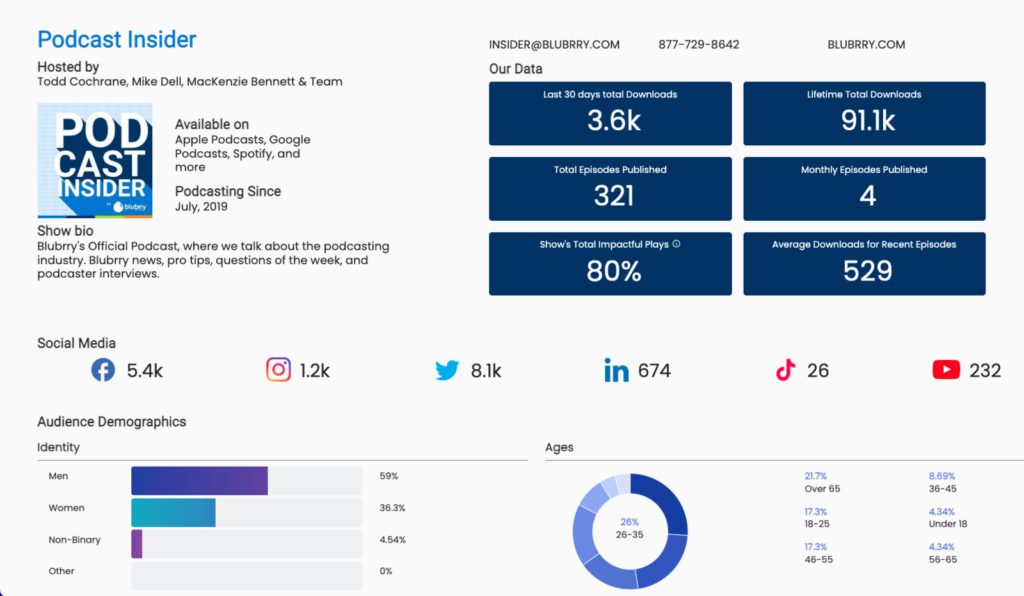
    Blubrry is introducing a podcasting industry first by providing all Blubrry paid customers a podcast media kit that updates daily with information you choose to include. The kit includes data you provide, podcast statistics and audience survey results.

    Podcast Media Kits can be expensive and time-consuming to put together and are always out of date as soon as you publish them. Our media kits are refreshed daily with the newest data.

    Who to Share Your Podcast Media Kit With

    • Advertisers
    • Sponsors
    • Media writers
    • Partnership deals
    • Future guests
    • Event and speaker coordinators

    The data provided in the media kit listed below includes the ability to toggle specific data points on and off, under your discretion.

    Podcast Data Points

    • Podcast website link
    • Show start date
    • Average monthly episodes published
    • Audience survey results (minimum 10 responses)
    • Number of episodes published overall
    • Monthly episodes published
    • Host bio
    • Show description
    • Social media follower count
    • Contact information

    Media Kit example

    Once you’ve completed the media kit, a public URL will be provided in its dashboard. This URL is unique and complex for search engines to index, but it is possible, especially if it’s shared on social media.  Automatic updates to the media kit will be done daily, but podcasters can change/update the media kit whenever they’d like. You can find the media kit within the podcast statistics section of the dashboard.

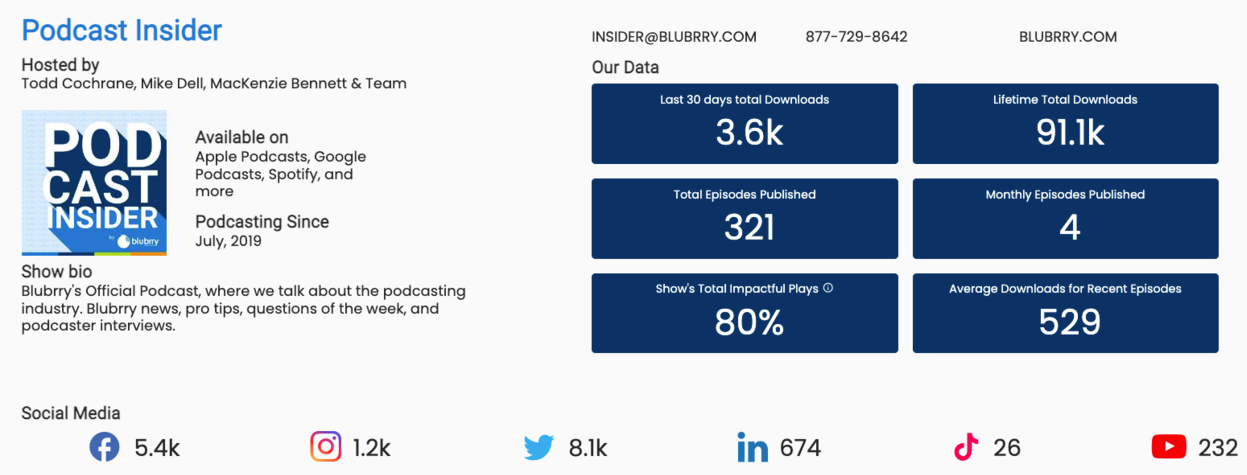
    Take a look at the Podcast Insider media kit here. We’ve chosen to include all of the data points that are made available. As always, we want your feedback. We came to this version after much debate on how fancy or bare bones to make these media kits, based on how we think they would benefit most podcasters. We know podcasters are eager to point out ways we can improve. So let our support team know here and if you love the final result, share it with your audience on social.

    Get started to showcase your podcast in an accurate, creative way!

  • Tips For Using Discord As A Podcaster

    Tips For Using Discord As A Podcaster

    Using ‘Discord’ to Connect Fans with Fans 

    Discord logoYou probably have Twitter and Facebook accounts for your podcast. Some podcasters also use Instagram or Mastodon. Those are all great ways to let listeners know when your newest episode is up. That said, sometimes the social media algorithms will make it difficult for new people to find your show. One way around that is to make a Discord channel that is dedicated to your podcast and its fans.

    Discord gives fans of a podcast a way to meet and get to know each other. It also gives those fans a connection to the host (or hosts) of the show. Include a link to your channel on your website (like Blubrry’s free site), mention it in your podcast; give people a call-to-action to get started.

    What is Discord?

    Discord https://discord.com has a very welcoming description of itself:

    “Imagine a place where you can belong to a social club, a gaming group, or a worldwide art community. Where just you and a handful of friends can spend time together. A place that makes it easy to talk every day and hang out more often.”

    Each Discord is unique. Podcasters can set up the Discord for their show as they like. You can choose to make your Discord invite-only if your community wants to feel safe. Or, you can let anyone join in without vetting. Either way, it is a good idea to make someone a moderator, or to have several moderators. Removing the bad actors is important because they are the ones who tend to come in and try to undermine things. Don’t let them destroy a healthy community!

    The majority of Discords have topic-based channels where people can add things or make comments. There can also be channels where only the admins can add to it. The most important channel topics you need to create are ones that match the topic of your podcast. 

    A News channel can be used to post recent information that directly relates to the topic of your podcast. A gaming podcast will add news about the game (or games) that their podcast focuses on. A podcast that has guests in every show can post about who the next guest is.

    Make a channel where you post a link to the newest episode that has been released. This helps people who aren’t on social media and who won’t see tweets or posts about it. Doing this also reminds people who frequent the Discord about the new episode. 

    A Community channel can be used by anyone who joined your Discord. Typically, people tend to stick to topics that match the main focus of the podcast. If that channel gets too cluttered, you can make new channels where people can chat about random or unrelated things. I’ve seen Discords with channels such as “cute,” “general,” “food” and “Discord suggestions.” 

    It is also possible to have voice channels where people can talk to each other directly, without using text. Gaming podcasts often have one of these because it makes it easier for people to communicate in the game they are playing together. Another great use of the voice channels is to keep your community up to date on the conference that you are attending.

    Some podcasters like to record their episodes directly into Discord, where the community can listen to it live and post chat comments. Others prefer to record it first and then add a link to the show notes in the Discord. Either way can work well.

    Be Present

    Discord is a very social experience. People who join a Discord are either doing it because some of their friends are in it, or because they are big fans of the podcast. For best results, you need to make an effort to pop into the Discord and say hello or join in a conversation. People like it when the host of the podcast shows up and makes themselves accessible for conversation.

    Another great way to use Discord is to connect with other Discords that match your show’s topic. Recently, I participated in a “campfire” conversation that was recorded on someone else’s Discord. A person from that Discord invited me to join the campfire and asked permission to post a recording of it on my podcast’s server after it was finished. It was fun! Sharing exclusive content like that can benefit both Discords, as people who are on one might decide to join the other.

    Podcasters should check in on what’s happening in their Discord often. Take a second to “wave hi” to people in the Welcome channel who recently joined. Make a post in the Community channel to announce new channels you have added (and why they are useful). Watch for the little red circle that appears next to your Discord’s icon and pop in and respond to it. 

    In short, the best thing about Discord is the connectivity between fans and even the host (or hosts) of the show in a way that cannot be replicated on other types of social media.

    ____________

    Jen Thorpe wearing glasses, hat and face maskJen Thorpe has been podcasting since 2005. They are the host of the Shattered Soulstone podcast, which releases new episodes every week. When they aren’t podcasting, they are playing video games or Dungeons & Dragons.

  • Blubrry Introduces New Account Sharing for Podcasters

    Blubrry Introduces New Account Sharing for Podcasters

    Share your podcast account publishing/stats access with team members

    Remote team onlineBlubrry Podcasting introduces account sharing. One of our most requested features is now available: allowing for additional users and permissions for each show. The ability to share publishing or stats access with other team members, co-hosts, and sponsors is now live. This new feature is handy to podcasters, and now anyone with a Blubrry account and podcast can add additional users to their show. In the past, we’ve recommended using a shared email account for the Blubrry login, but we’re happy to have remedied that situation with a more sophisticated solution.

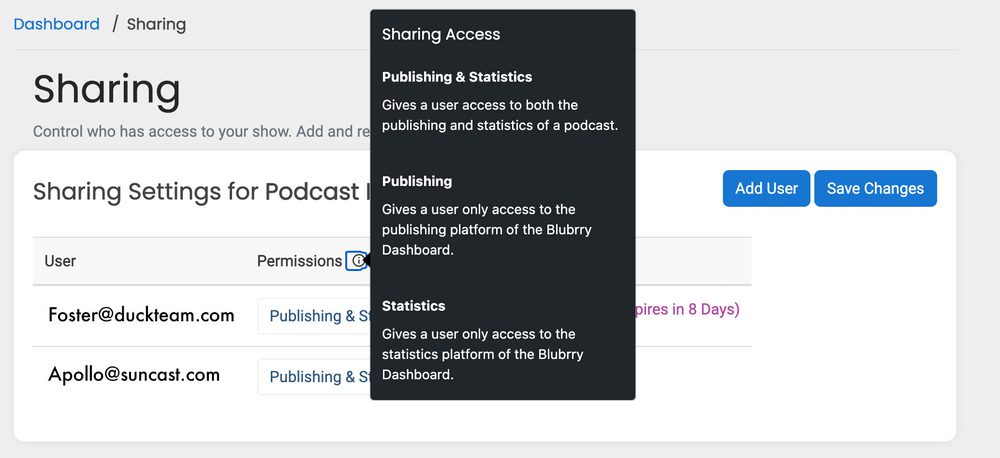
    Podcasters can share their podcast with anyone they’d like with a simple email invitation. For example, if you have a podcast editor that you want to allow to upload the finalized episodes, you can add Publishing permissions and exclude the statistics. On the other hand, if you have a sponsor that wants to be able to view the statistics regularly but keep away from the episode files, set them to Statistics only. There are easy-to-manage scenarios in which our three permissions settings can benefit you and your team.

    Each user must create a Blubrry account but doesn’t need to sign up for any services. Once accepted, the shared podcast will be added to their account with permissions set by the podcast account owner.

    Where to Find Sharing

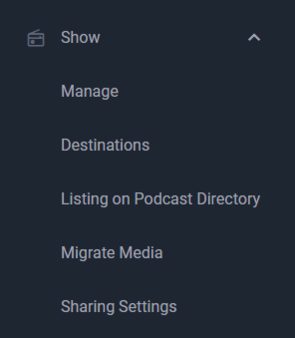
    You can find the account sharing in the sidebar when logged into the dashboard. Head to ‘Show’ and then ‘Sharing’ to manage your users and permissions. You can manage users and their permissions from the same menu.

    Permissions

    Publishing and Statistics
    Full access. Users can publish your episode files and access the statistics, including exporting data.

    Publishing
    They can publish your episodes but not access the statistics section of the Blubrry dashboard.

    Statistics
    They can only access the statistics section of the Blubrry dashboard.

    Invites

    Invitations are sent via email and expire after 10 days; a new invite must be sent if expiration occurs. If the invitee does not yet have a Blubrry account, they’ll be prompted to create one (using the same email address as the invite). They can then follow the prompts to accept or decline the invitation.

    If a user has declined, modifying the permissions will not send a new invitation. It’s best to remove them and send a new invitation. There is no need to send a new invite if you change permissions.

    Professional hosting customers have no limit on the number of users they can share per show or the overall network. All other account owners are capped at five additional users per show. 

    Again, this is free and available to any Blubrry user. Even if you’re using our statistics, you can now share them with whomever you want.

    Blubrry podcasters can now quickly and securely share their podcast service with their chosen team members. Just another way we’re letting you be in control of your podcast; grow your team and delegate those podcast-related tasks. If you have any questions or issues, don’t hesitate to contact Blubrry support.

  • Livestream Your Show

    Livestream Your Show

    You’ve been podcasting for a while. You’ve got a good amount of episodes in your we-moved-the-blog-to-this-site-when-we-made-a-new-website.blubrry.com/ hosted catalog. You’ve got a great group of loyal fans. Most importantly, you’ve created a brand people are connecting with. Now what? How do you keep your listeners engaged? How do you spice up your content? How do you attract new listeners and make them take that additional step to like and subscribe? It might be time to consider adding some lights, camera and action by doing a livestream episode of your show.

    One of the most important things in retaining your podcast audience is engagement. Your audience wants to feel like they’re part of the show. Not only will engaging with your audience by adding a video version of your show satisfy your loyal fans, doing a livestream on platforms like Twitter, Twitch or YouTube can also boost the visibility of your show for the Google algorithm search gods.

    You may be thinking, “I only have a handful of listeners,” or, “I podcast because I don’t like being on camera,” or, “I’m not technically savvy enough to figure out how to livestream.” Let’s address some ways to overcome these common concerns and accomplish what’s most important about doing a livestream — connecting with your audience on a deeper level.

    Audience Size

    It truly doesn’t matter if you have five listeners or 500,000. Your fans WANT to be part of your show. They’re already on board for the inside jokes, your content, and your unique point of view. They want to see your reactions and maybe even your cool (even if it’s in a closet) studio!

    For shows with a large following, set up a livestream as a special incentive, part of an offering for your Patreon subscribers, or even a platform to give out prizes from your sponsors. Maybe you’ve finally landed that guest you’ve been trying to get for months or maybe you have a big announcement that you want to make sure all your listeners know about. No matter the event, using a livestream as a reward, or promoted as, “exclusive behind the scenes content,” is incredibly effective for creating buzz around your show. 

    Shows with smaller followings can’t go wrong with live-streaming a show. If the goal is to grow your show, you want to create as many opportunities for people to find your content. The more variations on how your content is consumed or discovered, the better. You can also take clips from the livestream show and use those as promotional tools on your social media profiles. 

    The results your show can get from a livestream proves that size truly does not matter!

    Camera Shy to Camera Sly

    While there is no magic bullet for overcoming this aversion, there are things to consider if being on camera makes you want to run for cover. First and foremost, your fans already like you — they are rooting for you. They want to see all the ways you are reacting and having fun while you are doing your show. 

    Start where you are comfortable. Just turning on the camera while you record is a great place to start. Gradually welcome questions from your audience. You can branch out as far, or as near, as you feel comfortable, knowing that your show will reap the rewards from video engagement.

    Think you come off as awkward and weird? Embrace it. Name it while you’re feeling it and know you are not alone in feeling this way. The more you can own how you’re feeling in the moment, the more relatable you become to your audience. Perhaps seeing you squirm and carry on will give other people the courage to do the same. 

    We can’t wait to SEE your show soon!

    Written by: Tara Jean O’Brien

    Tara Jean O'BrienTara Jean O’Brien has been a writer, actor, improviser, podcaster, and stand-up for nearly 800 years. When not producing, editing, and hosting her podcast, Single Vs. Married, or co-hosting, Cinema Craptaculus Presents: B-sides, she also writers on Medium and recently found a floor safe hidden in her coat closet.

  • There are Times You Want to Keep It Private Your Company can Secure Content for Exclusive Audiences

    A recent report estimates that in 2021 the number of monthly U.S. podcast listeners will increase by 10.1% to 117.8 million. This means not only are there more listeners, there is more of a need for carefully segmenting content designed for limited listeners.

    Employees at your company are already consuming podcasts. Their favorite shows fit their lifestyle: they like to listen whenever and wherever is convenient for them, whether at work or on the go.

    That’s a key to how many employees want to be educated and trained by their employers. Many companies still try to connect with employees through written communications (i.e. via email or the company’s intranet). But, given the choice, a lot of people would prefer to listen vs. read. We live in an age where people expect the option to consume their content via audio and video media, the way they learn best.

    Companies have shown an interest in using the podcast medium to communicate internally, with use-cases ranging from company announcements and interviews to onboarding and training. But they’re being held back for a very important reason: security. Even if the content isn’t controversial or sensitive, no company really wants their internal content to get out. We’re not just talking about company trade secrets; most executives don’t want any content intended for internal audiences to be accessible outside the company.

    You won’t need to search long to find hosting services offering “private podcasting.” Beware! Many services suggest or imply their product is secure, but in reality it’s simply an obscure RSS feed. The fact you can’t find the latest episode on Apple Podcasts or Spotify doesn’t mean the media is truly secure. Security Tip: Secure private podcasts require login credentials and authentication.


  • Blubrry Podcasting Developer API Resources

    Developer API ResourcesBlubrry has more to offer than simply hosting and statistics for podcasters; we also offer Application Programing Interface (API) integration for developers who work behind the scenes of podcast publishing and measuring. Our developer resources provide ways for teams of creators to add our services into their mobile and web-based applications.


    We offer a variety of RESTful API endpoints that allow Blubrry users to access our robust podcast services. All endpoints use standard OAuth2 flows for authentication for ease of integration. 

    Resources

    • Blubrry API Overview: Summary of all different API collections
    • OAuth 2: Use API keys to generate an access token for API calls
    • Podcast Media API: Upload & manage media files
    • Podcast Stats API: Retrieve stats about overall show and individual episode downloads
    • Episode API: Create episodes programmatically
    • Network API: Manage access to your podcast network and search the Blubrry podcast directory

    Use Cases

    • Create or integrate your podcast statistics dashboard
    • Publish episodes and manage files from your corporate software
    • Manage your network outside of Blubrry with your desired platform
    • PowerPress, our WordPress publishing plugin, is open source and we are always open to new ideas and code contributions

    The use-cases listed above are possibilities, certainly not the only ways to utilize our APIs. We first introduced our Blubrry API endpoints in 2009 and have worked to provide additional APIs to the Blubrry Podcasting developer community the past decade.

    Our documentation makes it easy to get started.

    Learn more here and request an API key.

    We are also tightly integrated into Amazon Web Services (AWS), making podcast deployment even more robust for those utilizing AWS. Rich API integration, tied to AWS services via the Amazon Marketplace, makes Blubrry the most robust platform for developers with which to integrate.

  • The Biggest Benefit of Clubhouse for Podcasters

    …Versus it’s Biggest Shortcoming

    Clubhouse app on iphone and headphonesClubhouse, a “drop-in audio chat,” offers podcasters an innovative marketing opportunity. A key component of marketing is to know your audience and part of knowing your audience is to go where your audience is. Launched about a year ago, Clubhouse’s exponential growth of users continued throughout February 2021, with corporate heads dreaming of becoming the next Facebook, Twitter or Instagram.

    Clubhouse users are people accustomed to listening to audio content on their phones and other iOS devices, and would probably enjoy your podcasting content.

    How can you use Clubhouse to your advantage? Simply, be in front of people on Clubhouse offering value and encourage people to go check out your podcast. To do this, quickly learn the Clubhouse etiquette and start hosting rooms. The Australian company Impactiv8 has created maybe the best overview of Clubhouse’s history and etiquette. After reading the article, you’ll be ready to host your first Clubhouse room.

    What should you present? How about talking about whatever you talked about on your most popular podcast episode? What should you title your room? How about “[Insert your name here] talks about [insert topic here].” And then just talk. With 10 million Clubhouse users, someone will come and listen to what you have to say. If you make sure to mention your podcast a few times, people will go over and check out your show.

    Here is the not-so-good news… At this point, you need to be invited to Clubhouse by an existing user, so you’ll need to know a member before you can become one. One way of finding a member is to sign up and then access your contact list, which isn’t ideal. Clubhouse also is a listen-live-only platform. What you share with your room is streamed and people need to be in your room on Clubhouse to hear it. This is contrary to the Blubrry Way. Blubrry strongly believes you should own your platform and control your listener’s experience, including access to the information you want and need at all times.

    With that in mind, definitely check out Clubhouse as a means to promote your podcast. But keep your focus on your podcast audience and continue to offer them high quality, all-access content that they expect from your podcast.

    If you have trouble balancing the time needed to make a high quality podcast and the time needed to market your podcast effectively, consider outsourcing the technical aspects of your podcast (including post-production editing and writing expert show notes), with Blubrry’s Professional Podcast Production Services.

  • Audioburst: An Easy Way to Extend Your Podcast’s Reach

    Audioburst: An Easy Way to Extend Your Podcast’s Reach

    This platform’s tool can capture and build your audience.

    AudioburstIf you’re like most — if not all — podcasters, you’d like to expand the reach and influence of your podcast. To that end, consider the services offered by Audioburst, a platform that indexes audio to create short, topical segments of information for search and playlists. With Audioburst you can repurpose your audio content into brief video files to use for promotion, engagement or expansion of your core message.

    Here are three scenarios that can benefit from Audioburst’s resources:

    • Imagine someone unfamiliar with your show is visiting your podcast’s website. Sure, that potential listener can read a little bit about you and check out the show notes from your recent episodes. Yet the next step of engagement would be to click a play button and listen to a full episode, and that can be a large time commitment. By embedding an Audioburst player on your website, you offer prospective fans the opportunity to hear a brief audio segment of your show (which you can edit for this purpose). This will encourage greater initial engagement with your content and drive more people to listen and download your show.
    • Podcasters sometimes struggle with what to post to YouTube, TikTok, Instagram and other social media outlets. Since Youtube is searched most frequently, many podcasters resort to uploading the audio of their latest episodes and allowing YouTube to display a static image of their podcast’s artwork as it plays. Not too engaging, right? With Audioburst, podcasters can upload their edited clips to Youtube and include how and where to listen to their full show in the video description.
    • Lastly, there are times that having audio-only content is a disadvantage. People rarely have the volume up on their phones as they scroll through their social media feeds. Podcasters can create “Audiobursts” that display a transcript of their audio as another means to engage potential fans. This text could entice casual followers to listen to an episode that they would not have otherwise noticed.

    Blubrry is proud to call Audioburst a business partner. We have a web page dedicated to a special offer from Audioburst and learn more from our interview with their CEO, Amir. If you are considering using audiograms to expand your podcast’s reach, now is the time to try this free trial. Are you using Audioburst? Tell us how it has benefited you and your show.