Category: Tools

  • Blubrry Partners with Podpage to Help Podcasters Build Search-Friendly Websites More Easily

    Blubrry Partners with Podpage to Help Podcasters Build Search-Friendly Websites More Easily

    Your podcast deserves more than just a listing in a podcast app.

    That’s why Blubrry Podcasting is partnering with Podpage to give podcasters a simpler way to create professional, automatically updated podcast websites powered directly by their RSS feed.

    For many creators, launching a podcast website can feel overwhelming. Traditional website platforms often require plugin management, manual updates, design customization, and ongoing maintenance that many podcasters simply do not have time for.

    This new partnership is designed to remove those technical barriers and help creators build a searchable online presence around their podcast without needing advanced web development experience.

    Learn more about the Blubrry + Podpage collab here.

    Why Podcast Websites Still Matter

    Podcast apps like Spotify and Apple Podcasts are important for distribution, but your website gives your podcast a home you control.

    A podcast website helps:

    • Create searchable pages for episodes
    • Organize your content in one place
    • Share important links with listeners
    • Build credibility for your show
    • Support long-term discoverability outside podcast apps

    Many podcasters rely entirely on social media or podcast directories for visibility. A website creates another layer of discoverability by helping search engines better understand and index your podcast content.

    What Is Podpage?

    Podpage is a website builder used by thousands of podcasters because it’s designed specifically for creators using podcast RSS feeds.

    Instead of building a website manually, Podpage automatically creates and updates podcast websites whenever new episodes are published through your RSS feed.

    That means podcasters can spend less time maintaining a website and more time creating content.

    For Blubrry hosting customers, this creates a much easier path toward building a professional online presence around their show.

    Automatically Generated Episode Pages

    One of the biggest advantages of the Blubrry and Podpage partnership is the ability to automatically generate search-friendly episode pages.

    Every new episode published through your Blubrry feed can automatically appear on your podcast website with:

    • Episode titles
    • Descriptions
    • Embedded media players
    • Show notes
    • Episode organization
    • Podcast-focused metadata

    This creates a larger searchable footprint for your podcast online while helping keep your website continuously updated without manual work.

    For podcasters trying to improve podcast SEO, this is especially valuable. Individual episode pages help search engines better understand what your content covers, making it easier for potential listeners to discover your show through search.

    Built for Podcast SEO

    Unlike generic website builders, Podpage is designed specifically around podcast discoverability and podcast SEO.

    Features like:

    • Search-friendly episode pages
    • Structured metadata
    • Automatic sitemap generation
    • Podcast-focused page organization
    • Mobile-friendly layouts

    help create a cleaner and more searchable online presence for podcasters.

    The goal is not to promise instant audience growth or overnight success. Instead, this partnership helps podcasters build a stronger long-term foundation for discoverability and listener engagement.

    A Podcast Website Without the Usual Website Problems

    Traditional website platforms can quickly become complicated.

    Many creators struggle with:

    • Plugin updates
    • Security patches
    • Manual formatting
    • WordPress, Squarespace, etc. maintenance
    • Website performance issues

    Podpage removes much of that overhead by automating the structure and updates of your podcast website.

    For podcasters who simply want a clean, professional, search-friendly website without becoming web developers, this partnership offers a much simpler workflow.

    More Than Just a Website

    A podcast website should do more than simply list episodes.

    Podpage websites can also include:

    • Listener contact forms
    • Email signup forms
    • Social media links
    • Listener engagement tools
    • Podcast reviews and social proof

    These features help podcasters create a more connected experience around their show while keeping everything organized in one place.

    Built Around RSS and Podcast Ownership

    At Blubrry, we’ve long believed in open podcasting and RSS-based ownership.

    This partnership continues that philosophy by helping creators build a website powered directly by their podcast feed rather than relying entirely on closed platforms.

    Your podcast remains portable, searchable, and connected to the broader podcast ecosystem while still giving you a professional home online.

    A Good Fit for New and Experienced Podcasters

    This partnership is designed for:

    • Podcasters who want a simple website solution
    • Creators who do not want to manage WordPress
    • Shows looking for search-friendly episode pages
    • Podcasters building a long-term online presence
    • Creators who want their website to update automatically

    Whether you’re launching your first show or managing an established podcast, Podpage helps simplify one of the most overlooked parts of podcasting: maintaining a website that stays current and searchable.

    Start Building Your Podcast Website

    Blubrry hosting customers can now access a free webpage option directly from the Manage Show section of the Blubrry Podcaster Dashboard.

    For creators looking for additional customization and advanced website features, podcast website plans from Podpage are also available at any time.

    Podcasting already involves enough moving parts:

    • Recording
    • Editing
    • Publishing
    • Promotion
    • Scheduling
    • Audience engagement

    Your website shouldn’t become another obstacle.

    Through the partnership between Blubrry and Podpage, podcasters now have a simpler way to build a professional, automatically updated, search-friendly website powered directly by their RSS feed.
  • 🎁 2025 Holiday Gift Guide for Podcasters

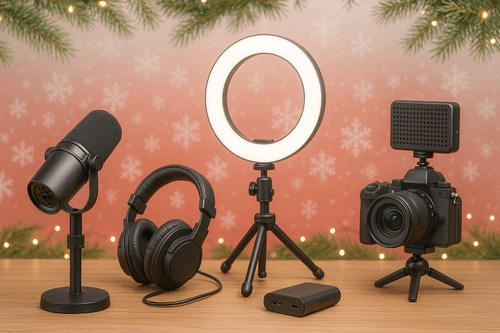
    🎁 2025 Holiday Gift Guide for Podcasters

    Blubrry’s Holiday Gift Guide for the Podcaster in Your Life

    Fast Picks. Big Upgrades. No Guesswork.

    Starting a podcast? Ready to add video? Want to sound like a pro instead of a potato mic from 2010? We’ve got you.

    This guide is short, scannable, and built for podcasters — not generic YouTube creators. Because listeners bail on bad audio, and viewers scroll past boring video. These picks fix both.

    Let’s jump in.


    ⚡ Quick Picks: Best Gear Fast

    Category Top Choice Why
    Starter Mic Shure MV7 USB now, XLR later
    Pro Mic Shure SM7B Broadcast voice unlocked
    Best Video Camera Sony ZV-E10 II Creator-level 4K
    Best Webcam Logitech MX Brio 4K You’ll look crisp
    Best All-in-One Scarlett 2i2 Studio Everything to start
    Best Editing Value PowerDirector Drag. Drop. Done.
    Best Remote Guests Riverside.fm No more Zoom audio nightmares

    💸 Best Budget Bundles (Choose What Fits You)

    Budget What to Buy Why
    Under $250 Behringer XM8500 + Scarlett Solo Giant audio upgrade for tiny cost
    Under $500 Shure MV7 + solid webcam Sound legit + look decent
    Under $1,000 RØDE PodMic USB + ZV-E10 II Full podcast + YouTube setup

    🎙️ Pro tip: Upgrade audio first. Everyone notices.


    ⭐ Good → Better → Best

    (How you grow your setup)

    Level Audio Gear Video Gear
    GOOD XM8500 • Scarlett Solo Elgato FaceCam 4K
    BETTER PodMic USB • Vocaster Two Canon R50 • Key Light Air
    BEST SM7B • ATH-M50x Multi-cam + pro lighting grid

    🔥 Upgrade order: Mic → Lighting → Camera

    (Yes, lighting before camera. Trust us.)


    📹 Video Gear for Podcasters

    (60% of this guide because video = more reach)

    If you want new fans, your face needs screen time. Here’s the gear that makes people stop scrolling:

    Cameras + Capture

    Lighting + Stability

    On-the-Go Creators

    🎬 Videos → clips → TikTok, Reels, Shorts → more listeners.

    Yes, this is the way.


    🎙 Audio Gear That Makes You Sound Legit

    (40% of this guide because audio = loyalty)

    Think of this section as “avoid bad reviews” gear.

    🎧 Sound good first. Look good second.


    🔌 USB vs XLR (Real Talk)

    If you want… Buy…
    Zero fuss USB mic
    Pro sound + co-hosts XLR mic + interface
    Both Hybrid (hello again, MV7 💅)

    Simple. Done.


    🧰 Software That Speeds Up Everything

    Publish + grow with:

    • Blubrry Hosting — You own your show. Period.

    • Blubrry Pod2Vid — Audio → YouTube posts

    • Blubrry Vid2Pod — Videos → podcast feed

    The more you automate, the more you publish. 🎯


    🧭 What Should YOU Upgrade Next?

    Your Situation Upgrade First
    “My audio is meh.” A real mic
    “I want to post clips.” Key Light → camera
    “I record interviews.” Portable recorder
    “Editing takes forever.” Better software

    Think: What slows you down the most? Fix that.


    🎄 Final Thoughts

    Podcasting gear has evolved dramatically, and the best equipment today makes it easier than ever to record studio-quality content from home. Whether you’re improving sound, stepping into video, or building your first setup from scratch, these tools will help you sound —and look— like a pro.

    This holiday season, give (or get) the tools to create with confidence. And once your setup’s ready, let Blubrry help you publish, host, and grow your audience with ease.

    However you celebrate this season, we’re excited to hear your next episode.

    Happy podcasting — and happy holidays! 🎧✨

  • How to Use Podcast Episode Comparison with Thrive to Boost Engagement

    How to Use Podcast Episode Comparison with Thrive to Boost Engagement

    podcast-episode-comparison

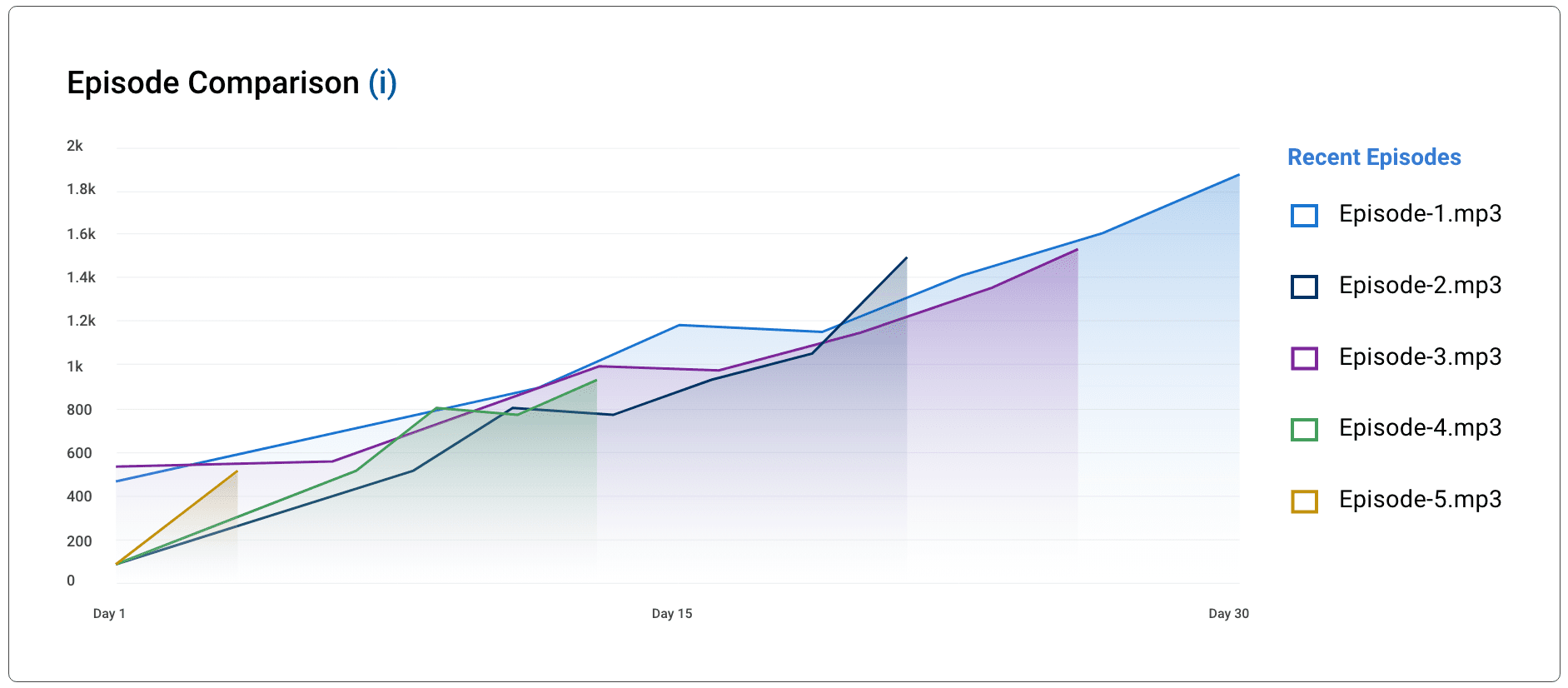
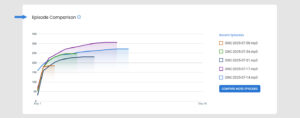
    If you want to understand what truly resonates with your listeners—and keep them coming back for every new release—the podcast Episode Comparison feature in Blubrry’s Thrive Bundle is one of the most powerful tools you can use. Listener behavior can vary dramatically from episode to episode, sometimes for obvious reasons, sometimes for reasons you’d never guess. Being able to see those trends clearly, side-by-side and in real time, empowers you to make smarter content decisions that lead to higher engagement, stronger retention, and faster audience growth.

    What You Can Compare

    Blubrry gives you podcast comparison tools based on your hosting level:

    • Standard Stats: Compare your three most recent episodes—great for quick checks on current momentum.
    • Thrive Bundle: Compare any five episodes from your entire catalog—not just your most recent ones.

    This added flexibility in Thrive is a game-changer because it allows for deeper, more strategic insights and long-term content planning instead of just reacting to the last few releases.

    How Podcast Episode Comparison Works

    The moment you select your episodes, Thrive instantly generates a beautiful, easy-to-read graph that visually displays listener uptake across the chosen shows. Within seconds, you can see:

    • Which episodes gained traction the fastest (and why your audience shared it like crazy)
    • Which ones lagged behind or had slower adoption (and where you might have lost them)
    • How pacing and drop-off points differ across your content
    • What hooks, intros, or topics your listeners responded to—or completely ignored

    podcast-episode-comparison

    This isn’t just raw data dumped on a spreadsheet; it’s a visual story of how your audience actually behaves when they press play.

    Create Custom Comparison Sets With Thrive

    Thrive goes far beyond automatic comparisons. You can handpick exactly which podcast episodes you want to analyze. For example:

    • Want to compare every episode featuring a specific guest to see if they consistently move the needle?
    • Want to analyze how your season premieres or finale episodes perform against regular releases?
    • Curious whether solo episodes outperform interviews, or if certain controversial topics spike engagement?

    Simply select any five podcast episodes from your library—new or old—and the platform instantly displays them side by side on the same graph. With this freedom, you’re no longer limited to your most recent content; you can evaluate patterns, test theories, and uncover hidden winners across your entire catalog.

    How These Insights Boost Engagement

    By spotting what takes off fastest—and what quietly flops—you gain the clarity to:

    • Identify the exact topics, formats, or guests your listeners love most
    • Shape future podcast episode themes and series around proven winners
    • Improve pacing, hooks, segment structure, and calls-to-action
    • Decide which experiments are worth repeating (and which to retire)
    • Adjust marketing, social promo, and cross-promotion strategies based on real listener behavior rather than guesswork

    When you consistently create more of what your audience has already proven they want, engagement naturally rises—along with reviews, shares, and word-of-mouth growth.

    Final Thoughts

    Podcast Episode Comparison in the Thrive Bundle gives you the rare ability to clearly see what works, what needs refinement, and what your audience is begging for next. With side-by-side visual data, precise listener pacing insights, and the freedom to compare any five episodes you choose, you can make confident, data-backed decisions that elevate your entire podcast strategy.

    Ready to stop guessing and start knowing? Add the Thrive Bundle to your Blubrry hosting plan today and start using podcast Episode Comparison to create more of what your audience loves—episode after episode.

  • How to Actually Understand Your Podcast Audience with Advanced Statistics

    How to Actually Understand Your Podcast Audience with Advanced Statistics

    When you’ve been podcasting for a while, growth isn’t just about hitting bigger download numbers — it’s about knowing exactly who your listeners are, how they engage, and what keeps them coming back. That’s where advanced podcast statistics come in.

    If you’re a Blubrry podcaster with an Advanced or Professional Hosting plan, you already have access to tools that dig deeper than basic analytics. These aren’t just numbers to glance at — they’re a road map to creating more compelling content, improving listener retention, and building a loyal, engaged audience.

    Go Beyond Downloads

    Downloads alone tell you how many people grabbed your episode, but advanced podcast statistics uncover what happened next. With Blubrry’s IAB Tech Lab–certified metrics, you can measure:

    • Listener Retention: See how long people stay tuned and pinpoint where drop-offs occur.
    • Engagement Trends: Track how episodes perform over time, identifying which topics keep audiences listening longer.
    • Geographic Reach: Learn where your audience is growing, whether that’s your own city or halfway around the globe.

    Instead of guessing why an episode resonated (or didn’t), you’ll have concrete evidence that can guide future production decisions.

    Identify Your ‘Stickiest’ Content

    One of the most powerful ways to use advanced podcast statistics is to find your stickiest content — the episodes people listen to all the way through. Retention graphs show if your listeners are hooked from the intro to the outro or if there’s a point where they start tuning out.

    If you notice a consistent drop-off 15 minutes into your 30-minute episodes, that’s a clue to tighten your pacing or rearrange your segment order. Conversely, if a special guest episode keeps retention high, it’s a signal to invite similar voices onto your show.

    Compare and Improve Over Time

    Blubrry’s Advanced Stats let you compare episodes side by side, so you can see patterns in your audience’s behavior. Are your newer episodes holding attention better than older ones? Does releasing on a certain day lead to more complete listens? These insights let you refine your release schedule, format, and even promotional strategy.
    And because the platform stores historical data, you can track whether changes you’ve made — like tweaking your intro, investing in better audio, or experimenting with different topics — are making a measurable difference.

    Understand Your Audience Segments

    Your audience isn’t one big, homogenous group. With advanced podcast statistics, you can break down your listenership by location, listening app, and playback device. This information can shape how you promote your podcast and where you focus your marketing.

    For example, if you see a surge in listeners from a specific region, you can create episodes that speak directly to that audience or run targeted ad campaigns. If you discover most listeners use a particular podcast app, you can optimize your presence there — from crafting app-specific descriptions to adding platform-exclusive calls to action.

    Turn Data Into Action

    Numbers only matter if you act on them. Every insight from your advanced podcast statistics should inform your next creative or strategic move. That might mean restructuring an episode for better pacing, doubling down on a popular theme, or experimenting with new content formats to boost engagement.

    By making data-driven decisions, you’re not just producing more episodes — you’re creating a show that continually resonates with your audience, grows in loyalty, and stands out in a crowded podcasting landscape.

    With Blubrry’s advanced podcast statistics, you’re not just tracking your audience — you’re learning from them. And when you understand your listeners, you can deliver exactly what they want, episode after episode.

  • Podcast Analytics Explained

    Podcast Analytics Explained

    How to Measure & Improve Your Podcast Performance

    Ever upload a new podcast episode, cross your fingers, and hope the download numbers climb? You’re not alone — but you don’t have to leave growth to chance. According to Dave Clements, Blubrry’s longtime support analyst, “Podcasting feels personal, but growth is math. Without data, you’re guessing — ‘I think people liked that guest?’ Analytics replace guesswork with proof.”
    At Blubrry, Dave and the team have coached thousands of podcasters through the maze of stats and trends. In his latest video (embedded below), he breaks down how to use Blubrry’s dashboard to make informed, actionable decisions that grow your show with intention, not luck.

    The Metrics That Matter

    The first step is knowing which metrics to track. Dave says, “We’ll cover which stats actually matter, how to read them, and simple tweaks you can make right now to boost downloads and retention.”

    Start with the Recent Episode Stats panel. This provides a snapshot of how your latest batch of episodes is performing, including total downloads over the past 30 days, the number of episodes included, and your global ranking. “That context helps you set smart growth goals and not sweat the small spikes or dips,” Dave explains.
    Trends Over Time: Zooming Out

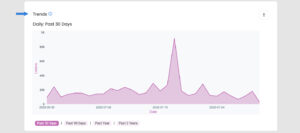
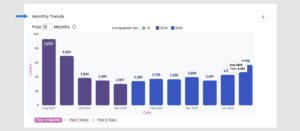
    Beyond episode snapshots, look at long-term trends. The 30-day daily graph gives you heartbeat-level insight, showing spikes from promotions or guest appearances. The Monthly Trends chart zooms out even further, letting you spot seasonal patterns, format shifts, or long-term growth.
    Episode Detective Work

    Want to know which episodes really connected with your audience? Use the Episode Comparison tool to line up shows side by side and compare performance. For a deeper look at listener behavior, check out Average Daily Plays.

    “That chart helps you see if an episode keeps pulling listeners long after launch—hello, evergreen content!” says Dave.

    Retention: The Power Metric

    Plays tell you how many clicked, but Retention shows how long they stuck around. “Look at the red section—those are your ‘impactful plays.’ The folks who listened to at least 75%. They heard your CTA. They heard your sponsor,” Dave notes. If you’re seeing early drop-offs, he suggests tightening your intro or getting to the good stuff faster.

    Audience Insights: Listeners, Subscribers & Geography

    Target audienceThe Estimated Audience panel breaks downloads into unique listeners and loyal subscribers. “If subscriber counts lag behind total listeners, remind casual fans to follow in-app,” Dave recommends.

    Geolocation heat maps can reveal surprising pockets of fans. “Maybe you’re huge in Toronto and Berlin — hello, bonus shout-outs, tailored ads, or even live events,” Dave says. You can drill down to detailed regions such as U.S. Nielsen DMAs, Canadian provinces, or U.K. counties.

    Device and App Data: Meet Listeners Where They Are

    Scroll to Apps & Devices to see where people are tuning in. “If 60% of your listeners use mobile apps, make sure your episode titles and descriptions look great on small screens,” Dave advises.

    Test, Track, Repeat

    Data should drive decisions. Use the Event Tracker to mark experiments like promo pushes or guest spots. “A week later, you’ll see whether that push produced a spike — or crickets. No spreadsheets, no mental math—just a visual before-and-after,” Dave says.

    Close the Loop with Surveys

    Podcast Survey“Quantitative stats say what happened; surveys tell you why,” Dave reminds us. Use the free, built-in listener survey to gather demographics and preferences. “Maybe your tech podcast attracts a surprising 45-plus crowd — that might influence your ad partners or the level of detail in your episodes.”

    Package Your Proof for Sponsors

    “When you’re ready to pitch sponsors, grab the daily-updated media kit,” Dave says. The Blubrry dashboard pulls your freshest download, retention, and demographic data into a polished one-sheet, making sponsorship outreach simple and current.

    Your Next Steps

    Ready to grow your podcast on purpose? Dave recommends this three-step action plan:

    1. Define one metric to move — downloads, retention, or geographic reach.
    2. Run a focused experiment — try a new episode title style, cross-promo, or shorter intro.
    3. Use the Event Tracker to measure results, then repeat.

    “Data-driven tweaks compound fast,” Dave says. “Start small, stay curious, and let the numbers guide you. Make your next episode your best-performing one yet.”

  • How to Take Your Podcast to the Next Level with Advanced Hosting

    How to Take Your Podcast to the Next Level with Advanced Hosting

    As you evolve from a solo creator or small collective into a polished, growth-minded podcast brand, you need a hosting partner that scales with ambition, not one that holds you back. That’s where Blubrry’s Advanced Hosting steps in, offering expanded storage, deeper analytics, and enterprise-worthy features designed to fuel your next stage of growth.


    🔝 1. More Storage for Higher Quality & More Content

    Launching longer-form shows or video podcasts? Recording in lossless audio for crystal-clear production? You need flexibility, and Blubrry delivers.

    Our Advanced Hosting plans have heightened monthly storage across all tiers — no overage penalties — just predictable room to grow. For example:

    • The $12 plan = 125 MB
    • $20 plan = 400 MB
    • $40 = 800 MB
    • $80 = 1,600 MB

    At standard encoding rates, even the entry-level tier supports at least six hours of monthly content from Blubrry Podcasting**.** For serious creators, that’s freedom to produce lengthier episodes, lavish specials, or video companion shows without worrying about hitting caps.


    📊 2. Unlock Advanced Statistics & Insights

    Blubrry’s Advanced plan isn’t just about numbers — it’s about turning metrics into strategy.

    You’ll gain access to Advanced Statistics that extend beyond basic plays, including:

    • Listener demographics (location, device, app)
    • Engagement trends
    • Content performance by episode

    This intel lets you deliver smarter content, optimize your publishing schedule, and shape sponsorship packages with concrete data.


    🌐 3. Domain Mapping for a Professional Touch

    Establishing your own branded domain matters for credibility and discovery. Advanced Hosting includes domain mapping, seamlessly integrating your podcast into your website, and boosting SEO. Instead of awkward redirects or plugin workarounds, you get a polished, self‑hosted experience that aligns with your narrative and brand identity.


    💡 4. Scale-Focused Features Built for Ambition

    Blubrry recognizes that higher capacity also means more complexity. That’s why on the Advanced plans, you’ll find tools tailored for growing producers and networks:

    • Upgrade anytime: Need storage mid-month? Blubrry’s support will often grant “one-time bumps” to handle extra episodes.
    • Seamless scheduling: With plenty of storage headroom, you can publish consistently without worrying about running out of space.
    • Support that scales: Access to responsive service and technical support that understands the challenges of multi-show operations.

    🚀 5. Build for Growth: More Quality, More Engagement

    As CEO Todd Cochrane says:

    “Additional storage allows a podcaster more flexibility with their schedule and episode length. This bump helps with both quality and quantity.”

    That combination is powerful: more episodes mean more exposure; richer audio/video quality improves listener experience; consistent scheduling fosters loyalty. Stronger engagement metrics help convince sponsors or advertisers that you’re a serious player.


    Should You Upgrade?

    If you’re:

    • Recording video podcasts or high‑bitrate audio
    • Producing more than 4–5 episodes monthly
    • Committed to growth, not just consistency
    • Looking for professional analytics and brand-building features

    …then the Advanced Hosting tier is a clear step forward.

    You’ll pay a little more, but you’ll gain:

    • Predictable, ample storage
    • Rich analytics for smarter decisions
    • Branded domain mapping for growth
    • Room to expand without friction

    How to Get Started

    1. Log in to your Blubrry dashboard.
    2. Navigate to plans and pricing.
    3. Choose (or upgrade to) the Advanced tier that matches your production volume.
    4. Connect your domain and explore Advanced Statistics.
    5. Plan, produce, and publish with confidence through your next season.

    Blubrry’s Advanced Hosting delivers more than just space — it unlocks growth opportunities. Whether you’re running a tight network of shows, eyeing sponsorships, or ready for higher quality productions, this tier gives you the tools to move from side project to polished brand.

    Ready to level up? Blubrry’s Advanced Hosting: because serious podcasts deserve serious infrastructure.

  • Why Standard Hosting is the Smartest Way to Launch Your Podcast

    Why Standard Hosting is the Smartest Way to Launch Your Podcast

    Blubrry Gives New Podcasters Everything They Need — Without the Overwhelm

    When you’re just getting started in podcasting, the path forward can feel like a maze of microphones, metrics, and monthly costs. At Blubrry, we believe launching your show should be exciting, not stressful.

    That’s why our Standard Hosting plan, complete with our Standard Statistics, is the perfect low-risk, budget-friendly starting point for new podcasters and hobbyists alike.

    Think of it as your launchpad: all the essential tools, none of the noise.

    Blubrry’s Standard Hosting gives you everything you need to publish, distribute, and manage your podcast with ease. There’s no need to worry about a steep learning curve — especially if you’re using PowerPress, our free WordPress plugin. You’ll be able to publish directly from your website, own your brand, and distribute your episodes to all major podcast directories like Apple Podcasts and Spotify.

    But the real magic is this: no distractions, no upsells you don’t need, and no analytics rabbit hole pulling you away from your creative flow.

    Standard Stats: Smart, Streamlined, and Sufficient

    When it comes to measuring your podcast’s performance, many beginners assume they need every chart and graph available. But if you’re just launching — or you’re podcasting for fun, community, or side projects — you might not want to bother with pro-level analytics.

    With Blubrry’s Standard Stats, you get exactly what matters most:

    • Total downloads
    • Downloads per episode
    • Top-performing episodes
    • Geographic data
    • Directory breakdown (such as Apple Podcasts and Spotify)

    It’s enough to show where your listeners are coming from, what content resonates, and how your audience is growing, without burying you in data. Plus, your stats are IAB-certified, meaning they’re accurate and industry-standard. That makes a difference when you’re ready to grow, pitch a sponsor, or celebrate milestones like your 100th download.

    Grow at Your Own Pace

    You might start your show as a creative outlet or personal project, and Blubrry’s Standard plan lets you do just that, affordably and flexibly. When you’re ready to upgrade to more advanced analytics, monetization or professional options, you can. Until then, you have what you need to build confidence and community on your terms.

    And remember: you can always test the waters without long-term commitment. Blubrry offers no-fuss monthly plans, so you’re never locked in. Try it for a month. See how it feels. Fall in love with podcasting.

    A Platform That Grows With You

    Blubrry’s Standard Hosting isn’t just a “starter” option—it’s a complete solution designed for those who want quality, support, and simplicity from day one. With top-tier customer support, seamless publishing, and foundational stats, you’ll have peace of mind knowing you’re podcasting the right way, without breaking the bank or overcomplicating the process.

    So whether you’re chasing a lifelong dream, testing a new idea, or simply sharing your voice for fun, Blubrry’s Standard Hosting is here to make your start smooth, supported, and sustainable.

    Ready to launch your podcast the simple way?

    Explore Standard Hosting at we-moved-the-blog-to-this-site-when-we-made-a-new-website.blubrry.com/.

  • Why Your Podcast RSS Feed Needs Podcast Mirror

    Why Your Podcast RSS Feed Needs Podcast Mirror

    Your podcast RSS feed is the lifeline of your show. It delivers your episodes to Apple Podcasts, Spotify, and every podcast directory your audience uses. But what happens when that feed gets bogged down by hundreds of episodes, unpredictable traffic spikes, or outdated tech? Slowdowns. Errors. Missed opportunities.

    That’s where Podcast Mirror comes in — a simple but powerful tool created by Blubrry Podcasting to give your podcast RSS feed the boost it deserves.

    Many podcasters don’t even realize their RSS feed is slowing them down — literally. Podcast Mirror acts as a fast, reliable copy of your original feed, speeding up delivery while adding advanced features your show needs to stay ahead.

    A Speed Boost for Your Growing Show

    Podcast Mirror is especially valuable for shows with a large catalog of episodes. The more you publish, the heavier your RSS feed gets. That means longer load times for podcast apps—and a higher chance listeners won’t see your newest episodes right away.

    Podcast Mirror lightens the load with optimized caching and fast servers, giving your podcast RSS feed a serious performance boost. Whether your audience is growing steadily or you suddenly go viral, your feed won’t buckle under the pressure.

    Rock-Solid Reliability

    Podcast Mirror logoLet’s face it: your web host probably wasn’t built to handle podcast syndication. That’s why Podcast Mirror exists. It’s powered by Blubrry’s robust infrastructure, built for podcasters by podcasters. It acts as a smart middle layer between your PowerPress-powered site and the apps that distribute your show.


    If your website ever has issues or gets overwhelmed, Podcast Mirror keeps your feed online and your listeners connected. It’s like having a backup generator that kicks in before the lights go out.

    Ready for Podcasting 2.0

    Podcasting is evolving fast, and your feed needs to keep up. Podcast Mirror is built with Podcasting 2.0 in mind, supporting leading-edge tags and features such as transcripts, funding links, and chapters.

    As more apps adopt these enhancements, Podcast Mirror ensures your show is future-ready, without you needing to code anything yourself. You get to focus on making great content while your tech keeps pace.

    Free for Blubrry Hosting Users

    Here’s the best part: if you host your podcast with Blubrry, Podcast Mirror is 100% free. And it’s already integrated with PowerPress, so setup is simple and streamlined.

    Not a Blubrry customer? You can still use Podcast Mirror for just $60 a year—a small price to pay for speed, reliability, and peace of mind.


    Your podcast RSS feed shouldn’t be the weakest link in your publishing chain. With Podcast Mirror, you get faster load times, built-in stability, and next-gen podcasting features—all from the team that understands podcasting inside and out.

    Upgrade your feed today and keep your show moving forward, no matter how big your audience grows.

  • Why You Should Use a Podcast Feed Validator

    Why You Should Use a Podcast Feed Validator

    A Simple Step Helps Avoid Distribution Errors

    Think your podcast is everywhere it should be? Think again. Even the most seasoned podcasters may unknowingly have RSS feed issues that prevent their show from being listed — or updated — on major platforms such as Apple Podcasts or Spotify. That’s where Blubrry’s Podcast Feed Validator comes in.

    Podcast RSS feeds are not your average web feed. Unlike a blog’s RSS, podcast feeds are far more complex. They include media enclosures, iTunes tags, episode-specific metadata, and increasingly, Podcasting 2.0 tags that support features like transcripts, value-for-value, chapters, and funding links. As the ecosystem evolves, so do the standards—and that means more room for error.

    Blubrry understands how frustrating and technical feed issues can be. That’s why they’ve revitalized their Podcast Feed Validator to help creators identify and resolve problems before they cause real damage to discoverability. It’s completely free and designed to be accessible for both beginners and advanced podcasters.

    “Even a tiny formatting issue or a missing tag can prevent your show from being listed or updated in directories,” said Todd Cochrane, CEO of Blubrry. “We created the Podcast Feed Validator to take the guesswork out of RSS troubleshooting.”

    Here’s how it works:

    1. Go to castfeedvalidator.com
    2. Enter your podcast RSS feed URL
    3. Click ‘Validate Feed’
    4. Review the results – Errors and warnings will be displayed along with explanations and guidance on how to fix them.

    If your feed is perfect, you’ll get a big green light. If not, the validator will point you directly to the problems — whether it’s a malformed image URL, a missing <title> tag, or a deprecated format that could prevent future compatibility.

    As Podcasting 2.0 gains traction, maintaining a compliant and modern RSS feed becomes even more critical. Podcasting is no longer static — it’s interactive, dynamic, and evolving. And the validator helps ensure you don’t fall behind.

    It’s not just about reaching more listeners; it’s about being sure your show is reachable at all.

    Whether you’re hosting with Blubrry or another platform, using a reliable podcast feed validator regularly is a proactive step every podcaster should take. Test your feed now at castfeedvalidator.com and keep your podcast accessible, discoverable, and future-ready.

    Because if your feed breaks and no one hears it, did your episode even drop?

  • How to Repurpose Podcast Content for More Reach & Engagement

    How to Repurpose Podcast Content for More Reach & Engagement

    Maximize Your Show’s Reach With Blubrry

    Creating a great podcast takes dedication, creativity, and time — so why let that content work for you only once? At Blubrry, we’re all about helping podcasters get more mileage from their efforts. That’s why repurposing your podcast content is one of the smartest strategies you can use to grow your reach and boost engagement.

    “Every episode you’ve recorded is a valuable asset,” says Dave Clements from the Blubrry Support Team. “Repurposing lets you reach new audiences, reinforce your message, and keep your content evergreen.”

    Whether you’re a newbie or sitting on years of episodes, there’s untapped value waiting in your archives. Repurposing turns that value into action — and we’re here to show you how.

    Why Repurposing Matters

    Each podcast episode is more than just a one-time listen — it’s a resource. Repurposing that content helps keep it visible and valuable long after it’s published.

    “It’s not just smart — it’s essential for staying visible and relevant without burning out,” Dave explains. “You’re building long-term engagement across platforms.”

    Think blog readers, social media followers, YouTube viewers, and newsletter subscribers — all discovering your content in formats they prefer. Repurposing also gives your content a longer shelf life, keeping it fresh and discoverable over time.

    Best Practices for Smart Repurposing

    So how do you do it effectively? Start with your best-performing episodes and turn them into:

    “A two-minute tip from your show can make a great LinkedIn post, Instagram reel, or newsletter snippet,” Dave suggests. “Different platforms call for different formats — it’s not copy-paste, it’s translation.”

    Updating older episodes is also part of the strategy. Dave recommends: “Avoid overly time-sensitive language. Add follow-up updates. And use Dynamic Ad Insertion to refresh your promos without re-uploading the whole thing.”

    Let Blubrry Make It Easy

    The best part? Blubrry provides the tools to streamline the entire process.

    “We’ve built tools that make content reuse and longevity simple,” Dave says. “Everything’s just a few clicks away.”

    From your Blubrry dashboard, you can:

    And don’t underestimate transcripts. “Transcripts are a hidden gem — they’re great for blog posts, SEO, and even eBooks,” Dave notes.

    Keep Your Content Evergreen

    Repurposing isn’t just about reusing — it’s about reimagining.

    With Blubrry’s Dynamic Ad Insertion, you can even update sponsorship messages across your entire back catalog. “Your back episodes don’t have to be static — they can keep working for you,” says Dave.

    This flexibility keeps your content fresh for new listeners, even months or years after its original release.

    Use Stats to Guide Your Strategy

    Not sure where to begin? “Use your Blubrry stats to find top-performing episodes. That’s where the gold is,” says Dave.

    Let your analytics guide you — start by repurposing content that’s already resonated with your audience, then track what works best on each platform.

    “Start with what’s already working, and expand from there. It’s smart strategy, not guesswork.”

    Ready to Repurpose?

    Repurposing podcast content doesn’t just save time — it amplifies your reach and helps you build a more engaged audience. With Blubrry’s tools and support, you’re equipped to do it easily and effectively.

    As Dave puts it: “Repurposing podcast content doesn’t just save time — it boosts your impact. And with our tools and support, you’re never on your own.”

    Get started today at we-moved-the-blog-to-this-site-when-we-made-a-new-website.blubrry.com/, and let your past episodes power your future growth.