Category: PowerPress

  • Immortal Podcasts and Creating Networks in PowerPress

    PPPiTunesAlbumArt-385Creating a podcast network doesn’t have to be difficult. Mike and MacKenzie talk about how to get one setup in PowerPress on this episode of the PowerPress Podcast. Categories, channels, taxonomies and a whole lot of other decisions are discussed to help you get a better idea of how to start a network easily with the help of PowerPress. Early in the show Mike brings up an article he read that mentioned a podcast host passing away – which got them thinking, what happens to your show after you’re no longer around? For a rather sad topic, they keep it fairly upbeat. They wrapped up the show talking about ending a show when it becomes to much work. Recently Gimlet Media decided to end one of their shows which sparked lots of conversation. Thanks for listening and go subscribe to the show!

    Fan of PowerPress? Leave us a review, here!

    Show notes:

    Look for: Category Podcasting, Podcast Channels, Post Type Podcasting and Taxonomy Podcasting

    Multi-site

    Contact MacKenzie

    Blubrry Twitter

    Blubrry Facebook

  • Money in Podcasting and Blubrry WordPress Website

    PPPiTunesAlbumArt-385In this episode of the PowerPress Podcast MacKenzie talks about who has been invested in, who has been bought and more in the podcast world. She even gives you an update on the release of Blubrry WordPress Website and ponders on recording timing in her podcasting chronicle.Some podcasters may be taking a break or cutting back during the summer, but that does not mean media companies, including Blubrry are slowing down anytime soon. While there is no guest that doesn’t mean there isn’t quality news and information packed in this episode. Next episode will be July 1st and we’ll definitely have lots to talk about concerning Podcast Movement and releases happening around that time for all different kinds of companies.

    Events:
    New Media Europe! June 18th-19th London, England. If you’re there, be sure to enter to win a prize from Blubrry.
    Podcast Movement! July 6th – 8th Chicago, Il. Buy your ticket today using the code ‘Blubrry’ and save $40.
    Elite Man Conference! August 6th-7th Plymouth, MA. Save 10% on your ticket using the code ‘Blubrry10’.
    Show notes:
    Twitter and SoundCloud

    E.W. Scripps and Stitcher


    Attend Podcast Movement Blubrry Workshop


    Email MacKenzie
  • PowerPress 7.0 Is Now Available, With New Features To Power Your Podcast

    Welcome to PowerPress 7.0! This major release includes many new features to improve your podcast.

    Among The Many New Features in PowerPress 7.0:

    (more…)

  • Blubrry Stats Is Now Tracking Over A Dozen New Apps (Including Google Play Music Podcasts)

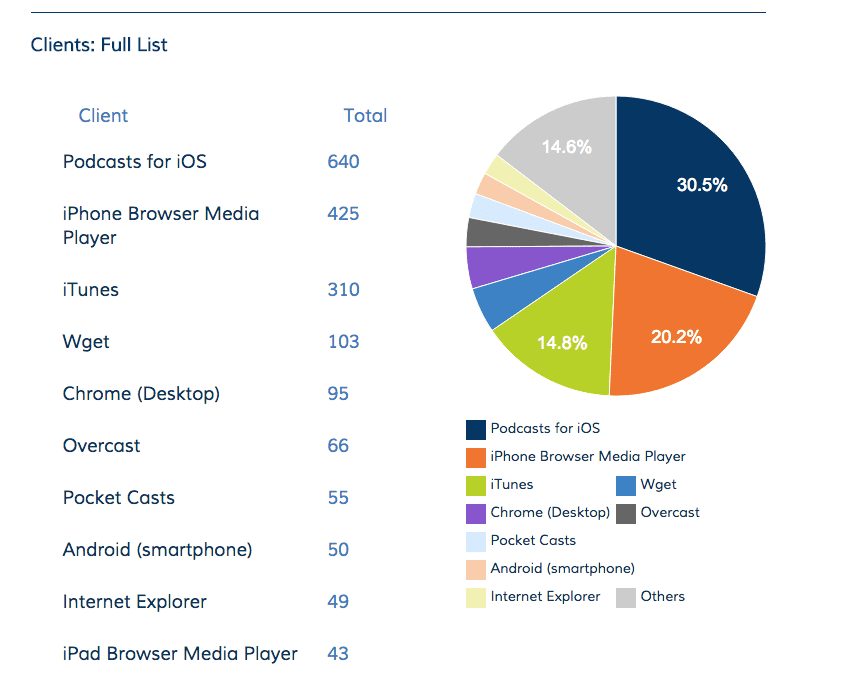
    If you have Blubrry stats, you may have noticed we now list several new clients in your statistics dashboard. We’re pleased to report as of April 19 over a dozen new apps have been added to our ever-growing list of podcast clients. We now track nearly 200 unique podcast applications, devices, and platforms.

    client stats

    Here’s a list of some of the apps we’re now tracking individually in your stats menu:

    • Google Play Music Podcasts – This much-awaited app is tracked by Blubrry, but it’s important to note that as of now, Google Play Music Podcasts is not making individual download numbers available to outside services. Instead, each episode that Google Play Music Podcasts makes available to its users will only show as one download, no matter how many people listen in the app. For now, you’ll need to log in to Google Play Music Podcasts to see your total download number.
    • Player FM for Android
    • AntennaPod for Android
    • Kodi – open source home theater software
    • Clementine – music player and library organizer for MAC and Windows

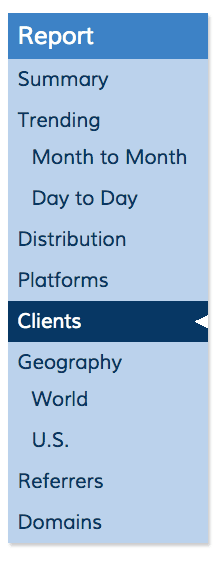
    To see how many downloads each app is delivering your podcast, click “clients” in the statistics section of the Blubrry dashboard.
    client screen shot

    Curious how to list your podcast with Google Play Music Podcasts? Check out our latest episode of the PowerPress Podcast!  


  • Blubrry and PowerPress Player

    PPPiTunesAlbumArt-385On this episode of the PowerPress Podcast MacKenzie and Angelo Mandato talk about the new Blubrry and PowerPress player. They also discuss, 6 reasons why podcasts are the future of storytelling. The new player is available exclusively to Blubrry hosting customers, and will be available in PowerPress next week. Listen to find out where to get the embed in Blubrry and PowerPress. Thanks for listening, and please leave a review on iTunes! And if you haven’t yet, subscribe using iTunes, Android, Email – however you want in the player below.

    Thinking about attending Podcast Movement? Use promo code ‘Blubrry‘ for $40 off your ticket!

    From the Blubrry Podcaster Dashboard.
    Manage Episodes
    Find the embed option in ‘Manage Episodes’ in the podcast dashboard.
    Use the link to post the embed anywhere.
    Use the link to post the embed anywhere.


    Show notes:

    6 Reasons Why Podcasting is the Future of Storytelling

    New York Times Podcast Network Starting

    Blubrry Player information

  • New iTunes Podcast Directory Recommendations: What Podcasters Need To Know Now

    The higher your podcast ranks in iTunes, the easier it is to grow your audience – so it’s crucial to keep up on and follow their recommendations.

    This month, iTunes made a number of changes to the iTunes Store podcast directory that could have a direct impact on the success of your podcast.

    Here’s what you need to know (and do) to comply with the new iTunes Podcast
    Directory Recommendations:

    iTunes Podcast Image Recommendation Change

    Apple now recommends using a 3000 x 3000 pixel JPG or PNG in the RGB color space in a compressed format. Saving your image as a JPG with your favorite image editing software should automatically compress your image to optimize for mobile devices.

    If you are saving your image as a PNG, please be aware that your image must be saved in the RGB color space. If the image is saved as a CMYK color space (used for printing), it will not be accepted by iTunes. (See our guide to logos, branding and theme for more information on color spaces and other crucial things to keep in mind while designing your cover art.)

    The minimum size of 1400 x 1400 may continue to be used and will look acceptable on a tablet or phone – but while it’s not an urgent change, the larger 3000 x 3000 size will look best when viewed in the Apple TV podcasts app.New iTunes Podcast Directory Recommendations February 2016

    iTunes Podcast Explicit Setting Change

    Apple has changed the iTunes explicit setting. You must now select “clean” or “explicit” – the ‘no’ option is no longer available.

    The “explicit” setting previously allowed for a 3rd option referred to as “no” (also referred to as “none” by some services). Nothing was displayed next to your podcast on iTunes if neither “clean” or “explicit” were set. With this change, there is no longer a neutral option.

    If you don’t set your podcast as either “clean” or “explicit,” it appears that Apple will now make that determination for you. To guarantee that your content is marked correctly, please update your explicit setting as soon as possible.

    The explicit setting is available both at the program/show level as well as the episode level. If all of your episodes are explicit or clean, you will only need to set this attribute at the program/show level.

    We are still waiting on a response from Apple staff how to handle the situation with mixed explicit and clean episodes. We assume the previous behavior still applies:

    • If your program is marked “explicit,” then all episodes within that show are also considered explicit. A “clean” episode for an explicit show/program is not applicable.
    • If your program is marked “clean,” then all episodes are considered clean unless otherwise marked explicit.

    The explicit setting is very important to maximize your distribution on iTunes. Some territories and countries such as India do not allow explicit content.

    iTunes does enforce its explicit settings. Do not assume you can mark content as clean even though it includes explicit content – many podcasters have learned the hard way that mis-labeling your show will lead to being removed from the iTunes podcast directory.

    Managing Podcast Submissions to iTunes has Changed

    Podcast submissions to the iTunes podcast directory are now managed by the new Podcast Connect website. The new website allows you to submit new podcasts, as well as refresh, hide and delete your current podcast listings.
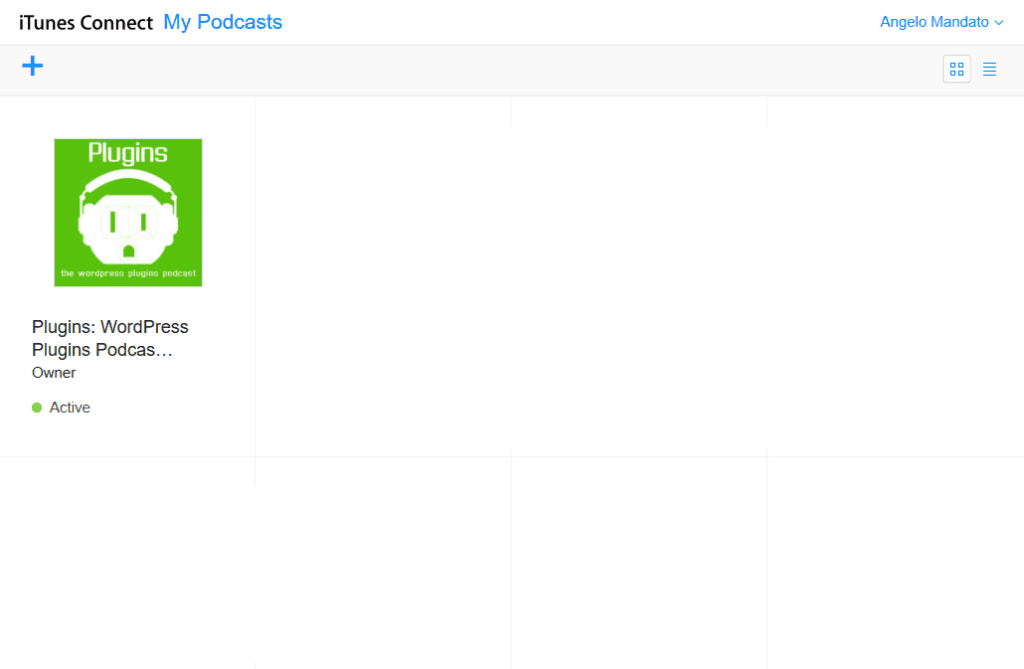
    iTunes Podcast Connect

    In February, 2011 Apple dropped the update listing protocol, leaving podcasters with no way to refresh their podcast listings on iTunes. The new Podcast Connect website includes a Refresh Feed option, we applaud and appreciate the addition.

    Check back here at the PowerPress Podcast blog weekly for important updates and information that can help you improve your podcast’s chances for success!

  • PowerPress bug fix, update out now!

    On Wednesday, December 9th PowerPress was updated because of a bug based on a WordPress update. WordPress update 4.4 caused an issue, blank feed titles.

    It affects iTunes listings, effectively erasing the title from your listing. If you have already updated WordPress 4.4 then you need to update to PowerPress 6.2.2 as well to fix the issue.

    Your listings will then update on iTunes within 24 hours.

    The update is a simple one and due to fixing this recent bug. We do not anticipate any other issues or updates before the end of the year. If you haven’t updated in a few months now is the time. The Blubrry team has made several upgrades to features this year that provide great advances for your podcast.

    We apologize for any inconvenience this may have caused you and value your continued support. Please look to the support forum and contact us if you still experience issues after updating.

    Thanks,
    The Blubrry Team

  • Blubrry Partners with Triton Digital to create an Audio platform Plugin for PowerPress

    Blubrry has collaborated with Triton Digital to create a private WordPress plugin that integrates the PowerPress Podcasting Plugin with Tap, Triton’s customizable advertising platform designed to help publishers monetize audio content. The plugin, designed for Blubrry Professional Podcast Hosting clients, allows our customers to leverage Triton’s Advertising Platform to seamlessly streamline operations and monetize audio content while using PowerPress’ powerful publishing tools.

    “Our Professional Hosting clients are provided with this private plugin as soon as they create an account within Triton’s Tap,” explains RawVoice / Blubrry CEO Todd Cochrane. “The Plugin integrates with PowerPress and allows our customers to post, upload and publish audio content, while seamlessly monetizing it through Triton Digital’s Tap platform.”

    “We are pleased to partner with Blubrry to offer podcast producers and publishers with the tools they need to scale their audience and increase revenue,” said Hugo Martel, Product Manager at Triton Digital.

    Broadcasters, podcasters and digital music services of all sizes are encouraged to reach out to RawVoice / Blubrry or Triton Digital to learn more and request a demo. Blubrry remains committed in providing all our clients with tools that allow them to grow their shows and build sustainable business.

    Todd Cochrane
CEO RawVoice / Blubrry

    For more information about Triton Digital, please visit www.tritondigital.com

  • Clammr WordPress Plugin Supported by PowerPress

    Today RawVoice / Blubrry announced the integration of the Clammr WordPress Plugin with PowerPress as a social-sharing option for podcast audiences. Clammr is an application that provides bite-sized audio clips that highlight what audiences need or want. And now Clammr has an add-on plugin for the Blubrry PowerPress plugin that helps audiences cut through the noise and find great audio whenever they wish.

    “Blubrry’s mission has always been to provide podcasters ways to grow their shows and expand their social presence,” said Todd Cochrane, CEO of RawVoice, Blubrry’s parent company. “Clammr’s support is part of the Blubrry mission to increase the social sharing capabilities of the PowerPress plugin.”

    clammr2


    Clammr Audio Sharing Plugin is embedded within the Blubrry player and allows podcasters and listeners to share a segment of their audio on social networks. Web-based users now have the same features as those that are using the Clammr mobile application. The share button posts an audio highlight that is playable natively in Facebook and/or Twitter with a link back to the full podcast.

    The integration in PowerPress 6.2 provides the ability to add features independent of the plugin and yet be fully integrated. Podcasters simply install the Clammr plugin and enable the function in PowerPress.

    “Audience growth is the top issue that podcasters cite when discussing where they they would like to see improvements in their experience. We are thrilled to partner with Blubrry to enable social sharing of great podcast moments directly from the PowerPress player,” said Parviz Parvizi, co-founder of Clammr. “Podcasters who have enabled the Clammr sharing feature in their Web audio players have seen ten-times the plays for every highlight that their listeners share to their social networks.”

    In its effort to support the power of podcasting, Blubrry is open to working with teams building add-on plugins that are compatible with PowerPress, Cochrane said. The Blubrry team greatly appreciates Clammr’s support the plugin and hopes for more social platforms to foster relationships such as this.

    “Blubrry and PowerPress have been trailblazers from the very earliest days when podcasting was born. It’s only fitting that PowerPress is continuing to innovate by enabling podcasters to use Clammr to bring a social and viral element to their audio for the first time,” Parvizi said.

  • PowerPress podcasters can now CrowdFund their Podcast Directly to Subscribers

    Blubrry has added another innovative podcast attribute to PowerPress; podcasters are now able to add donate and monetization links directly to their podcast feed and website. Blubrry is working with Skipcast an iOS podcast application the first of its kind to take donate links from the feed to display the podcasters donate or Patreon link in the application.

    SkipCast is proud to partner with Blubrry to provide iOS’s first in-app crowdfunding feature. Providing an easy and safe way for listeners to offer financial support helps guarantee a vibrant and diverse podcasting ecosystem for years to come,” said SkipCast developer Matt Grdinic. “At SkipCast, we’re simply thrilled to be part of this incredible movement.”

    PowerPress is the first service to provide donate and support links that will be syndicated within the podcast feed. Podcasters will be able to use this new RSS element for donations, promoting their brand via shirts, mugs, etc., even direct links to sponsors of their show. PowerPress users provide the donate URL in PowerPress and it is syndicated along with the podcast information. With a donation link embedded as an element in the RSS feed, third-party sites like Blubrry and podcast apps like SkipCast can now display that link.

    “Our goal is like Subscribe on Android, other third-party apps will add a donate or support link in their apps /sites. Helping podcasters raise money for their shows on and beyond their websites is a lot easier now,” said Todd Cochrane, CEO of RawVoice and Blubrry.

    For most, podcasting full-time sponsorship is a challenge so these extra monetization opportunities are a game-changer. This feature guarantees that donate and support links will be circulated to all listeners and that they will know where to donate to the podcast regardless of where they listen to a show. Podcasters can even use the feature to promote affiliate opportunities.

    More than 50,000 podcasters use PowerPress for their podcast website, and this feature can easily be enabled with one click. The Podcast Feed markup is part of the RawVoice RSS2 namespace, which is publicly available and can be adopted by any podcast service. Blubrry and SkipCast are proud to be the first podcast companies to provide this tool for podcasters.