Category: PowerPress

  • Build Your Own Podcast Network — Now Available to All Blubrry Hosting Customers

    Build Your Own Podcast Network — Now Available to All Blubrry Hosting Customers

    Podcast networks used to feel like something only major media brands could build.

    Today, independent creators, businesses, educators, nonprofits, and growing podcast teams are creating their own networks — bringing multiple shows together under one shared website, one mission, or one recognizable brand.

    Now, Blubrry is making that easier than ever. 👉 View the Podcast Network Tool

    With the latest update to PowerPress, the Podcast Network tool is now available to all Blubrry hosting customers. Previously associated with higher-tier plans, this feature is now included so more podcasters can build something bigger than a single show.

    That means if you host with Blubrry, you can now create a professional network website that showcases multiple podcasts from one central hub.

    What Is a Podcast Network Website?

    A podcast network website is a single website that promotes multiple podcasts together.

    Instead of every show living separately with no connection, your website can become a central destination where listeners discover all the podcasts in your ecosystem.

    This can be useful for:

    • A creator with multiple podcasts
    • A business with shows for different audiences
    • A creator community supporting each other
    • A local media group with several niche podcasts
    • An organization featuring multiple voices or departments
    • A growing brand expanding beyond one show

    The goal is simple: make discovery easier for listeners and growth easier for creators.

    One Website, Multiple Shows

    The PowerPress Network Website tool helps turn your WordPress site into a home base for all your podcasts.

    Your network website can showcase:

    • A branded homepage for your network
    • A list of all podcasts in the network
    • Podcast artwork and show descriptions
    • Direct links to listen or subscribe
    • Easy navigation between shows
    • A professional destination for listeners, sponsors, and partners

    Instead of sending audiences to multiple disconnected places, you can bring everything together under one roof.

    Your Shows Do Not Need to Be Hosted With Blubrry

    One of the most valuable parts of this tool is its flexibility.

    The podcasts featured on your network website do not all need to be hosted with Blubrry.

    That means you can create a network page that includes:

    • Blubrry-hosted podcasts
    • Shows hosted on other platforms
    • Partner podcasts
    • Client podcasts
    • Community creator podcasts
    • Legacy shows from older systems

    If a show has a valid podcast feed, it can be part of your larger network strategy.

    This gives you the freedom to build the creator ecosystem you want — without forcing every show onto the same host.

    Why This Is Powerful for Podcasters

    Many podcasters eventually outgrow the “one show only” mindset.

    You may want to launch:

    • A second show in a new niche
    • Seasonal bonus content
    • A business companion podcast
    • A spin-off with a co-host
    • A community creator lineup
    • A full content brand with multiple voices

    The Network Website tool helps you grow naturally when those opportunities arrive.

    Instead of starting from scratch each time, you can add new shows to a network that already has momentum.

    Better for Listeners Across All Shows

    This update benefits listeners just as much as creators.

    When someone enjoys one of your podcasts, there’s a strong chance they’ll enjoy another show connected to the same style, topic, or mission.

    A network website makes that discovery easier.

    Listeners can:

    • Find more shows they’ll likely enjoy
    • Stay inside your brand ecosystem longer
    • Explore creators they already trust
    • Subscribe to multiple shows in one visit
    • Feel more connected to your overall community

    Instead of ending the relationship after one podcast, you create more ways for listeners to stay engaged.

    Built on WordPress With PowerPress

    Because this tool works through PowerPress, your network can be built on your own WordPress website.

    That means:

    • You own the website
    • You control the branding
    • You manage the experience
    • You choose which shows to feature
    • You grow on your terms

    PowerPress has long helped creators publish podcasts directly from WordPress, maintain ownership of their RSS feeds, and build stronger discoverability through their own sites.

    Why This Matters Now

    Podcasting continues to mature.

    Creators are no longer just launching shows — they’re building communities, brands, and media ecosystems.

    The podcasters who think beyond one feed often create stronger long-term opportunities for monetization, collaboration, and audience loyalty.

    Now more Blubrry customers can start building that future earlier.

    Start Building Your Podcast Network

    If you’re already hosting with Blubrry, the Podcast Network Website tool is now available to you.

    Whether you manage two shows or twenty, you now have a smarter way to organize your podcasts, showcase creators, and help listeners discover more.

    Because sometimes the best way to grow a podcast…

    …is to grow a network of them.
    👉 Explore the Podcast Network Tool

  • New, Easy PowerPress 9.0 Onboarding

    New, Easy PowerPress 9.0 Onboarding

    Refinements made to the onboarding process within PowerPress makes starting a podcast easier.

    PowerPress logoHaving a website can be critical for your podcast, especially to ensure audience growth. We’re reminding you of this to also tell you that we’ve updated our onboarding process for PowerPress, our publishing podcast plugin for WordPress. By the end of the process, you’ll be publishing your first episode and on your way to submitting to numerous podcast directories. Talk about efficiency.
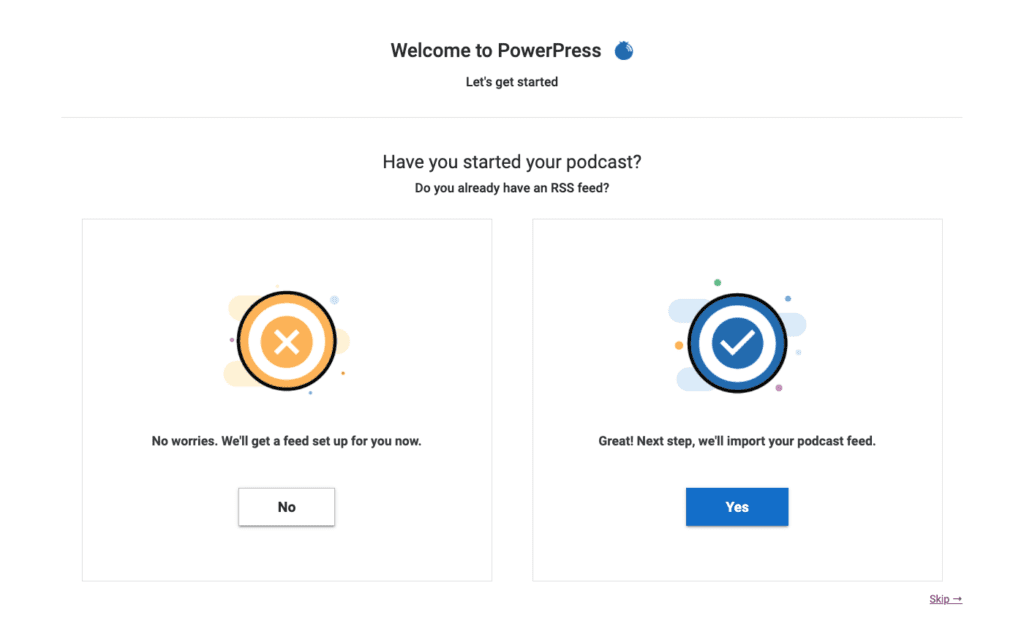
    PowerPress 9.0 onboarding screen

    You can go one of two ways: starting a podcast or moving a podcast. Starting is a quicker process than moving, however, you’ll be able to complete the desired goal either way.

    Starting a Podcast with PowerPress

    You create your podcast within the onboarding process. Add your title, artwork, some finer details, and, lastly, you’ll receive an auto-generated RSS feed from WordPress. Those who are not yet a member of the Blubrry family can sign up for podcast hosting through their WordPress website and use our one-month free trial to try us out. Got hosting taken care of already? That’s ok, just go ahead to the next step. You’ll be all set within a few minutes.

    Anyone with a WordPress site can try podcasting out for free within a few clicks, and all without leaving WordPress.

    Importing and Switching a Podcast to PowerPress

    Using Blubrry’s podcast hosting is not a requirement of PowerPress. Anyone can import their podcast to PowerPress, and those beginning to use Blubrry hosting can move their media episode posts (including show notes). The steps are easy: sign up for hosting, then Blubrry automatically imports your media, and then we import your episode posts (show notes). We move your existing show’s title, RSS feed and artwork, so it’s a complete transfer for the podcast.

    The import and migration time length depends on how many past episodes you have, as well as their file size. Luckily, you’re able to get it started and then come back later to check on the progress. We always recommend you reach out to our support team and review the full steps when leaving other hosts.

    We recommend you have the following ready:

    • Title: Well researched and something you won’t feel the need to reassess in the near future
    • Artwork: Eye-catching and properly sized (3000×3000 or 1400×1400), 72 dpi in JPEG or PNG
    • Log-ins: Your Blubrry login information to link the account

    We’ve tweaked the onboarding process for all new users in the onboarding process for PowerPress, with an emphasis on reaching the end goal of being able to easily publish an episode at the end of the process.

    Since day one we’ve developed our tools to help you own your brand and control your show, nowadays with a bigger emphasis on the growth of your show. By the end of the PowerPress onboarding process, you’ll be set to easily manage your podcast within your own website; and focus on tools that will help you market your show.

    Learn more about PowerPress here. Give it a shot yourself and get your podcast started today.

  • Podcast Index Tags Implemented in Blubrry’s PowerPress

    New RSS feed tags have been added for podcasters

    Orange and white rss feedToday, Blubrry released an update of our WordPress plugin, PowerPress 8.5, now featuring five new RSS feed tags initiated by the Podcast Index team. These new tags put more power in the podcaster’s hand, such as creator protections, personalization and accessibility.
    The following tags were added:

    • Lock – make sure no one can import your show to a different directory, host, etc., aka piracy
    • Transcript – easily add your episode transcripts, good for SEO and accessibility (and can be added publishing)
    • Funding – this tag will work with any donation URL also in your feed
    • Location – add your location, similar to Instagram posts and Tweets
    • Chapters – help your listeners jump to a specific portion of your episode

    These tags are easy to find and use within PowerPress, and you can pick and choose which ones to use or try out. Any PowerPress user can take advantage of these tags; you do not need to be using Blubrry podcast hosting. You’ll find Lock under Feed and Feed Settings; Funding and Location in Feeds and Basic Show Information; and Chapters and Transcripts in the Advanced tab in the episode publishing section.

    “We knew from the start that we wanted to implement these tags; we’re interested in any improvement on RSS feeds,” said Todd Cochrane, CEO of Blubrry. “These tags from Podcast Index undoubtedly help podcasters protect and build their shows.”

    The Podcast Index team’s main focus is to ensure that podcasting remains an open platform of free speech for any and all creators. The tags are one of the first ways they are pushing the industry forward for inclusivity and accessibility.

    This isn’t our only PowerPress update, we’ll be releasing a new update shortly that we know you’ll like as well. Look for it this month and, as always, keep in touch and let us know what you think!

  • PowerPress 8.2, Updated Episode Box

    PowerPress 8.2, Updated Episode Box

    PowerPress has been undergoing a UI/UX transformation the past few months and will continue to do so in the coming months. The release of 8.2 is the second step in the transformation and focuses on new on-boarding and getting started menus. The first release occurred in December 2019.

    The biggest change in the 8.2 update is the consolidation of many of the episode settings features in the episode box. In the past, users had to activate many options in PowerPress Settings that were not default or available directly in the episode box. Users can now find all their options in the Episode Box section, underneath the blog section.

    List of updates:

    • The media link is now verified automatically upon upload.
    • PowerPress Player shortcode is now displayed in the episode box.
    • Episode tab in Settings has been eliminated.
    • ID3 library updated to be compatible with PHP 7.4.

    The new ‘episode box’ tabs

    1. Settings focused on SEO, including Apple Podcasts optimization, can be found here.
    2. Episode Artwork for all podcasts and Post Image settings for video files are included.
    3. Website Display includes info on the PowerPress player shortcode.
    4. Meta Marks allows users to edit their audio with tags and comments.

    Overall, users are still able to change and verify their media, and the file size and duration are visible. Users will be happy to see everything pertaining to episode details in one place from now on.

    We have additional updates we’re planning on making for PowerPress this year in our continued efforts to bring you the best podcasting tools out there. On that note, we’re looking for beta testers for our third and largest update to PowerPress — the entire menu system.

    Read here to learn about becoming a future beta tester.

  • How To Build a Podcast Network

    How To Build a Podcast Network

    Now that podcasting is solidly in the mainstream of popular culture, and now that there are so many tremendous podcasts out there, a lot of podcasters are beginning to look for that next edge to develop & grow their audience. One good option could be to create a podcast network. Here, we’ll briefly explain what that means and give some ideas on how to do it.

    What is a podcast network and why should you build one?

    Think about old-school broadcast TV networks: it’s a collection of shows that are cross-promoted, and they share overhead costs among other things. A podcast network is quite similar. A podcast network is a collection of podcasts that have decided to group themselves together in order to make cross-promotion easier, as well as possibly sharing production and overhead costs.

    Why should you build a podcast network? Because your listeners are having trouble finding podcasts. We all know that podcast discovery is a big issue, and there are plenty of companies (cough)google(cough) spending plenty of resources to make that easier. One way you can make it easier is by making a podcast network. Putting together a group of shows that could potentially grow each others’ audiences through cross promotion is kind of a no-brainer. But it’s not all that easy with the tools that are currently available.

    How do you build a podcast network?

    Like most things, there’s the human side and the technical side. On the human side, you need to seek out and/or create podcasts that are in some way related. It could be that the podcast “on air” talent is the same. It could be that the subject matter is similar, or at least somewhat related. It could be that the audience demographics or interests are very similar. So, when you are creating your podcast network and approaching other podcasters to join forces, have a plan and a pitch as to why those other podcasters should join you. Help them understand what’s in it for them with things like revenue and cost sharing, cross promotion, etc.

    On the technical side, it’s honestly not that easy right now. You can cobble together a working podcast network with some existing tools. Our CEO, Todd Cochrane, recently spoke with two podcasters who had just launched their brand new podcast network… after 3-4 months worth of work designing & coding. He mentioned to them that PowerPress is actually robust enough that you could create a network with it and in fact many have. And if you’re a Blubrry customer, our real live humans in customer support would be happy to get you up and running. Also—and we don’t usually tip our hat like this—we have something pretty big in store for later this year: Blubrry is putting the finishing touches on a Podcast Network Plugin for WordPress which will make it ridiculously easy to set up and maintain your own podcast network. We noticed that more and more of us are creating podcast networks, we have it nailed with publishing, but we wanted to make it easy to showcase a network. So what we have in the pipeline is going to extend the tools we have today. That’s how we got started way back in 2008, actually. We were podcasting, but the tools were lacking, so we built PowerPress. And hosting. And stats. Be sure to stay tuned for pricing and availability.

    Podcast networks are definitely here to stay, and you might benefit from creating or joining one. But it’s still a bit tricky, on the technical side of things, to get one set up. But keep you eyes peeled for our upcoming podcast network plugin to be released.

  • How the 2019 Apple Podcast Category Changes Affect Your Podcast

    How the 2019 Apple Podcast Category Changes Affect Your Podcast

    2019 Apple Podcast Category changes affect nearly 75% of podcasts shows. Is your podcast affected by the change?

    Chances are, your podcast will be affected by the new Apple podcast category change coming this August. For podcasters worried about what will happen to their category listing on Apple Podcasts, breathe easy: Apple will map removed subcategories to their top-level category. That means that if you do nothing and your category is affected, you will still, at the very least, be in a top-level category.

    Take advantage of this opportunity! If your show can take advantage of the new categories, update your categories immediately. This change is an opportunity for your show to be of the first in these new categories. If you are a we-moved-the-blog-to-this-site-when-we-made-a-new-website.blubrry.com/ hosting customer, please go to the podcaster dashboard, click on "Podcast Settings" then select your new August 2019+ categories. If you are a PowerPress user, please update to version 7.5 or newer, then go to PowerPress Settings, select the "Apple" tab and proceed to set your new August 2019+ categories.

    The most affected categories include “Comedy”, “Education”, “Government & Organizations”, “Music”, “News & Politics”, “Sports & Recreation”, “Technology”, and “TV & Film”. Comedy, Music, News & Politics and TV & Film now have 37 new subcategories to grow into. Sports & Recreation was essentially re-factored and is now simply called “Sports”. Education had many of its subcategories eliminated, replaced with new more appropriately titled subcategories. Sadly “Government & Organizations” and  “Technology” had their subcategories completely eliminated. The most shocking subcategory to be eliminated was “Podcasting” found under “Technology” since there are nearly 10,000 shows found in that subcategory today.

    Before we dig further into the changes, the 2019 Apple Podcast category changes is a refreshing step forward with improving the organization of podcasts in the Apple podcasts directory. The last category changes were made way back in 2011, and even then, they were only minor changes. The 2019 Apple Podcasts category changes, though, are significant. So significant, you’ll probably re-read this article a few times to fully understand the scope of the changes.

    Again: this update is significant! In August Apple will transition from 67 top and subcategories to 112. Every top-level category has been touched, either with the title being renamed or the addition or removal of sub-categories. Of the changes, 51% of the existing categories remain unchanged and 16% are renamed and the remaining 33% removed. There are nearly 70% more podcast categories. Wrap your head around that! 

    Using data from the blubrry podcast directory—with over 700,000 podcasts—over 130,000 of these shows have at least 1 required category change. Over 55% of shows that use a top-level category as their primary category now have new subcategories to pick from. Nearly 75% of podcasts are affected by these category changes!

    Top-level Apple podcast category changes

    The current 16 top-level categories continue, however, 6 have been re-titled. 3 new top-level categories have been added. These new top-level categories include “True Crime”, “History” and “Fiction”. Fiction is the only new top-level category that also includes new subcategories.

    Pre 2019 top-level categories:

    • Arts (unchanged)
    • Business (unchanged)
    • Comedy (unchanged)
    • Education (unchanged)
    • Government & Organizations changed to “Government”
    • Health changed to “Health & Fitness”
    • Kids & Family (unchanged)
    • Games & Hobbies changed to “Leisure”
    • Music (unchanged)
    • News & Politics changed to “News”
    • Religion & Spirituality (unchanged)
    • Science & Medicine changed to “Science”
    • Society & Culture (unchanged)
    • Sports & Recreation changed to “Sports”
    • Technology (unchanged)
    • TV & Film (unchanged)

    New 2019+ top-level categories:

    • True Crime
    • History
    • Fiction

    411 on secondary level Apple Podcasts categories

    The secondary level category changes, or “subcategories” as Apple labels them, is much more complicated. Apple Podcasts almost doubled the number of subcategories from 51 to 93. We broke down the changes into 3 segments: removed, changed, and added.

    The most ambiguous subcategory titles have been removed in favor of titles that identify the category better. For example “Other” under “Religion & Spirituality” has been removed.

    Apple Podcasts subcategories that have been removed

    Apple removed 22 subcategories. Shows that fall into these subcategories will now default to their top-level category noted.

    • Business
      • Business News (shows will now appear under Business, see note1)
      • Shopping (shows will now appear under Business)
    • Education
      • Education Technology (shows will now appear under Education top category)
      • Higher Education (shows will now appear under Education top category)
      • K-12 (shows will now appear under Education top category, note2)
      • Training (shows will now appear under Education top category)
    • Government & Organizations (renamed to Government)
      • Local (shows will now appear under Government)
      • National (shows will now appear under Government)
      • Non-Profit (shows will now appear under Government)
      • Regional (shows will now appear under Government)
    • Health (renamed to Health & Fitness)
      • Self-Help (shows will now appear under the Health & Fitness top category, note3)
    • Religion & Spirituality
      • Other (shows will now appear under Religion & Spirituality)
    • Science & Medicine (renamed to Science)
      • Medicine (shows will now appear under Science top category, note4)
    • Society & Culture
      • History (shows will now appear under Society & Culture, note5)
    • Sports & Recreation
      • Amateur (shows will now appear under Sports)
      • College & High School (shows will now appear under Sports)
      • Outdoor (shows will now appear under Sports)
      • Professional (shows will now appear under Sports)
    • Technology
      • Gadgets (shows will now appear under Technology)
      • Tech News (shows will now appear under Technology)
      • Podcasting (shows will now appear under Technology)
      • Software How-To (shows will now appear under Technology)

    Note1: We recommend mapping “Business News” to News > Business News
    Note2: We recommend mapping “K-12” to Kids & Family > Education for Kids
    Note3: We recommend mapping “Self-Help” to Education > Self-Improvement
    Note4: We recommend mapping “Medicine” to Health & Fitness > Medicine
    Note5: We recommend mapping “History” to the new top-level category History

    Apple Podcasts subcategories that have been changed

    Apple has changed 11 subcategories. Shows that fall into these subcategories will not be affected other than appearing in a retitled category.

    • Arts
      • Literature renamed to “Books”
    • Business
      • Management & Marketing renamed to “Management” (see note1)
    • Education
      • Language Courses renamed to “Language Learning”
    • Health (renamed to Health & Fitness)
      • Fitness & Nutrition renamed to “Fitness” (see note2)
    • Games & Hobbies (renamed to Leisure)
      • Other Games renamed to “Games”

    Note1: We recommend marketing only podcasts use the new category Business > Marketing
    Note2: We recommend nutrition only podcasts use the new category Health > Nutrition

    Apple Podcasts subcategories that have been added

    Apple has added 67 new subcategories. These categories expand upon most of the top-level categories

    • Business
      • Entrepreneurship (new!)
      • Marketing (new!)
      • Non-profit (new!)
    • Comedy
      • Comedy Interviews (new!)
      • Improv (new!)
      • Stand-up (new!)
    • Education
      • Courses (new!)
      • How To (new!)
      • Self-Improvement (new!)
    • Fiction (new!)
      • Comedy Fiction (new!)
      • Drama (new!)
      • Science Fiction (new!)
    • History (new!)
    • Health & Fitness
      • Medicine (new!)
      • Mental Health (new!)
      • Nutrition (new!)
    • Kids & Family
      • Education for Kids (new!)
      • Parenting (new!)
      • Pets & Animals (new!)
      • Stories for Kids (new!)
    • Leisure
      • Animation & Manga (new!)
      • Crafts (new!)
      • Home & Garden (new!)
    • Music
      • Music Commentary (new!)
      • Music History (new!)
      • Music Interviews (new!)
    • News
      • Business News (new!)
      • Daily News (new!)
      • Entertainment News (new!)
      • News Commentary (new!)
      • Politics (new!)
      • Sports News (new!)
      • Tech News (new!)
    • Science
      • Astronomy (new!)
      • Chemistry (new!)
      • Earth Sciences (new!)
      • Life Sciences (new!)
      • Mathematics (new!)
      • Natural Sciences (new!)
      • Nature (new!)
      • Physics (new!)
      • Social Sciences (new!)
    • Society & Culture
      • Documentary (new!)
      • Relationships (new!)
    • Sports
      • Baseball (new!)
      • Basketball (new!)
      • Cricket (new!)
      • Fantasy Sports (new!)
      • Football (new!)
      • Golf (new!)
      • Hockey (new!)
      • Rugby (new!)
      • Running (new!)
      • Soccer (new!)
      • Swimming (new!)
      • Tennis (new!)
      • Volleyball (new!)
      • Wilderness (new!)
      • Wrestling (new!)
    • True Crime (new!)
    • TV & Film
      • After Shows (new!)
      • Film History (new!)
      • Film Interviews (new!)
      • Film Reviews (new!)
      • TV Reviews (new!)

    For a full list of the new podcast categories from Apple, please visit the Apple Podcasts Categories page.

    Analysis of the changes

    After reviewing the changes and comparing the number of podcasts that appear in the various subcategories, we have determined the changes Apple has made will be a net positive for most shows. These new categories and subcategories will now have their own top 200 shows featured within them, which will give over 13,000 podcasts top 200 exposure in the Apple podcasts directory. So, while change can be scary sometimes, in this instance you actually now have a better chance to gain more exposure. Which means it might make it easier to grow your audience.

    PowerPress Plugin Users

    We have a big update coming to PowerPress in the next few days with all these changes plus a lot more..

  • What Is A Podcast RSS Feed?

    What Is A Podcast RSS Feed?

    RSS feeds aren’t exactly user friendly to all, so we wanted to simplify them a bit so that everyone can understand. We explain not only what a podcast feed is but the importance of having one.

    What is a podcast RSS feed anyway?

    RSS stands for “Rich Site Syndication” or “Really Simple Syndication”. In short, according to Wikipedia, RSS “is a type of web feed which allows users to access updates to online content in a standardized, computer-readable format.” In human language, that means you and your audience can use an RSS feed to consume your content someplace other than your website. Remember blog aggregators/readers? That’s how they work(ed). And, if you have a podcast, the podcast RSS feed is how platforms like Apple Podcasts, Google Podcast, Spotify, and others get your podcast info: they are more like an old-school phonebook, in that they simply list your information, but your podcast is actually served from wherever you host your media files. Your podcast RSS feed tells them things like your show name, the podcast episode title, the duration, etc. By the way, if you’re looking for an incredibly flexible, fast, stable place to host your podcast media files, be sure to check out our Podcast Hosting plans. Or, if you’re wondering how to get your podcast on Apple Podcasts, check out our step by step guide.

    Why you need a podcast RSS feed

    Put yourself in your listener’s shoes… or eyes & ears… for a minute. When you post anything to your website, your RSS feed defaults to listing a certain number of your most recent items. For example, WordPress defaults to listing the 10 most recent posts. The thing is, podcast readers will ignore anything in the default RSS feed that isn’t a podcast. So, if you’re publishing a handful of blog posts per month as well as a podcast per week, your default feed will only serve up those four podcasts. Your listeners are missing out.

    BUT! If you have a podcast-only RSS feed as Blubrry users do, your listeners will have access to more of your awesomeness because the feed won’t be filled up with blog post content. Just the podcasts. You should have a podcast-only RSS feed.

    Three ways to create a podcast RSS feed

    Something to seriously consider as you set out on your epic podcasting journey: do you want to own and control your podcast RSS feed? The answer, if you truly care about your own story, is most likely yes. In which case, read on.

    1. The PowerPress WordPress plugin. It’s free. It’s super simple. It’s one of the most trusted ways to share your story with the world. The PowerPress WordPress plugin makes creating your podcast RSS feed ridiculously easy. That’s why there are tens of thousands of active installs, all over the world. We began developing the PowerPress WordPress plugin way back in 2008 because we wanted an easier way to create a podcast RSS feeds for our own podcasts. There is even a step-by-step guide on how to create your podcast RSS feed over at we-moved-the-blog-to-this-site-when-we-made-a-new-website.blubrry.com/.
    2. If you don’t have a WordPress site we provide one to every customer for free and it has PowerPress included. There certainly are a plethora of other options, but none are as simple to use or widely adopted and it’s integrated into the free WordPress site for those that do not have one.
    3. There is no three.

    Ok. Those are the basics of what a podcast RSS feed is, why you might want one, and how to set up your very own podcast RSS feed. Be sure to check back often for more podcast RSS tips and tricks. And, as always, if you’re a Blubrry customer and you have any questions at all, give us a call. We have real, live humans ready, willing and able to help you build your podcast– including technical support in setting up a podcast RSS feed.

    We should also mention that sometimes our corporate customers or podcasters experimenting in the space do not want to go the WordPress route. That's really ok as we have a solution for you where you can publish directly on we-moved-the-blog-to-this-site-when-we-made-a-new-website.blubrry.com/ as well and we will provide you an RSS feed from there. We always want to suggest the best solutions first, as we truly believe you should build your brand on your .com this results in the best SEO for your show.

  • How To Take Advantage of Google’s Plan To “Double” Podcast Listening

    How To Take Advantage of Google’s Plan To “Double” Podcast Listening

    Google made news last week when the announced a strategy to put podcasts front and center in its content offerings. In fact, according to Google Podcasts Product Manager Zack Reneau-Wedeen, the company has a bold and ambitious goal to double the amount of podcast listening worldwide over just the next couple of years. 

    For years Google has prioritized text, images, and video in search results. With Google’s new podcast strategy, podcasts will join this elite class of content and enjoy enhanced ranking on Google search. 

    That’s good news for podcasters, but great news for PowerPress, Blubrry WordPress Website and PodcastMirror users, because Blubrry services meet all of Google’s requirements for promotion and distribution. 

    Your Feed Matters.

    By “owning your podcast feed” – which you do, when PowerPress / Blubrry WordPress Website originates your feed from your website or PodcastMirror which mirrors the metadata in your original feed – your podcast is positioned to take care of this Google search advantage. On the other hand, if your podcast host owns your podcast feed and the links to the episodes and home page link back to your host, it’s your host that will get the benefit of your show’s new search ranking. Those using Blubrry service offerings are in the best possible position as they do not need to make any changes to how they are publishing their shows.

    In addition to search discovery, Google’s podcast strategy also will include a plan to recommend podcast content – for example, if someone searches “new diets”, Google might suggest your paleo-eating podcast. This recommendation could happen at the program level, or Google might recommend a specific episode. So, having a centralized podcast website with good show notes and descriptive titles, podcasts can compete with big shows even if they aren’t part of a large network or podcast hosting company. Since podcasts will be recommended based on content, as long as your content is of high value to the listener, your show can be recommended.

    Again, the best practice here is that your podcast has a dedicated website, that your podcast feed metadata links to your website, and that you employ good practices of writing descriptive titles and descriptions for each episode you produce. With all those things in place, your podcast will be positioned to take full advantage of audio SEO, and you’ll be able to target Google search results, recommendations within Google, and will even be able to be utilized by smart speakers like Google Home.

    Blubrry has been ahead of the curve on this for a number of years in helping podcasters through the Podcast SEO settings in PowerPress to optimize whats in the feed versus what is on the public website. With the metadata always linking back to your brand. Blubrry Podcasting uses the absolute best practices in the space and the beauty is the strategy we have promoted for years aligns perfectly with Google’s strategy.

    A big part of the new strategy from Google is curating content for listeners based on their needs and listening habits – i.e. cueing up your travel show based on a listener’s Google Maps use, or news when the listener is on his or her commute. Google may also remember the show that was last played to allow a listener to continue where they left off when they switch from listening in their car commute to listening on their laptop at work or on your Google Home device – so planning for your episode to be consumed across multiple devices is a must. It’s exciting stuff for podcasters, but making sure your podcast is optimized to align with Google’s new strategy is the first step, and key to taking advantage of the growth. 

    To take full advantage of Google’s new podcast growth strategy, your podcast website and feed must meet these requirements: 

    1. Expose a valid RSS feed of your podcast.
    2. Feed must contain at least one episode
    3. Feed must have a dedicated <link> to your podcast’s homepage.
    4. The “home page”, RSS feed and audio must be index-able by googlebot. (URLs must not be protected by robots.txt or <noindex> tags)
    5. The “home page” must include the RSS feed meta tag

    PowerPress has had supported these requirements through the Podcasting SEO settings in PowerPress. PowerPress 7.4+ will have all of these requirements enabled by default. If you have a previous version of PowerPress, just check the Podcasting SEO settings and enable the Podcast Directory SEO Guidance setting, and you’ll be all set to take full advantage of Google’s efforts to rapidly increase your podcast audience.

  • Podcast Equipment and Marketing with David Pollock

    If you haven’t discovered David Pollock’s podcast, The 10 Minute Marketer, now is a great time to start listening. He’s this week’s guest on the PowerPress Podcast and had lots to say about Blubrry, PowerPress, and some best practices for new podcasters. MacKenzie and David discuss what type of equipment a new podcaster should get – and what you shouldn’t do when buying any. After working in radio David transitioned into podcasting and realized what he was missing out on by taking control of his brand. They end the show talking about reviewing podcasts and sharing your favorite episodes with others. Thanks for listening and please subscribe!

    PowerPress SEO Tip:
    For example, you can make your blog post title optimized for web SEO by excluding your episode number, but on the news feed, the episode title allows you to expand on keywords that help with iTunes search. One thing to keep in mind is that iTunes only indexes (their search) your episode and program titles, not show notes.
    In the PowerPress menu, select ‘Podcasting SEO’
    Select the first option, under section ‘Episode Titles,’ select the first option, ‘Feed episode title replaces post title.’

    Fan of PowerPress? Leave us a review!

    Show notes:

    How Much Should I Spend on Podcast Equipment?
    Blues Brothers – Sold it for a microphone
    The 10 Minute Marketer – David Pollock
    The Pod People – Paste Magazine

  • Getting Wise About Podcasting

    Getting Wise About Podcasting

    PPPiTunesAlbumArt300Ken Wise recently celebrated his 1 year podcasting anniversary and is the guest on episode 31 of the PowerPress Podcast. MacKenzie and Ken talk about his show, Wise About Texas, that focuses on all kinds of history that pertains to the great state of Texas. As for recent news, well, there’s another podcasting studio available to the public. If you’re in the St. Louis area and looking for an easy podcast recording solution, check this out. Check out the link below for more details. And for those of you out there that are interested in transcripts for your show, there’s another tool coming your way! It’s in beta now, but autoEdit will be available in the future. Those of you looking to test, be aware, it’s open source. MacKenzie caught up on her podcast chronicle – check out the picture below of the new studio setup. Thanks for listening and hit one of the many subscribe buttons to the show!

    PowerPress fan? Leave us a review, here!

    newblubrrystudio

    Show notes:

    Wise About Texas
    Facebook
    Twitter
    Instagram

    autoEdit – Open source tool for transcripts

    Email MacKenzie
    Blubrry Twitter