Category: Announcement

  • Blubrry’s Podcaster of the Month and User Experience Feedback Winner

    Blubrry’s Podcaster of the Month and User Experience Feedback Winner

    When we released our new podcast publishing Dashboard, we asked for your feedback on the user experience. Hearing from so many of you was instrumental in catching some early bugs and getting fixes in place during the first couple of weeks.

    To add some fun to giving feedback, we said we’d select one lucky feedback provider to receive one year of free podcast hosting, our compliments. Well, it was helpful, and it is fun!

    Today we’re announcing our lucky winner, who is also October’s Podcaster of the Month: Natty Bumpercar.

    Tell us about yourself!

    A little bit about me: I’ve been doing comedy for almost a million years. I tend to work squeaky clean, and have a bundle of tangential energy. I excel at getting into awkward situations, telling ridiculous stories, and falling in love with kittens that aren’t available — emotionally. I’ve illustrated a children’s book, Douglas: A Christmas Tale, produced cartoons, webcomics, my podcast, The Bumperpodcast, — which all live on my website. I’ve worked in radio, sung in a band, been in films, theater, and commercials. I like to stay busy. I consider myself a maker of things and a doer of stuff.

    What inspired you to do your own podcast?

    I like to talk. I also enjoy the sound of my own voice — and, that’s not entirely ego speaking. I’m an only child, and I managed to get through a bunch of life by cocooning into my imagination. From there, I found a nifty place called Coffee-Can Alley. It’s pretty special, and pretty ridiculous. I went to school at the University of Georgia, over in a swell little town known as Athens, and started doing something along the lines of stand-up while also working a few radio shifts at WUOG 90.5 fm. I got a Bachelor in Painting, then a Masters in Painting — where I continued to explore some of the foibles of Coffee-Can Alley. At some point, I started making webcomics, and cartoons — and even got to pitch a show to Cartoon Network! Then, in 2009, I figured out how to make sounds, what an RSS feed was, and started making the Bumperpodcast. It’s truly a blast, and my stomach hurts when I don’t get a chance to record once per week. I’ve got a bunch of ideas for other shows, but until I can successfully clone myself, I’m just going to stick with the best idea that I have — the Bumperpodcast.

    How do you prepare for an episode?

    I wander out to the studio in my barn, affectionately known as the Bumperbarn, get all of the equipment set up and working properly, and then throw some treats to my dogs, Banjo and Popcorn, to try to distract them. It is usually during the wandering that my brain starts fluttering through the roulette wheel of random occurrences and thoughts that may find a place in the episode. Then, I look at the title of the last episode, hope that it sparks some sort of memory in my brain, that may or may not gel in some way with the wander-thoughts, and start recording. After that, it really becomes a blur, based off of a bundle of variables — mostly which of the other characters from the show happen to either stop by, or be available. I must say that once the show starts recording, there are generally no guarantees that the show will end anywhere near where it began. I’ve heard the words ’train-wreck’ and ‘off the rails’ used repeatedly in reference to the Bumperpodcast — and that’s just from my wife and kids …

    What advice do you have for someone just starting out?
    The most important thing, to me, is to be true to yourself, and do what makes you happy. Don’t go into podcasting expecting to become famous or rich or awesome. You’re probably already awesome as you are, and those other goals aren’t promised to anyone. So, take a deep breath, figure out what you want to do, do some research — if that floats your boat, get your setup established, and then get to it. Don’t be afraid to try things out, and have it not work. Trying things is how you learn. Ask yourself a million questions. Don’t pigeon-hole yourself. Also, try not to take any advice from bears. Not to bear shame, but — it has always been my experience that they have their own underlying motives that will almost certainly not always line up with what you are trying to do — whatever that is!


  • Facebook Releases Special Tools for Podcasters: Facebook for Creators

    Facebook Releases Special Tools for Podcasters: Facebook for Creators

    Podcasters can now add their podcast to their Facebook page for people to discover, listen and share with friends directly within the Facebook app.


    New podcasting features by Facebook:

    • Comments and reactions – Spark a discussion and get feedback on your content. Comments allow podcast creators to engage directly with their listeners.
    • Podcast clips – Highlight favorite segments by creating snippets of episodes and sharing them on Facebook.
    • Audio destination – A central place to discover and share audio content. Recommendations are curated based on popularity or personalized interests.

    Resources:

    Visit the Facebook for Creators website to learn more.

    At this time, podcasts are only available on the Facebook mobile app, and only to U.S. listeners.

    Does your podcast have its own Facebook page? If not, create a page dedicated to your show.

  • Blubrry Has Updated Podcast Hosting Plans

    Blubrry Has Updated Podcast Hosting Plans

    Podcast Hosting ServiceWe are once again bringing more value to podcast hosting customers with our Advanced Plan. Advanced Statistics and Domain Mapping (for those using our free WordPress websites) are now included in our $20+ hosting plans.
    Growing a podcast audience is exciting, and we are offering one of the best ways to keep track of this growth by making adjustments based on data. We provide that data with Advanced Statistics.

    Advanced Statistics, Blubrry’s most powerful podcast analytics, are now automatically included with all Advanced Hosting plans. Released as an add-on in 2019, Advanced Stats provides data on partial downloads, play delivery, and listener retention.

    Mapping a domain name to your website is the ultimate way to build your brand under your .com and gain the authority, search, and referral traffic your show deserves.

    New Offerings:

    Advanced Hosting starts at $20 for 400MB monthly storage

    • Advanced Statistics included (new)
    • Domain mapping is included with the free Blubrry WordPress site (new)
    • Extra Storage $20 provides 400MB of additional storage (new)

    Current plans of $20 and above have received an automatic upgrade. There is nothing you need to do except take a deep dive into the new analytics in your dashboard.

    Also, map a domain to your Blubrry-provided WordPress website or migrate your WordPress site to the free one provided by Blubrry.

    Standard Statistics are still included with all $12 hosting plans, or available to any podcaster not using Blubrry hosting for $5 per month. Please enjoy our new Advanced Hosting plans!

  • Blubrry’s New User Dashboard

    Blubrry’s New User Dashboard

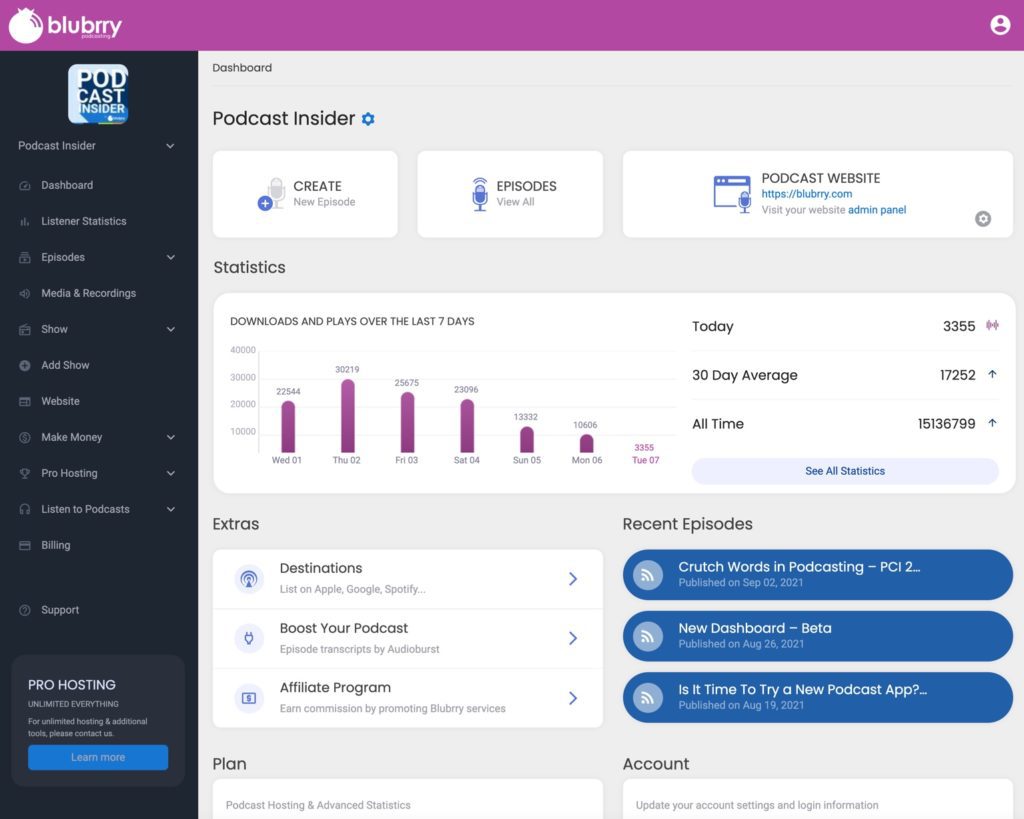
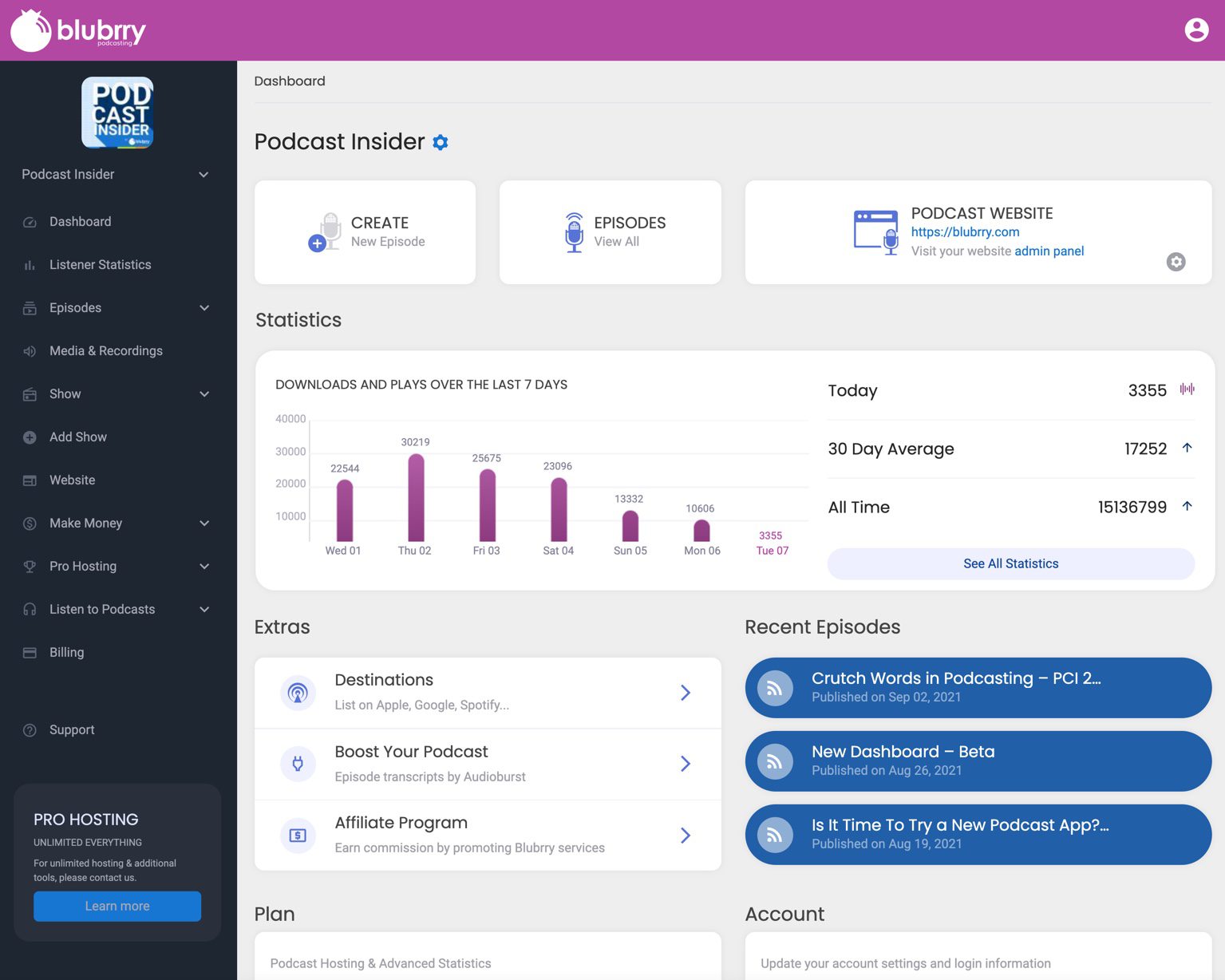
    Blubrry has released a brand new Podcaster Dashboard to all users. We’re psyched and can’t wait for you to try it out. Our goal was to provide new and existing customers the ability to manage, publish, and promote new episodes efficiently. At Blubrry Podcasting, our main goal is to provide the tools and data that podcasters need to grow their shows.

    Main Page


    What to Expect

    • A whole new look and feel
    • Sidebar navigation that includes everything you’ll need
    • Easily see how much storage you’ve used and what’s left this month
    • Socially share your latest episodes with Headliner and Audioburst integrated
    • Seamlessly manage your Blubrry provided WordPress website
    • View stats data on your dashboard
    • Get to your episodes faster
    • Change your plan quickly

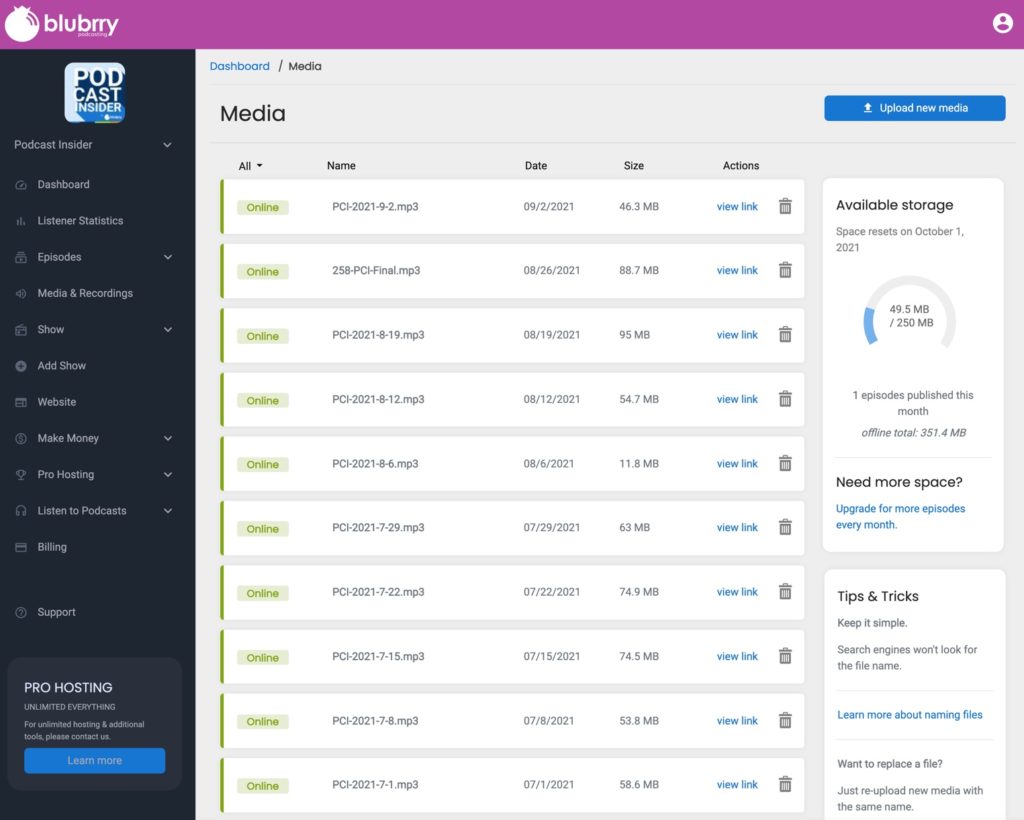
    Media Management

    As always, we provide the tools and services that make publishing a podcast easy, including a modern user experience. One that allows podcasters to get going instantly and get your content published and distributed.

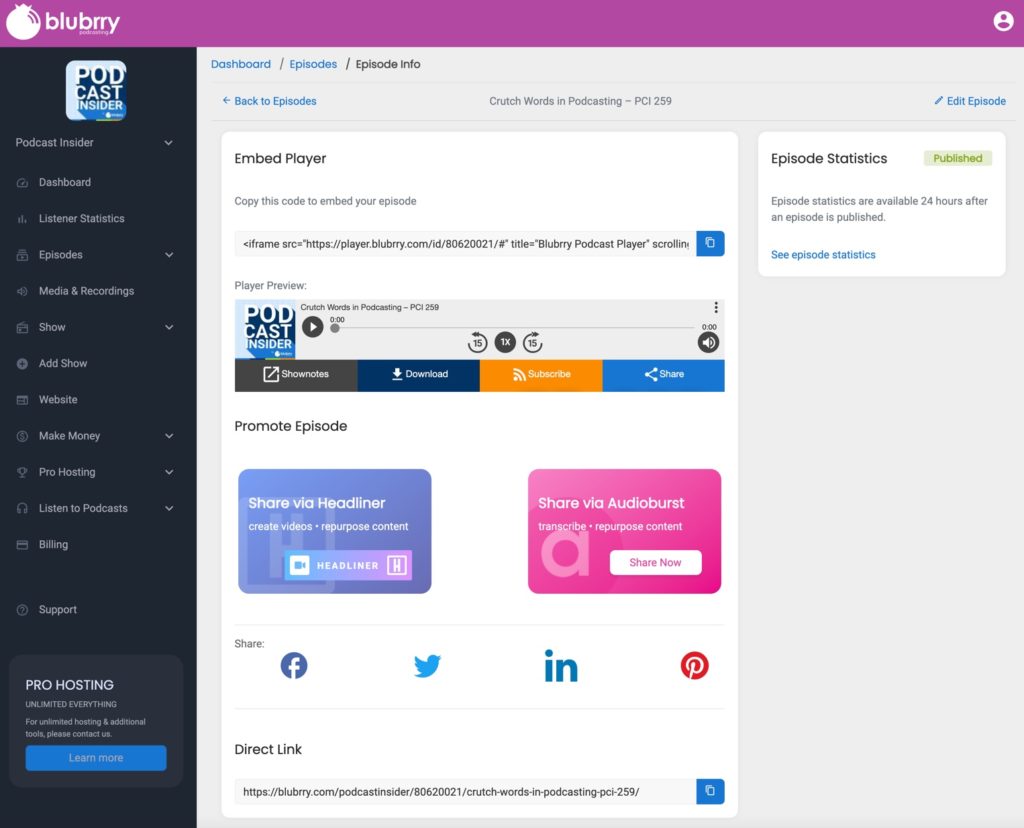
    Podcasters focusing on growth and sharing new episodes will be directed to these options automatically after they’ve published an episode. Partners such as Headliner and Audioburst are integrated to share on social media and are now available to engage with immediately.

    Social Promotion

    We’ve also released a new version of onboarding: a simple setup process for new customers or those adding another show to their account. With this new dashboard, you will be creating and publishing your first episode in minutes.

    There has never been a better time to start a podcast with Blubrry. Our goal is to provide powerful tools and features in a more accessible and efficient way. Making simple utilization of Blubrry’s services is our teams’ No.1 priority.

    Test out Blubrry’s new dashboard today when you log into your account! Be sure to participate in our feedback contest linked on the dashboard home page for a limited time. As our thank you for participating, one lucky Blubrry user will receive 12 free months of podcast hosting.

    Blubrry has only just begun its revamp. Keep up to date on what exciting updates we have coming when you tune into Podcast Insider. The Blubrry Podcast Statistics redesign is coming soon.

  • Easily Sign Up For Blubrry’s Pro Hosting

    Great news! Any podcaster can now easily sign up for Blubrry’s Professional Hosting plan, right here on our website. Additionally, Pro-Hosting customers can manage their pro account, add shows, and add services directly from the Podcaster Dashboard.


    For new customers get your $100 setup fee waived by signing up directly online.

    The professional hosting plan includes numerous exclusive features:
    – Unlimited monthly bandwidth use (fees apply)
    – Unlimited storage
    – Standard and advanced statistics
    – Dynamic advertising insertion
    – Network tool for PowerPress
    – WordPress websites for any hosted show

    This plan is advantageous for podcasters managing their own network and those who need more sophisticated features, such as advertising insertion or network capability within PowerPress (where podcasters can easily showcase any show on their website associated with the network).

    Managing multiple shows is simple, by adding or deleting them within the dashboard. Similar to our standard hosting plans, payments are made automatically. However, they are now charged at the beginning of the month for the previous month’s usage. With a base cost of $100, additional monthly costs factor in additional shows, features, and bandwidth use.

    Pro Hosting is available to any podcaster; upgrade or purchase on we-moved-the-blog-to-this-site-when-we-made-a-new-website.blubrry.com/.

  • Blubrry’s New Podcaster Onboarding

    Blubrry Released a New Onboarding System for New and Existing Podcasters

    As part of an upcoming series of UI/UX updates, Blubrry has released a new podcaster onboarding system that simplifies the process for a new show and/or for an existing podcaster to initiate or migrate a show.

    The significantly improved process for getting a show started on the Blubrry platform enables even the most inexperienced podcasters to have their new account set up and ready to start their podcast within minutes.

    The new onboarding process serves Blubrry’s entire user base, whether the podcaster needs a simple podcast page or is looking for a more robust platform in using WordPress with PowerPress, Blubrry’s podcasting plugin.

    While podcasters can still choose to use a free Blubrry WordPress website, they also can opt to have a landing page for their show within the Blubrry podcasting platform. Podcasters that already have their own WordPress website are guided in setting up their hosting account.

    “We were focused on helping podcasters get to their first episode, we needed to make it easier for them to get started in the first place,” said Todd Cochrane, CEO. “Our tools always made it simple to publish episodes, but we streamlined the process to get started. So, we dedicated time simply to fixing our onboarding for any user.” 

    Over the past two years, the Blubrry team has worked to redesign the forward-facing website, design a new onboarding system, and will be rolling out a brand new dashboard and a host of other features that will transform the Blubrry experience for new and existing customers.

    Those that are planning to start a new show or migrate and will be using the new onboarding can receive a $25 Amazon gift card. Email Blubrry (marketing@blubrry.com) before you get started, and we’ll observe you going through the process, just to see if we got it right.

  • Blubrry Podcasting Launch Partnership with Samsung

    Podcasts Now Available with Samsung, Submit Your Show Now

    Welcome to Samsung PodcastsBlubrry Podcasting is proud to announce that we are a Samsung Podcast Launch Partner,  get your show on the Listen Tab of Samsung Free.

    This is an incredible opportunity to have your show reach a large segment of Samsung users here in the United States. Samsung has a global mobile business and we look forward to podcasting being highlighted on the “Listen Tab” of the Samsung Free.

    To get started fill out the following form. We will follow up with each show that submits. Please be patient as this program is just kicking off.

    Samsung Free – Device Support

    Samsung Free is available on the following compatible Samsung Galaxy devices. Galaxy S21, Galaxy S20, Galaxy Note20, Galaxy S10 and Galaxy Note10 series. The “Listen” tab update will be available within the United States.

  • Podcast Index Tags Implemented in Blubrry’s PowerPress

    New RSS feed tags have been added for podcasters

    Orange and white rss feedToday, Blubrry released an update of our WordPress plugin, PowerPress 8.5, now featuring five new RSS feed tags initiated by the Podcast Index team. These new tags put more power in the podcaster’s hand, such as creator protections, personalization and accessibility.

    The following tags were added:

    • Lock – make sure no one can import your show to a different directory, host, etc., aka piracy
    • Transcript – easily add your episode transcripts, good for SEO and accessibility (and can be added publishing)
    • Funding – this tag will work with any donation URL also in your feed
    • Location – add your location, similar to Instagram posts and Tweets
    • Chapters – help your listeners jump to a specific portion of your episode

    These tags are easy to find and use within PowerPress, and you can pick and choose which ones to use or try out. Any PowerPress user can take advantage of these tags; you do not need to be using Blubrry podcast hosting. You’ll find Lock under Feed and Feed Settings; Funding and Location in Feeds and Basic Show Information; and Chapters and Transcripts in the Advanced tab in the episode publishing section.

    “We knew from the start that we wanted to implement these tags; we’re interested in any improvement on RSS feeds,” said Todd Cochrane, CEO of Blubrry. “These tags from Podcast Index undoubtedly help podcasters protect and build their shows.”

    The Podcast Index team’s main focus is to ensure that podcasting remains an open platform of free speech for any and all creators. The tags are one of the first ways they are pushing the industry forward for inclusivity and accessibility.

    This isn’t our only PowerPress update, we’ll be releasing a new update shortly that we know you’ll like as well. Look for it this month and, as always, keep in touch and let us know what you think!

  • Blubrry Podcasting Statistics: Name Changes

    Free, Standard, Advanced: It’s time to get used to the new names for Blubrry’s podcast statistics plans. First off, nothing has changed about how these plans work; just the names have been updated to more clearly reflect what they are. Our stats still provide the same reliable, accurate and insightful information as before.

    • Basic (for the most part known as free) is now Free
    • Professional (Pro, included with hosting) is now Standard
    • Advanced (no change) will continue to be Advanced

    Not a stats user at this time? No problem. Our Free Statistics are available to any podcaster, as long as it fits with their host (not all podcast hosts allow for the Free Stats prefix). There is no harm in using our stats with a different host, and the numbers might even surprise you. We’ve been doing this since 2007 and we were the first to receive compliance certification from IAB (industry standards).

    We hope you’ll find these name changes helpful for understanding our services. We want to ensure that anyone — customer or not — fully comprehends what we have available, without a deep-dive explanation.

    You’ll see these changes reflected on our website, emails, receipts, etc. but it may take us a while to get them everywhere. If you see a mistake on our end, please feel free to let us know.

    Learn more about Blubrry Statistics and get your first Standard or Advanced month free!

  • Podcast Statistics Partial Play Data

    Blubrry Introduces Play Tracking with Advanced Stats

    Play tracking listener retention percentage

    Blubrry’s Advanced Stats has a new feature: play tracking. If you’re already using these stats, you understand how valuable the listener retention data is. And now you can see how long your episode was played in the web player we provide for each episode.

    Available at the episode level, podcasters can assess how many people listened via the Blubrry player. This information will be useful if you’re looking for more insight when you publish episodes using the Blubrry player on your website.

    If you suspect your audience is skipping over certain parts of your episodes, play tracking helps you find out for sure. This vital information is beneficial if you’re doing any kind of advertising in your episodes as well. For those already using Advanced Stats, you’ll find a new category in the Stats section.

    Plays and partials statistics per podcast episode

    If you’re not already using Advanced Statistics, now is the time to give it a shot. You don’t know what you don’t know until you take a look at all of the information available to you. And you can easily add Advanced Stats to your hosting. Got questions related to Advanced Stats or our player? Contact our support team. 

    This from our CEO, Todd Cochrane: “Play tracking data is going to vary from podcast to podcast. We looked at a lot of shows — some have a handful of web plays while others had hundreds per episode. This new data could be a marketing opportunity to remind listeners they can catch the show on the web.”

    P.S. Did you know that you can change the colors of our player to match your website and branding? You can do this in Blubrry’s Podcaster Dashboard or in PowerPress. And speaking of the player … we want your feedback! Tell us what you’d like to see in an audio player.