Tag: video podcast

  • Choosing the Right Blubrry Hosting Plan Based on How You Publish

    Choosing the Right Blubrry Hosting Plan Based on How You Publish

    One of the first questions new podcasters ask is, “What microphone should I buy?”

    Right alongside it is another question that can be just as confusing:

    “Which podcast hosting plan is right for me?”

    There are plenty of things to figure out when you’re getting a podcast off the ground—what to record with, how often to publish, how long your episodes will be, and where to host them.

    Choosing a hosting plan shouldn’t add another layer of confusion.

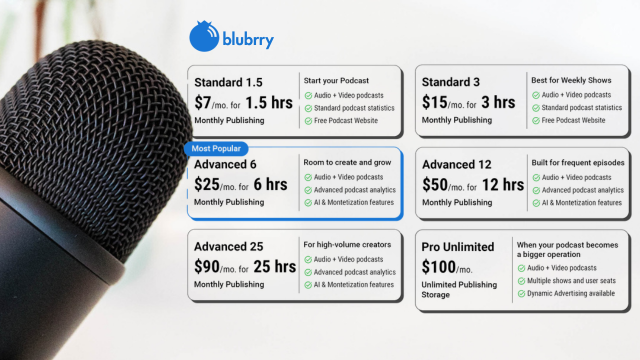
    That’s why Blubrry made its hosting plans simpler. Instead of trying to understand complicated storage limits or estimate how much space your files will take up, you can choose a plan based on how much content you actually publish each month.

    If you know how often you plan to publish and roughly how long your episodes will be, you already have a much easier way to find the right fit.

    Whether you’re creating an audio-only show, a video podcast, or a little of both, you can choose a plan that matches your publishing schedule today and upgrade whenever your podcast grows.

    Here’s how to figure out which plan is right for you.

    Start With Your Publishing Schedule

    The easiest way to choose a hosting plan is to answer two simple questions:

    • How long is each episode?
    • How many episodes do you publish each month?

    Multiply those together and you’ll have a good estimate of your monthly publishing time.

    For example:

    • Four 30-minute episodes = 2 hours per month
    • Two 60-minute episodes = 2 hours per month
    • One 90-minute episode = 1.5 hours per month
    • Eight 45-minute episodes = 6 hours per month

    You don’t need to calculate file sizes or worry about compression.

    Simply estimate your monthly publishing time.

    If You’re Just Starting a Podcast

    Many new podcasters publish one or two episodes each month while they find their rhythm.

    If that’s you, one of our entry-level plans will likely be the perfect fit.

    These plans are designed for creators launching:

    • Personal podcasts
    • Hobby shows
    • Business podcasts
    • Passion projects
    • Interview series

    You get everything you need to start publishing without paying for more publishing time than you’ll actually use.

    Weekly Podcasters
    Weekly publishing is one of the most common schedules in podcasting.

    If you’re releasing a new episode every week, estimate your average episode length and multiply it by four.

    Examples:

    • Weekly 30-minute show → about 2 hours per month
    • Weekly 45-minute show → about 3 hours per month
    • Weekly 60-minute show → about 4 hours per month

    Choosing a plan that gives you a little extra room can be helpful if you occasionally publish longer episodes.

    Video Podcasts Count Too

    More creators are adding video to their podcasts, and Blubrry makes it easy to host both audio and video under the same publishing-time model.

    That means you don’t need separate hosting for different formats.

    Whether you publish:

    • Audio only
    • Video only
    • Both audio and video

    your monthly publishing time works the same way.

    If you’re already creating videos for YouTube, you can also use Vid2Pod to turn those videos into podcast episodes for distribution across podcast apps.

    Don’t Forget Bonus Episodes

    Many podcasters publish more than their regular schedule.

    You might release:

    • Bonus episodes
    • Holiday specials
    • Live recordings
    • Listener Q&A episodes
    • Seasonal content

    If these are part of your publishing strategy, include them when estimating your monthly publishing time.

    Choosing a slightly larger plan now can help you avoid running out of publishing time during busy months.

    Running Multiple Shows?

    If you host more than one podcast, don’t estimate each show separately.

    Instead, calculate the total publishing time across all your shows.

    For example:

    Podcast A:

    • Weekly 30 minutes = 2 hours/month

    Podcast B:

    • Weekly 60 minutes = 4 hours/month

    Total publishing time:

    6 hours per month

    As your network grows, you may find that Professional Hosting becomes the better fit.

    When Professional Hosting Makes Sense

    Professional Hosting isn’t simply for podcasts with long episodes.

    It’s designed for creators who need more advanced tools.

    Consider Pro Hosting if you:

    • Manage multiple podcasts
    • Run a podcast network
    • Need unlimited storage
    • Publish high volumes of audio or video
    • Want Dynamic Ad Insertion
    • Need multiple users managing content
    • Want enterprise-level podcast management

    As your podcast grows, your hosting should grow with it.

    Why Publishing Time Makes More Sense

    Podcast file sizes vary more than most people realize.

    Two one-hour episodes may have completely different file sizes depending on:

    • Audio quality
    • Video resolution
    • Editing settings
    • Compression
    • Export format

    That’s why estimating storage has always been confusing.

    Publishing time is much easier to understand.

    You already know how long your episodes are.

    Now your hosting plan reflects that.

    You Can Always Grow

    One of the best things about choosing a hosting plan based on publishing time is that you’re not locked into your first decision.

    As your podcast evolves, you can upgrade to a larger plan whenever your publishing schedule changes.

    Maybe you start with one monthly show.

    A few months later, you launch a second podcast.

    Then you begin publishing video.

    That’s growth—and your hosting plan should be able to grow with you.


    Find the Plan That Fits Your Podcast
    Every podcast is different.

    Some creators publish one episode a month, while others release several episodes every week across multiple shows. And podcasts come in all kinds of genres, from business and news to sports, entertainment, education, religion, and everything in between.

    The right hosting plan isn’t necessarily the biggest one—it’s the one that matches the way you publish today while giving you room to grow tomorrow.

    With Blubrry’s new time-based hosting plans, choosing the right plan is as simple as knowing how much content you publish each month.

    Explore Blubrry’s hosting plans today and find the option that’s built for your podcast.
  • Audio vs. Video Podcasting: Do You Really Need Both?

    Audio vs. Video Podcasting: Do You Really Need Both?

    Podcasting has changed a lot over the last few years.

    What was once almost entirely audio is now expanding into video. Open YouTube today, and you’ll find podcasts everywhere, from solo creators recording in home studios to professionally produced shows with multiple cameras and dedicated sets.

    At the same time, millions of people still listen through Apple Podcasts, Spotify, Amazon Music, and other podcast apps every day.

    So if you’re starting a podcast, or thinking about growing the one you already have, you’ve probably asked yourself:

    Should I focus on audio, video, or both?

    The answer depends on your goals, your audience, and the type of content you create.

    Why Audio Podcasting Still Matters

    Despite the rise of video, audio remains the heart of podcasting.

    People listen while they’re:

    • Driving to work
    • Exercising
    • Walking the dog
    • Cooking dinner
    • Working around the house

    These aren’t moments when someone wants to sit and watch a screen.

    They’re moments where audio fits naturally into everyday life.

    That’s one reason podcast listening continues to grow. Audio gives your audience the freedom to consume your content wherever they are.

    If your podcast is built around conversations, education, interviews, or storytelling, audio alone can still deliver an excellent experience.

    Why More Creators Are Adding Video

    Video opens up opportunities that audio simply can’t.

    Viewers can connect with facial expressions, body language, demonstrations, and visual storytelling in ways that audio can’t capture.

    For many creators, video also creates more opportunities for discovery.

    Platforms like YouTube help new audiences find your content through search and recommendations, while short clips can be repurposed for Instagram Reels, TikTok, LinkedIn, Facebook, and YouTube Shorts.

    Video also gives sponsors more creative placement opportunities and helps strengthen your personal brand by putting a face behind the microphone.

    You Don’t Have to Choose One or the Other

    One of the biggest misconceptions is that you have to become either an audio podcaster or a video podcaster.

    In reality, many successful creators produce both.

    They record a single episode and publish it in multiple formats:

    • Audio for podcast listening apps
    • Full-length video for YouTube
    • Short clips for social media
    • Highlights for newsletters and blog posts

    Instead of creating separate content for every platform, they’re simply getting more value from each recording session.

    Think About How Your Audience Consumes Content

    When deciding whether to publish audio, video, or both, ask yourself a few simple questions.

    • Where does my audience spend their time?
    • Do they watch or mostly listen?
    • Is my content visual, conversational, or educational?
    • Would video add something meaningful to the experience?

    Some podcasts naturally benefit from visuals.

    Others don’t need them at all.

    Neither approach is right or wrong.

    The goal is to create the experience that best serves your listeners.

    Creating Video Doesn’t Have to Mean Starting Over

    Many podcasters worry that adding video means rebuilding their entire workflow.

    Fortunately, that’s rarely the case.

    If you’re already recording interviews over Zoom or Riverside, or filming your episodes for YouTube, you’re already creating valuable video content.

    The key is finding ways to make that content work harder for you.

    Instead of treating audio and video as separate projects, think of them as different ways to deliver the same conversation to different audiences.

    How Much Podcast Space Do You Actually Need?

    Once you’ve decided whether you’ll publish audio, video, or both, the next practical question is:

    How much hosting space do you actually need?

    That’s exactly what Dave covers in his latest video. He walks through the factors that affect your hosting needs and shares practical advice to help podcasters estimate how much space makes sense based on their publishing habits.

    Whether you’re publishing one episode each month or producing multiple shows every week, understanding your content schedule can help you plan ahead and avoid surprises as your podcast grows.


    The Best Strategy Is the One You’ll Stick With

    It’s easy to feel pressure to do everything.

    Launch on every platform.

    Record video.

    Create Shorts.

    Post reels.

    Write newsletters.

    But sustainable podcasting isn’t about doing everything at once.

    It’s about creating a workflow you can maintain consistently.

    If audio is where you want to begin, that’s a great place to start.

    If video helps you reach your audience and fits naturally into your process, it’s worth considering.

    And if you can comfortably produce both, you’ll give your content more opportunities to be discovered across multiple platforms.

    Ultimately, the question isn’t whether audio or video is better.

    It’s whether your content is reaching the people who want to hear, or watch it.

  • Already Creating Video? Turn It Into a Podcast With Vid2Pod

    Already Creating Video? Turn It Into a Podcast With Vid2Pod

    If you’re already creating videos for YouTube, you’re closer to launching a podcast than you think.
    Every interview, tutorial, webinar, panel discussion, or educational video you’ve published has the potential to reach an entirely new audience—without recording another episode.

    That’s exactly what Vid2Pod is built for.

    Instead of creating a separate podcast from scratch, Vid2Pod automatically converts your YouTube playlists into professionally distributed podcast episodes, helping you reach listeners on Apple Podcasts, Spotify, Amazon Music, and other major podcast platforms.

    The best part?

    You keep creating videos the way you always have.

    You’ve Already Done the Hard Work

    Creating video takes time.

    Planning.

    Recording.

    Editing.

    Publishing.

    Once your video is live on YouTube, most creators move on to the next project.

    But your content still has more to offer.

    Many YouTube videos naturally translate into podcast episodes, including:

    • Interviews
    • Educational content
    • Business discussions
    • Coaching sessions
    • Product demonstrations
    • Webinars
    • Live Q&A sessions
    • Industry updates

    Instead of creating an entirely separate audio version, Vid2Pod helps you get more value from the content you’ve already invested in.

    Turn One YouTube Playlist Into a Podcast

    With Vid2Pod, you don’t need to manually download videos, extract audio, or upload episodes one by one.

    Once you connect your YouTube channel and choose a playlist, Vid2Pod handles the rest.

    As you publish new videos to that playlist, they can automatically become podcast episodes.

    That means less manual work and more time creating content.

    Reach Listeners Beyond YouTube

    Not everyone consumes content the same way.

    Some people enjoy watching videos.

    Others prefer listening while:

    • Driving
    • Exercising
    • Working
    • Traveling
    • Walking

    By converting your videos into podcasts, you’re making your content available wherever your audience wants to consume it.

    Instead of limiting yourself to YouTube viewers, you can also reach millions of podcast listeners across:

    • Apple Podcasts
    • Spotify
    • Amazon Music
    • And many more podcast apps

    Your content works harder without requiring additional production.

    Built for Podcast Growth

    Vid2Pod doesn’t just convert video into audio.

    It gives your content access to the tools that help podcasts grow.

    With Blubrry Hosting, you can:

    • Track podcast downloads with dedicated podcast statistics
    • Distribute your show to major podcast directories
    • Embed episodes on your website
    • Maintain full ownership of your podcast RSS feed
    • Build your podcast brand with a free managed WordPress website

    Unlike YouTube analytics, podcast statistics provide insights specifically designed for podcast publishers.

    Monetize Your Content From Day One

    Your videos can also become another revenue opportunity.

    With Vid2Pod and Blubrry Hosting, you can take advantage of podcast monetization features, including:

    • Programmatic advertising
    • Dynamic Ad Insertion
    • Private sponsorship placements

    Best of all, there are no minimum audience requirements to begin monetizing through Blubrry’s programmatic advertising.

    Instead of relying solely on video revenue, your podcast becomes another way to generate income from content you’ve already created.

    Getting Started Is Simple

    Launching your podcast with Vid2Pod only takes a few steps:

    1. Choose a Blubrry Advanced Hosting plan or higher.
    2. Connect your YouTube channel.
    3. Select the playlist you want to convert.
    4. Customize your podcast artwork.
    5. Publish your show to the world’s leading podcast platforms.

    After that, your workflow stays almost exactly the same.

    Keep publishing videos.

    Vid2Pod takes care of turning them into podcast episodes.

    Stop Creating Twice

    Many creators think they need to record separate audio episodes for podcast listeners.

    You don’t.

    If you’re already producing quality video content, you’ve already created the foundation for a successful podcast.

    Vid2Pod helps you expand your reach without doubling your workload, giving every video another opportunity to connect with a new audience.

    One recording.

    More listeners.

    More platforms.

    More value from every piece of content you create.


    Ready to Turn Your YouTube Channel Into a Podcast?

    Don’t let your content live on just one platform. With Vid2Pod, you can automatically convert your YouTube playlists into professionally distributed podcast episodes and reach listeners on Apple Podcasts, Spotify, Amazon Music, and more.

    Included with Blubrry Advanced Hosting plans and above, Vid2Pod helps you repurpose your videos, grow your audience, track podcast-specific analytics, and unlock monetization opportunities—all without changing the way you create content.

    Start using Vid2Pod today and make every video go further.

  • Video Podcasting Without Starting Over

    Video Podcasting Without Starting Over

    video-podcastingPodcasting has changed.

    What started as an audio-first medium has expanded into video, opening new ways for creators to reach audiences on platforms like YouTube and beyond. As more podcasters explore video, many assume they need to rebuild their workflow, buy expensive equipment, or even switch hosting providers.

    The good news?

    You don’t have to start over.

    If you’ve already built an audio podcast, adding video doesn’t mean abandoning everything you’ve created. It’s about expanding your content, not replacing it.

    Your Podcast Doesn’t Need a Complete Reset

    One of the biggest misconceptions about video podcasting is that it requires an entirely new production process.

    In reality, your podcast already contains the most important part:

    Great conversations and valuable content.

    Adding video simply gives your audience another way to experience your show. Some listeners prefer audio during their commute, while others enjoy watching interviews, discussions, or behind-the-scenes moments.

    Offering both formats allows you to meet your audience where they are.

    Start With What You Have

    Many successful video podcasts didn’t begin with a professional studio.

    You can start with:

    • A webcam
    • Your laptop camera
    • A DSLR or mirrorless camera
    • A smartphone with a tripod

    The goal isn’t Hollywood-level production.

    It’s creating an authentic experience that complements your podcast.

    If you’re already recording remote interviews, adding video can often be as simple as enabling cameras during your recording session.

    Keep Your Existing Workflow

    One concern podcasters often have is whether moving into video will complicate their publishing process.

    It doesn’t have to.

    The best approach is to keep the workflow you’re already comfortable with while adding video as another publishing option.

    Record once.

    Edit once.

    Publish your audio and video together.

    This lets you continue serving your existing podcast audience while also reaching viewers on video platforms.

    Reach More People Without Creating More Content

    Video isn’t about doubling your workload.

    It’s about getting more value from every episode you already produce.

    A single recording can become:

    • Your podcast episode
    • A full-length video
    • Short clips for social media
    • Promotional teasers
    • Website content
    • Email newsletter material

    Instead of creating separate content for every platform, you’re maximizing the content you’ve already invested time into creating.

    Every Blubrry Hosting Plan Supports Video Podcasting

    Some hosting providers reserve video podcasting for premium plans.

    Blubrry takes a different approach.

    Every Blubrry hosting plan supports video podcasting, giving creators the flexibility to publish audio, video, or both without upgrading simply to access video capabilities.

    Whether you’re launching your very first show or growing an established podcast, you can expand into video whenever you’re ready.

    That means you can:

    • Publish audio and video episodes
    • Manage everything from one hosting account
    • Continue using your existing podcast feed
    • Grow your audience across multiple platforms
    • Scale your content without rebuilding your workflow

    Video podcasting becomes another tool for growth not another obstacle.

    Grow at Your Own Pace

    Not every podcast needs a multi-camera production.

    Not every episode needs fancy graphics.

    And not every creator wants to become a YouTuber overnight.

    The beauty of video podcasting is that you can start small.

    Record your conversations.

    Publish consistently.

    Improve your setup over time.

    Your audience cares far more about valuable content than perfect production.

    One Recording. More Opportunities.

    our podcast has already done the hard part.

    You’ve built an audience.

    You’ve found your voice.

    You’ve created valuable conversations.

    Adding video simply helps more people discover them.

    You don’t need to start over.

    You just need to press one more record button.


    Ready to Add Video to Your Podcast?

    Whether you’re producing audio-only episodes today or planning to introduce video in the future, Blubrry makes the transition simple. Every hosting plan supports video podcasting, so you can expand your reach without changing your workflow or switching platforms.

    Start creating once and publishing everywhere with Blubrry supporting your podcast every step of the way.

  • Video Podcasting in 2025: Should You Start One?

    Video Podcasting in 2025: Should You Start One?


    Podcasting has changed — and fast. What used to be an audio-only space has now exploded with video podcasts on YouTube, Spotify, and even TikTok. Everywhere you scroll, it seems like someone’s turning their mic sessions into full-blown shows.

    But the big question remains: Is video podcasting worth it?

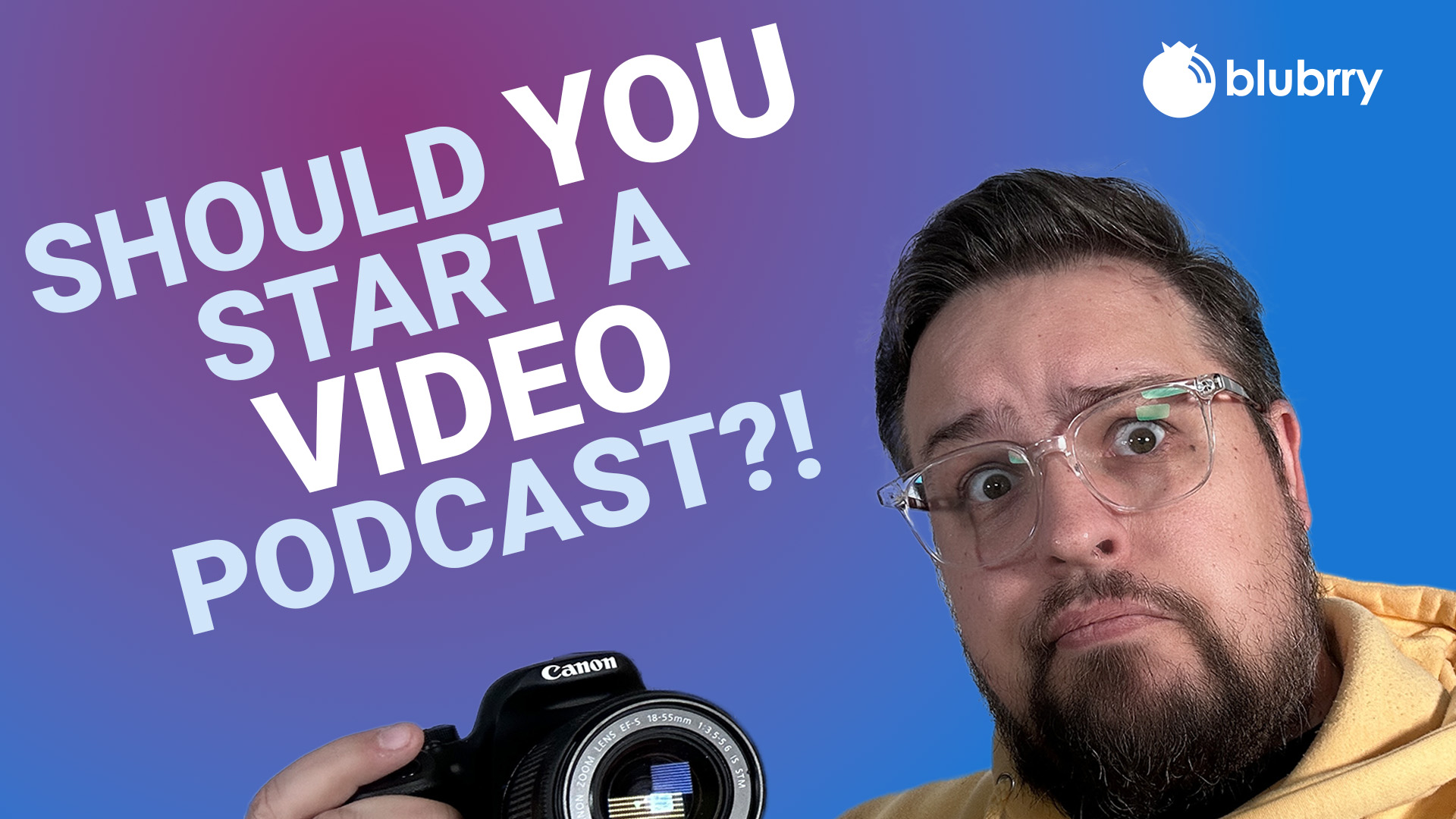
    Our Support Analyst Dave Clements has helped hundreds of podcasters make this decision. In our latest tutorial, he breaks down what’s driving the video podcast boom — and whether it’s the right move for you.

    What’s Behind the Video Podcast Boom

    “Platforms like YouTube and Spotify are betting big on video,” Dave explains. “It’s not just about listening anymore — audiences want to see you.”

    That visibility comes with perks. Video podcasts boost discoverability, since YouTube is the world’s second-largest search engine. They also create new ways to connect: people relate more deeply when they can see your expressions and personality.

    And there’s one more advantage — repurposing. A single video episode can become short clips for Instagram, TikTok, or YouTube Shorts, giving your content more life across platforms.


    But There’s a Catch

    Before you hit record, it’s worth knowing the trade-offs.

    Video podcasts take more time to plan, record, and edit. You’ll need extra storage, lighting, and some comfort on camera. Plus, not all podcast apps support video yet — meaning your show won’t reach every listener through traditional feeds.

    “Video is powerful,” Dave says, “but it can also burn you out faster if you’re not ready for the workload.”

    That’s why in the video, he walks through a smart way to test the waters without overcommitting — a hybrid method that lets you record your usual audio show while capturing video at the same time.


    Start Simple, Stay Smart

    The good news? You don’t need a studio to start.

    A webcam or smartphone paired with a quality microphone goes a long way. As Dave puts it, “Good audio beats good video every time.”

    Lighting helps, but connection matters more. Viewers don’t need perfection — they need authenticity.


    How Blubrry Makes It Easier

    Whether you stay with audio or jump into video, Blubrry’s here to help you publish everywhere your audience listens and watches.

    If you decide to go video-first, Blubrry’s Vid2Pod feature lets you upload your podcast to YouTube — then automatically turns it into an audio episode for all the major listening platforms.

    That means no extra uploads, no missed listeners, and no hassle.


    The Bottom Line

    So, should you start a video podcast in 2025?

    If you want to grow your reach, connect visually, and have the time to do it right — it’s a strong move. But if your focus is consistency and storytelling, audio-only podcasts are still thriving.

    Watch the full video below to hear Dave’s full breakdown — including how to test video podcasting safely and what tools he actually recommends.