
Tag: PowerPress

  • Blubrry Releases New Podcasting 2.0 Integration: Value4Value

    Blubrry Releases New Podcasting 2.0 Integration: Value4Value

    Value4Value is now available for Blubrry podcasters

    If you’re not familiar with Podcast 2.0 features, we’re here to help. Not only will we help you understand the advancements underway in the podcast space, but we’re at the forefront of implementing these changes. We have added a whole host of new features, and today we are introducing the Value4Value feature to provide you with a new revenue stream.

    Our Goal

    Blubrry and other podcast companies are working relentlessly to expand podcasting by expanding the functionality of RSS. We aren’t here to overwhelm you with technical jargon, but we’re here to inform you of the benefits to you and your audience.

    Many of these new features are easy to understand and implement. True, the V4V model is likely the most complicated and could cause you to scratch your head. That’s why we have made it as easily as humanly possible to implement with our partner, Alby.

    Implementation is only the first step; we will continue to educate you on the best practices to make your audiences understand the Value4Value model and how it can change the entire dynamic of your show.

    What is Value4Value?

    This is one of the most exciting new features yet and, as far as we are concerned, the most significant opportunity for podcasters to earn revenue for their show. We have placed this feature in an Experimental tab in both the Blubrry Publisher and PowerPress. Our partner, Alby, makes it easier for you to get started.

    The Value model means that you are able to accept online payments via your show. Value4Value uses the smallest unit of Bitcoin, the (Satoshi),  100 millionth of Bitcoin, as a method to donate to a show. It can be in the form of supporting the show by the minute and episode or a show-level donation known as a boost with an accompanying listener comment – all with an extremely low transaction fee.

    The Value4Value model can also accept donations in traditional currency; a great overview of the Value4Value model can be reviewed at Value4Value.info. We will cover the funding feature in future blog post(s), right now we want you to start with the Value4Value feature.

    Setting Up V4V in PowerPress

    1. Head to the Experimental tab, found in Episodes
    2. Connect to GetAlby
      1. Connecting to GetAlby allows you to automatically populate the Value fields
      2. This also creates a wallet on their platform
    3. You can start promoting the use of Podverse, Fountain and other apps at NewPodcastApps.com that support the new Podcasting 2.0 features that allow listeners to donate to your show.

    Setting Up V4V in Blubrry Publisher

    1. Go to Show Settings
    2. Click the Experimental Tab in Episodes
    3. Connect to GetAlby
      1. Connecting to GetAlby allows you to automatically populate the Value fields.
      2. This also creates a wallet on their platform.
    4. You can then start promoting the use of Podverse, Fountain and others at NewPodcastApps.com that support the new Podcasting 2.0 features that allow listeners to donate to your show.

    Value4Value takes a little bit of time to wrap your head around. Our team, and over 11,000 other shows, are seeing success in shows earning a Boost, which is a donation with an accompanying comment that can be sent from within the supported apps at NewPodcastApps.com. Another cool feature is that listeners can donate Satoshis by the minute as they listen to your show.

    We highly recommend that you take a look at our documentation concerning Podcasting 2.0 and various new tags. We’ve already added some valuable features (tags) for our users and are excited to see where this leads.

    Your next step is to try one of the new podcast apps to get familiar with what your users are going to see when you start recommending the utilization of these features.


  • New, Easy PowerPress 9.0 Onboarding

    New, Easy PowerPress 9.0 Onboarding

    Refinements made to the onboarding process within PowerPress makes starting a podcast easier.

    PowerPress logoHaving a website can be critical for your podcast, especially to ensure audience growth. We’re reminding you of this to also tell you that we’ve updated our onboarding process for PowerPress, our publishing podcast plugin for WordPress. By the end of the process, you’ll be publishing your first episode and on your way to submitting to numerous podcast directories. Talk about efficiency.
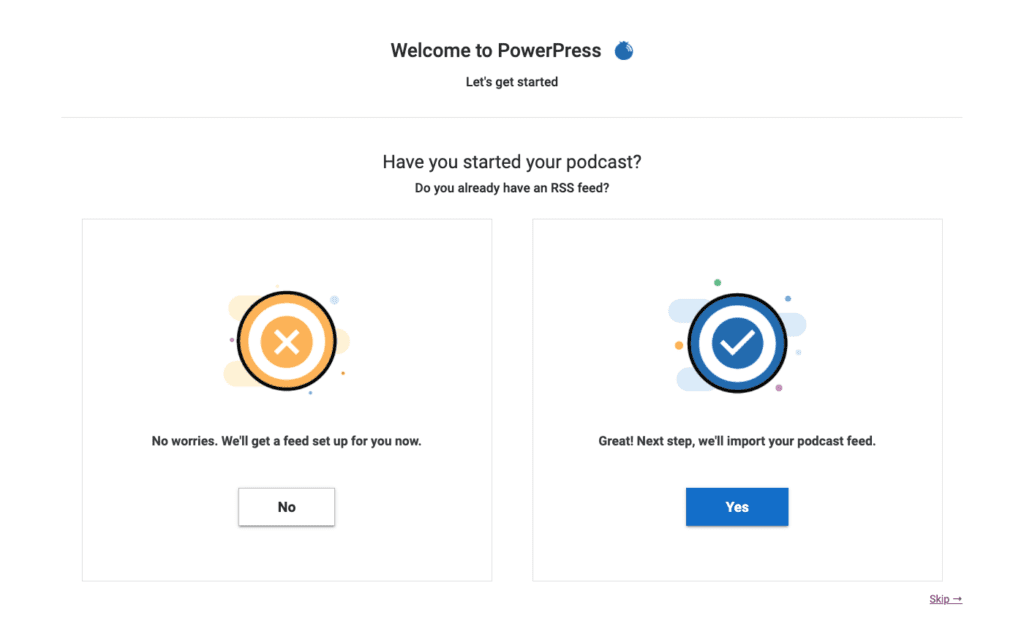
    PowerPress 9.0 onboarding screen

    You can go one of two ways: starting a podcast or moving a podcast. Starting is a quicker process than moving, however, you’ll be able to complete the desired goal either way.

    Starting a Podcast with PowerPress

    You create your podcast within the onboarding process. Add your title, artwork, some finer details, and, lastly, you’ll receive an auto-generated RSS feed from WordPress. Those who are not yet a member of the Blubrry family can sign up for podcast hosting through their WordPress website and use our one-month free trial to try us out. Got hosting taken care of already? That’s ok, just go ahead to the next step. You’ll be all set within a few minutes.

    Anyone with a WordPress site can try podcasting out for free within a few clicks, and all without leaving WordPress.

    Importing and Switching a Podcast to PowerPress

    Using Blubrry’s podcast hosting is not a requirement of PowerPress. Anyone can import their podcast to PowerPress, and those beginning to use Blubrry hosting can move their media episode posts (including show notes). The steps are easy: sign up for hosting, then Blubrry automatically imports your media, and then we import your episode posts (show notes). We move your existing show’s title, RSS feed and artwork, so it’s a complete transfer for the podcast.

    The import and migration time length depends on how many past episodes you have, as well as their file size. Luckily, you’re able to get it started and then come back later to check on the progress. We always recommend you reach out to our support team and review the full steps when leaving other hosts.

    We recommend you have the following ready:

    • Title: Well researched and something you won’t feel the need to reassess in the near future
    • Artwork: Eye-catching and properly sized (3000×3000 or 1400×1400), 72 dpi in JPEG or PNG
    • Log-ins: Your Blubrry login information to link the account

    We’ve tweaked the onboarding process for all new users in the onboarding process for PowerPress, with an emphasis on reaching the end goal of being able to easily publish an episode at the end of the process.

    Since day one we’ve developed our tools to help you own your brand and control your show, nowadays with a bigger emphasis on the growth of your show. By the end of the PowerPress onboarding process, you’ll be set to easily manage your podcast within your own website; and focus on tools that will help you market your show.

    Learn more about PowerPress here. Give it a shot yourself and get your podcast started today.

  • Podcast Index Tags Implemented in Blubrry’s PowerPress

    New RSS feed tags have been added for podcasters

    Orange and white rss feedToday, Blubrry released an update of our WordPress plugin, PowerPress 8.5, now featuring five new RSS feed tags initiated by the Podcast Index team. These new tags put more power in the podcaster’s hand, such as creator protections, personalization and accessibility.

    The following tags were added:

    • Lock – make sure no one can import your show to a different directory, host, etc., aka piracy
    • Transcript – easily add your episode transcripts, good for SEO and accessibility (and can be added publishing)
    • Funding – this tag will work with any donation URL also in your feed
    • Location – add your location, similar to Instagram posts and Tweets
    • Chapters – help your listeners jump to a specific portion of your episode

    These tags are easy to find and use within PowerPress, and you can pick and choose which ones to use or try out. Any PowerPress user can take advantage of these tags; you do not need to be using Blubrry podcast hosting. You’ll find Lock under Feed and Feed Settings; Funding and Location in Feeds and Basic Show Information; and Chapters and Transcripts in the Advanced tab in the episode publishing section.

    “We knew from the start that we wanted to implement these tags; we’re interested in any improvement on RSS feeds,” said Todd Cochrane, CEO of Blubrry. “These tags from Podcast Index undoubtedly help podcasters protect and build their shows.”

    The Podcast Index team’s main focus is to ensure that podcasting remains an open platform of free speech for any and all creators. The tags are one of the first ways they are pushing the industry forward for inclusivity and accessibility.

    This isn’t our only PowerPress update, we’ll be releasing a new update shortly that we know you’ll like as well. Look for it this month and, as always, keep in touch and let us know what you think!

  • Blubrry’s PowerPress Plugin Update Includes Improved User Experience

    Blubrry’s PowerPress Plugin Update Includes Improved User Experience

    The Blubrry team has diligently been working on PowerPress updates the past six months, and we’re now finally able to release our most comprehensive user experience update yet. Podcasters can go ahead and download PowerPress 8.3 now.

    We want to be clear, PowerPress has always been powerful, but now it’s easier to navigate and use. There are countless things that the plugin does, and as we were adding all of these capabilities, UI/UX unintentionally took a backseat, this year we’ve been rectifying that issue.

    Biggest Differences You’ll See

    • Welcome tab – consistent view of your progress and relevant Blubrry info
    • Destinations tab – Directories and apps are much more obvious now
    • Fresh, new look! Follows our updates to the website too
    • Sidebar, well this didn’t exist before, and now we provide a left-hand sidebar for individual tab organization


    Podcasting should be easy and we knew we had to ensure our tools weren’t a hindrance to publishing, getting started or helping new podcasters follow through. With this update we know podcasters will be able to locate features faster and there’ll be less head scratching trying to get things set up at the start.

    Currently the plugin has more than 60,000 active users, is available in four languages and free to WordPress.org users. To download the plugin and learn more about it, head here. The plugin is free to all podcasters and Blubrry hosting is not required for use.

    Fan of PowerPress? Leave us a review here 🙂

  • Podcasting Services Updates, Advice and Experiences

    Podcasting Services Updates, Advice and Experiences

    Blubrry recently updated PowerPress, Ryan Wheaton of the Branding Brews podcast shares his podcasting experience, and Aaron Mahnke of Lore gives podcasting advice. MacKenzie and Ryan discuss the changes that came in the PowerPress 7.1 update – including the Apple RSS feed tags – and you’re able to download the latest version now. Ryan tells about why he started his show and who he thinks will benefit from listening. If you’ve ever thought about diving into a podcasting network, Lore host Aaron Mahnke, has some advise for you.


    Thanks for listening and please subscribe!

    Fan of PowerPress? Leave us a review, here!

    Show notes:

    PowerPress Update
    Branding Brews
    How Aaron Mahnke Makes A Living Podcasting (And How You Can Too)
    Printful – After the recording, Ryan thought of a useful company for merchandise. You can connect it with a number of website platforms. Customers order a product on your site, it gets sent to Printful, they print and ship it to your customer. You don’t even have to pre-order products so no inventory or big up-front costs!

  • PowerPress 7.1 With all the iOS 11 features – Your Podcast 009

    PowerPress 7.1 With all the iOS 11 features – Your Podcast 009

    More evidence that Soundcloud is in trouble, how to submit your podcast to Spotify, Veronica Belmont is podcasting again, and PowerPress 7.1 with all the new iOS 11 features. All of that with Mike and Todd, covering a few tech topics as well. Thanks for listening to the show and please subscribe at PowerPressPodcast.com.

    Happy National Blueberry Day! (July 8th)!
    Eat some Blueberries and/or order professional statistics or media hosting from we-moved-the-blog-to-this-site-when-we-made-a-new-website.blubrry.com/ (promo code Blubrry005 for a free month).

    News:

    Topics:

    Tech:

    • File names – Best practices to make sure you are naming your media files correctly. KEEP IT SIMPLE!
      File names should only contain numbers, letters, dashes or underscores. No spaces, symbols, periods (other than the .mp3) or commas. This will insure that your files are compatible with all podcast apps and directories (including Apple Podcasts, Google Play Music and Stitcher).
    • PLEASE Contact us first instead of going on social media. We monitor email 7 days a week, have a phone number for support during business hours (9-5 US Eastern Time) and we are the best place to go for help with your show using Blubrry tools. Just call 1-877-729-8642 ext. 1 for support. Leave a voicemail if it’s after hours and we will get back to you. Or email support@blubrry.com.

    To ask questions or to comment on the show, contact Todd and Mike here: yourpodcast@blubrry.com

  • Proclaim16, Apple changes and the New PowerPress

    PPPiTunesAlbumArt-385

    In this episode Mike Dell, Lead Support Tech for Blubrry & RawVoice fills in for MacKenzie who is on assignment. Actually, she’s in Nashville at the Proclaim16 conference along with our CIO Angelo Mandato who reports LIVE from Nashville.


    Proclaim16

    News:
    Blubrry Community Newsletter is out on the street, so to speak.

    Political Podcasts – There is now a plethora of political podcasts for “political junkies” to enjoy. Jen Thorpe over at PodcasterNews has a list of some of the best political podcasts out there.

    Proclaim 2016 – Nashville, TN

    Angelo and MacKenzie reporting “live” from Nashville.

    PowerPress Update:

    The current version of PowerPress is 6.3.2.

    It includes some updates for required iTunes items such as Explicit tags and quite a few others. Here is the change log:

      • Added import podcast from Squarespace option (thanks Steve for bringing to our attention that importing from Squarespace requires added logic)
      • The itunes:summary tag values can now use CDATA encapsulation. Note updated that may not contain HTML, except for hyperlinks. (Thanks Apple iTunes team!)
      • Added checkbox to enable wrapping iTunes summary values with
      • Added new define option POWERPRESS_FEED_TEMPLATE. (Thanks Ron for the suggestion!)
      • Added new define option POWERPRESS_PREMIUM_GROUPS_PLUGIN, for premium podcasting with Groups plugin commonly paired with WooCommerce.
      • Removed iTunes explicit ‘no’ value from tag. (iTunes change – February, 2016)
      • Updated iTunes recommended image size to 3000 x 3000 saved in a compressed format such as JPG. (iTunes change – February, 2016)
    • Fixed notice message from appearing when using the playlist player (Thanks chefjoef for bringing to our attention).
    • Added width and height attributes to img tag for the HTML5 audio player image. (Thanks Eduard for the patch and information about the Accelerated Mobile Pages Project!)
    • Fixed tab control styling when other themes or plugins use newer versions of jquery-ui.
    • Added dismissable notification message to alert PowerPress users of the latest iTunes changes.
    Apple Podcasts Connect: Apple changed the way you submit a feed to them to a website based system. We have updated the Podcast Manual with the new information: http://create.blubrry.com/manual/podcast-promotion/submit-podcast-to-itunes/ Blubrry Tip of the Week: (A feature I do at Podcast Help Desk) Populate your RSS feed setting at we-moved-the-blog-to-this-site-when-we-made-a-new-website.blubrry.com/ if you are not using the we-moved-the-blog-to-this-site-when-we-made-a-new-website.blubrry.com/ feed for your podcast. This gives your listing in the Blubrry directory a way to stay up to date. It also makes it easier for us tech support types to help you troubleshoot any problems you might have. If you are using we-moved-the-blog-to-this-site-when-we-made-a-new-website.blubrry.com/ for your podcast website, this is not needed and can cause your listing to have duplicates. ———- Thanks for listening to the PowerPress podcast, Information and Ideas to Power your Podcast, from the Team at Blubrry. Don’t forget, if you love PowerPress, please rate and review PowerPress here!
  • PowerPress Wonder Why?

    PowerPress did not just happen, it came to be because of  a vision to give Podcasters better tools so they can focus on creating content letting PowerPress and our tools do the heavy lifting. Support the team that is supporting you! I show you the power of how we continue to power your podcast with hosting and podcast publishing as easy as 1,2,3.

    Become a Customer Today and Support the PowerPress Team

  • PowerPress Version 3.0

    PowerPress 3.0 is out, ladies and gents, and it’s already slammin’ the competition. Oh, wait, there is no competition. As always, Blubrry PowerPress brings the essential features for media creation to WordPress. PowerPress offers HTML5 audio/video player with flash fallback and multi-channel/multi-category podcasting support.

    It also offers:

    *Meta Marks a new feature that’s so fantastic that your going to want to learn more!
    *Customizable HTML5 audio/video-play icons.
    *Auto Media Length Detection added for .m4a/.mrv/.mp4
    *Podcast channels tied to custom post types.
    *Six languages includes Chinese, Danish, English, French, Italian and Romanian.
    *Optimized for WordPress 3.3+ (WordPress 3.0 is now the minimum required).

    So, whatcha waiting for? Go to we-moved-the-blog-to-this-site-when-we-made-a-new-website.blubrry.com/powerpress and get even more of what you want, need and expect from exceptional offerings at Blubrry.

  • PowerPress 1.0.4 Released: Added ‘Find Replace’ Media Tool and Plugin Podcasting Support

    Take a look at this! Blubrry PowerPress 1.0.4 is now available. This latest version is packed with new and useful features and is completely compatible with the latest release of WordPress 2.9.

    Support for Plugin ‘Podcasting’

    After the announcement that plugin “Podcasting” was coming to a close, we reached out to Spiral Web Consulting to see how we could help. They helped us help users ease the transition to PowerPress from plugin Podcasting.  Through their consultation we now include support for episodes created in Podcasting. If you are a Podcasting plugin user considering switching to PowerPress, check out our note near the bottom of this post for additional details.

    Find and Replace for Episode URLs

    Blubrry PowerPress now includes a tool found under the PowerPress menu “Tools” page titled “Find and Replace Episode URLs.” This lets you quickly find and replace portions of your episode media URLs.

    Because the feature verifies each URL and will stop the conversion if the new address URL is invalid, we recommend you back up your database before using this tool. The feature is perfect for users moving their media hosting to a new website or service such as Blubrry’s Podcast hosting.

    WordPress 2.6 Support

    We only maintain support for the latest three major releases of WordPress, ensuring that our plugin remains innovative and up-to-date. Because of this, support for WordPress 2.6 will be dropped in the next release of PowerPress. If you are using PowerPress with WordPress 2.6, be sure to upgrade WordPress to support future releases of PowerPress.

    Note to Plugin ‘Podcasting’ users

    PowerPress and Podcasting have been for the most part interchangeable. Episodes created by both plugins are stored the same way. The only difference between the two plugins was how the iTunes duration (time in seconds) was stored. PowerPress 1.0.4 now includes this value from plugin Podcasting as well.

    PowerPress 1.0.4 now includes an import plugin Podcasting settings option found under the Tools page. This option will import the key settings from plugin Podcasting to PowerPress.

    For Podcasting users who are using the custom formats feature, PowerPress has a similar feature called “Podcast Channels” that will allow you to add multiple media files to one blog post.

    The feeds for Podcast Channels in PowerPress are formatted differently than those found in plugin Podcasting. When you do make the conversion, you might need to notify your subscribers of the feed changes. If you need assistance re-mapping your old custom format feed to a PowerPress Channel Feed, feel free to contact us so we can assist you. Include the current feed URL and a link to your blog in your contact submission.

    So there ya have it! Lots of new information and we know you’ll benefit from all our latest innovations!