Tag: Podcast Publishing

  • Choosing the Right Blubrry Hosting Plan Based on How You Publish

    Choosing the Right Blubrry Hosting Plan Based on How You Publish

    One of the first questions new podcasters ask is, “What microphone should I buy?”

    Right alongside it is another question that can be just as confusing:

    “Which podcast hosting plan is right for me?”

    There are plenty of things to figure out when you’re getting a podcast off the ground—what to record with, how often to publish, how long your episodes will be, and where to host them.

    Choosing a hosting plan shouldn’t add another layer of confusion.

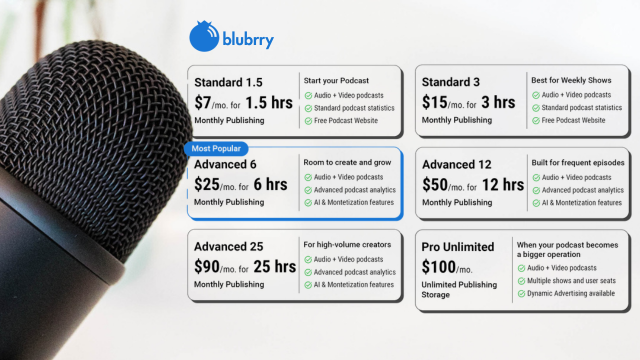
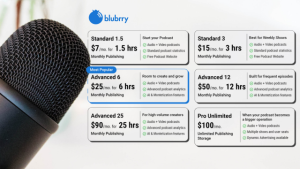
    That’s why Blubrry made its hosting plans simpler. Instead of trying to understand complicated storage limits or estimate how much space your files will take up, you can choose a plan based on how much content you actually publish each month.

    If you know how often you plan to publish and roughly how long your episodes will be, you already have a much easier way to find the right fit.

    Whether you’re creating an audio-only show, a video podcast, or a little of both, you can choose a plan that matches your publishing schedule today and upgrade whenever your podcast grows.

    Here’s how to figure out which plan is right for you.

    Start With Your Publishing Schedule

    The easiest way to choose a hosting plan is to answer two simple questions:

    • How long is each episode?
    • How many episodes do you publish each month?

    Multiply those together and you’ll have a good estimate of your monthly publishing time.

    For example:

    • Four 30-minute episodes = 2 hours per month
    • Two 60-minute episodes = 2 hours per month
    • One 90-minute episode = 1.5 hours per month
    • Eight 45-minute episodes = 6 hours per month

    You don’t need to calculate file sizes or worry about compression.

    Simply estimate your monthly publishing time.

    If You’re Just Starting a Podcast

    Many new podcasters publish one or two episodes each month while they find their rhythm.

    If that’s you, one of our entry-level plans will likely be the perfect fit.

    These plans are designed for creators launching:

    • Personal podcasts
    • Hobby shows
    • Business podcasts
    • Passion projects
    • Interview series

    You get everything you need to start publishing without paying for more publishing time than you’ll actually use.

    Weekly Podcasters
    Weekly publishing is one of the most common schedules in podcasting.

    If you’re releasing a new episode every week, estimate your average episode length and multiply it by four.

    Examples:

    • Weekly 30-minute show → about 2 hours per month
    • Weekly 45-minute show → about 3 hours per month
    • Weekly 60-minute show → about 4 hours per month

    Choosing a plan that gives you a little extra room can be helpful if you occasionally publish longer episodes.

    Video Podcasts Count Too

    More creators are adding video to their podcasts, and Blubrry makes it easy to host both audio and video under the same publishing-time model.

    That means you don’t need separate hosting for different formats.

    Whether you publish:

    • Audio only
    • Video only
    • Both audio and video

    your monthly publishing time works the same way.

    If you’re already creating videos for YouTube, you can also use Vid2Pod to turn those videos into podcast episodes for distribution across podcast apps.

    Don’t Forget Bonus Episodes

    Many podcasters publish more than their regular schedule.

    You might release:

    • Bonus episodes
    • Holiday specials
    • Live recordings
    • Listener Q&A episodes
    • Seasonal content

    If these are part of your publishing strategy, include them when estimating your monthly publishing time.

    Choosing a slightly larger plan now can help you avoid running out of publishing time during busy months.

    Running Multiple Shows?

    If you host more than one podcast, don’t estimate each show separately.

    Instead, calculate the total publishing time across all your shows.

    For example:

    Podcast A:

    • Weekly 30 minutes = 2 hours/month

    Podcast B:

    • Weekly 60 minutes = 4 hours/month

    Total publishing time:

    6 hours per month

    As your network grows, you may find that Professional Hosting becomes the better fit.

    When Professional Hosting Makes Sense

    Professional Hosting isn’t simply for podcasts with long episodes.

    It’s designed for creators who need more advanced tools.

    Consider Pro Hosting if you:

    • Manage multiple podcasts
    • Run a podcast network
    • Need unlimited storage
    • Publish high volumes of audio or video
    • Want Dynamic Ad Insertion
    • Need multiple users managing content
    • Want enterprise-level podcast management

    As your podcast grows, your hosting should grow with it.

    Why Publishing Time Makes More Sense

    Podcast file sizes vary more than most people realize.

    Two one-hour episodes may have completely different file sizes depending on:

    • Audio quality
    • Video resolution
    • Editing settings
    • Compression
    • Export format

    That’s why estimating storage has always been confusing.

    Publishing time is much easier to understand.

    You already know how long your episodes are.

    Now your hosting plan reflects that.

    You Can Always Grow

    One of the best things about choosing a hosting plan based on publishing time is that you’re not locked into your first decision.

    As your podcast evolves, you can upgrade to a larger plan whenever your publishing schedule changes.

    Maybe you start with one monthly show.

    A few months later, you launch a second podcast.

    Then you begin publishing video.

    That’s growth—and your hosting plan should be able to grow with you.


    Find the Plan That Fits Your Podcast
    Every podcast is different.

    Some creators publish one episode a month, while others release several episodes every week across multiple shows. And podcasts come in all kinds of genres, from business and news to sports, entertainment, education, religion, and everything in between.

    The right hosting plan isn’t necessarily the biggest one—it’s the one that matches the way you publish today while giving you room to grow tomorrow.

    With Blubrry’s new time-based hosting plans, choosing the right plan is as simple as knowing how much content you publish each month.

    Explore Blubrry’s hosting plans today and find the option that’s built for your podcast.
  • February 2024 Statistics Report

    February 2024 Statistics Report

    January was another stellar month for the podcast industry! The numbers jumped substantially from last month’s report (the December statistics) and that’s to be expected as podcasters take time off for the winter holidays.

    563,481 New Episodes
    in the Blubrry Directory

    TOTAL EPISODES
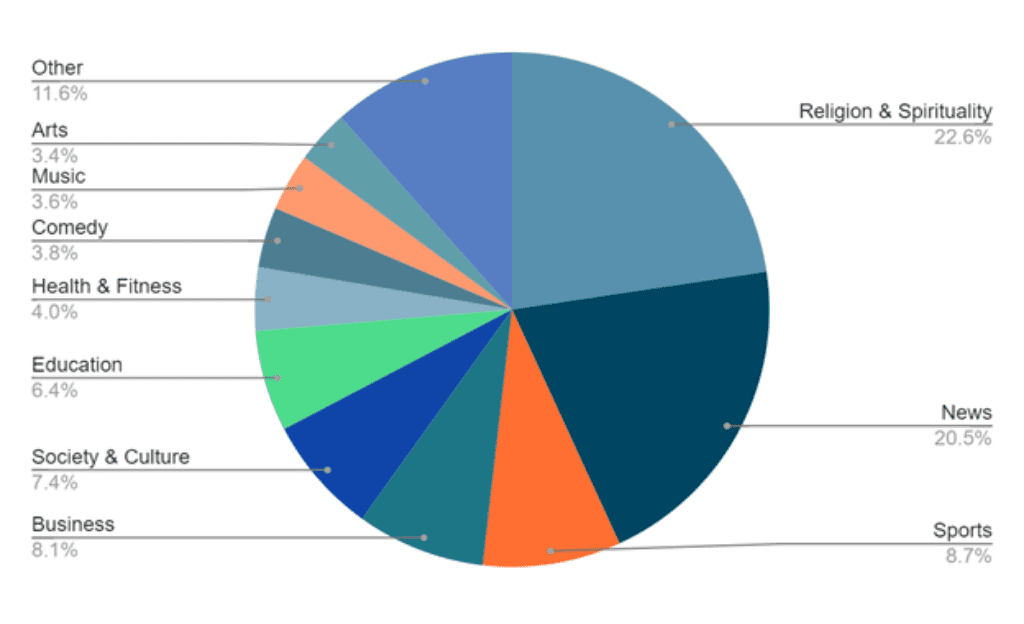
    Top 10 Published by Category

    Feb report total episodes

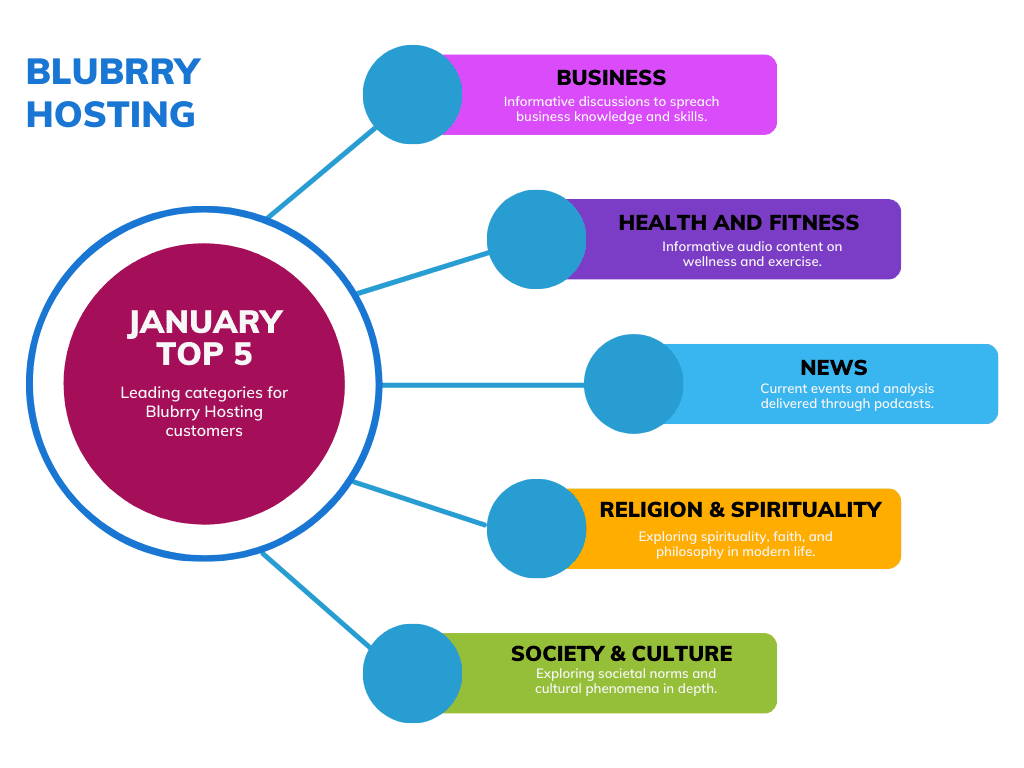
    BLUBRRY HOSTING
    Top 5 by Category

    Blubrry Top 5 categories

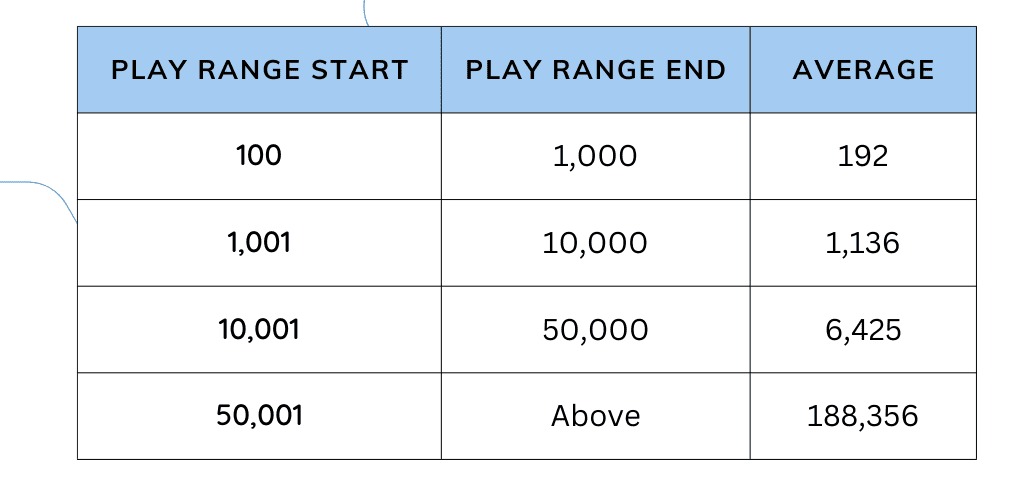
    AVERAGE EPISODE LISTENS
    By Show Size

    Average Episode Listens by Show Size

    Our ranges were determined when a show met the threshold one time, aka 10,001 listens/downloads, etc., during the reporting period. When a show met the threshold we included all episodes for the past 30 days that had been published a minimum of 10 days.

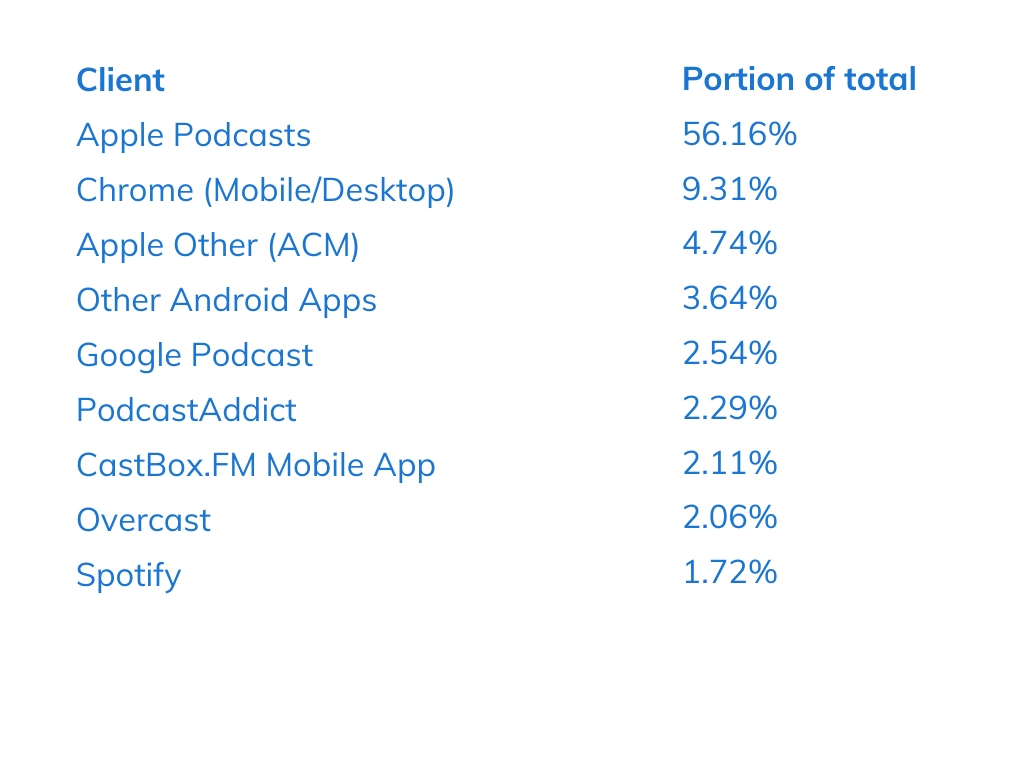
    TOP CLIENTS
    How Podcasts Were Consumed in January 2024 by Platform

    Top clients  February 2024 report

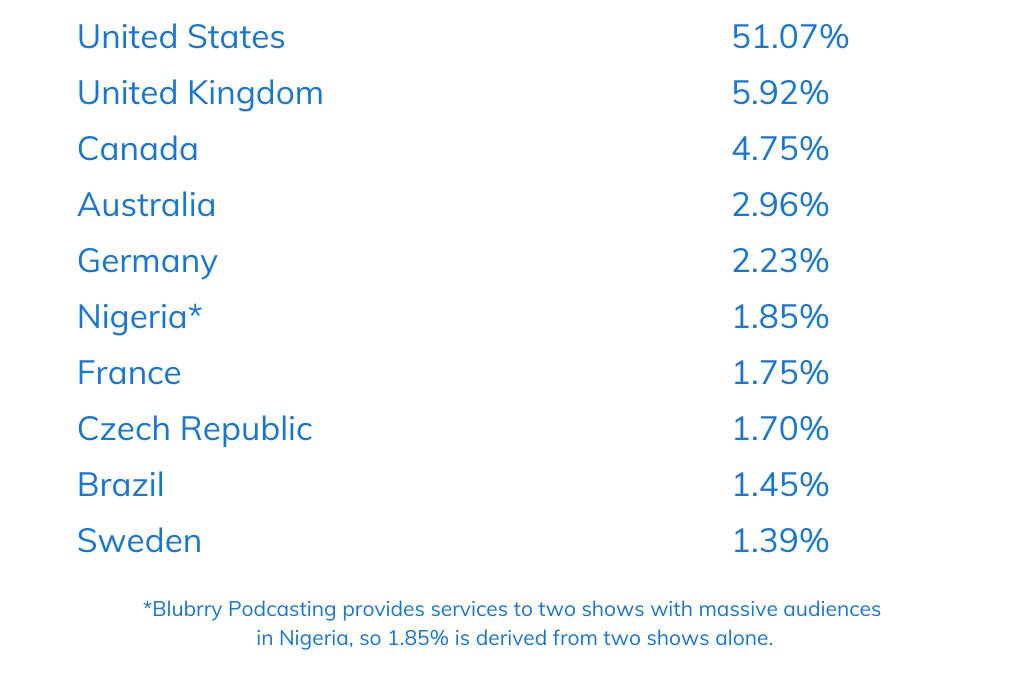
    BLUBRRY TOP 10 COUNTRIES

    Blubrry Top 10 Countries January

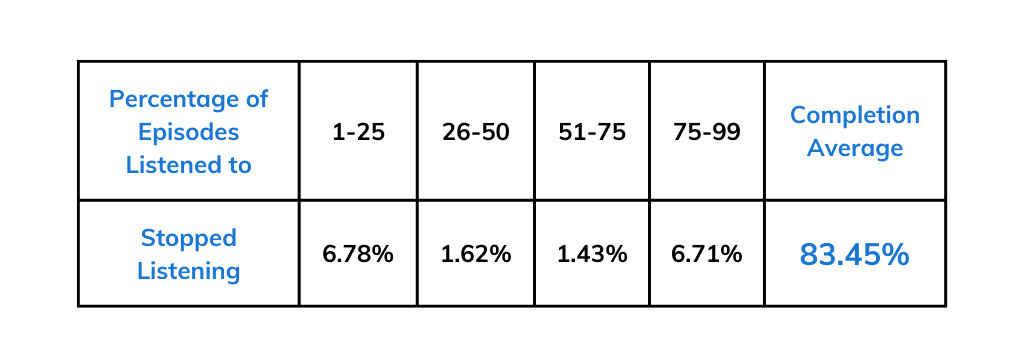
    BLUBRRY GLOBAL LISTENER RETENTION

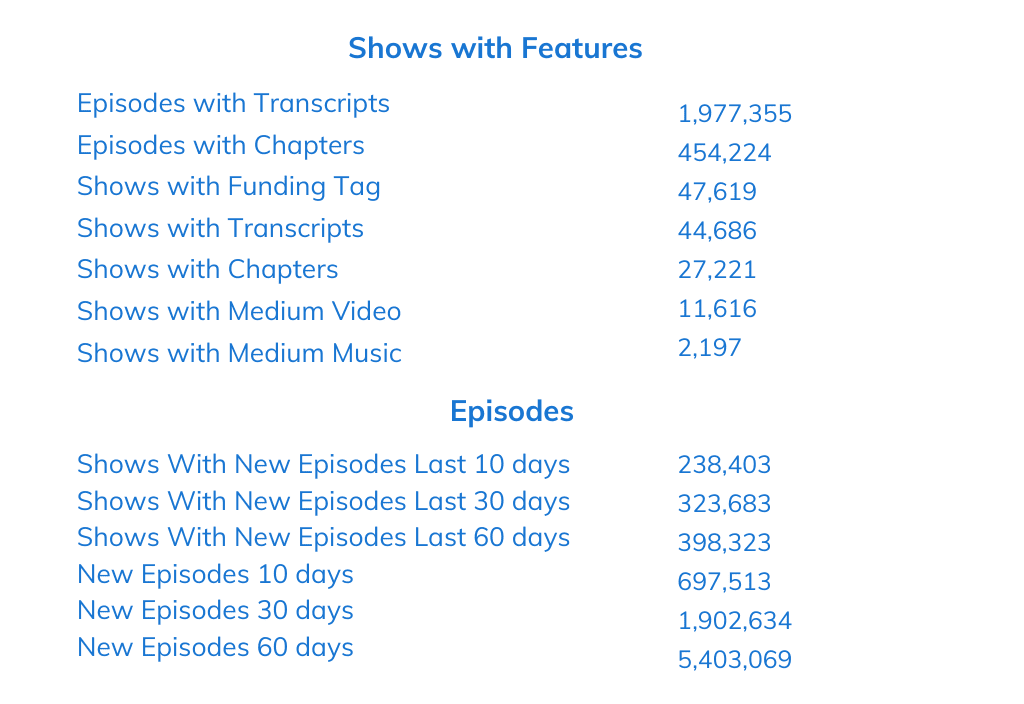
    GLOBAL PODCAST INDEX STATS
    Total Number of Podcasts: 4,094,443

    Blubrry Podcasting provides world-class Podcast Statistics to tens of thousands of shows via redirect/prepend for those hosting on other platforms, or direct stats for our podcast-hosting customers. We have data that no other stats provider provides. Sign up for Podcast Statistics today.

  • Blubrry Podcasters Can Publish Premium Episodes to Apple Podcasts

    Blubrry Podcasters Can Publish Premium Episodes to Apple Podcasts

    Blubrry and Apple Podcasts Subscriptions offer monetization opportunities for podcasters, enabling them to generate revenue from their content and listener base. It’s a profitable monetizing option — and signing up is easier than you think!

    What are Apple Podcast Subscriptions?

    Apple Podcasts Subscriptions offer creators a seamless way to provide premium audio experiences to listeners on Apple Podcasts.

    Creators Can Easily…

    • Set up a freemium or paid subscription for their show or channel
    • Define the premium benefits, such as exclusive content, early access, and ad-free listening
    • Configure monthly and annual pricing and free trials
    • Offer the subscription to listeners across devices in over 170 countries and regions

    Podcast Subscription Ideas

    • Paid subscribers get new episodes pre-selected days before free users.
      • Best Choice for Podcasters starting Premium offering
    • Paid subscribers get Ad-Free episodes.
    • Bonus Episodes for paid subscribers.

    Why You Should Use Apple Podcast Subscriptions for Subscribers

    There are a few reasons offering subscriptions for your podcast can work in your favor. Offering paid subscriptions is a great way to earn revenue for your podcast, made even easier by simple publishing within Blubrry. And, of course, people love to be part of a club. Subscriptions allow for a more intimate or close relationship with your audience, something all podcasters strive to achieve.

    How to Get Started

    First, you must have an Apple Podcasts Connect account and join the Apple Podcasters Program. Once you’ve done that, get started on the steps below.

    1. Choosing your subscription benefits is one of the most important parts! Here you’ll decide if you want to offer exclusive content earlier, only to subscribers, for a fee, etc. You’ll do this in the Apple Podcasts Connect account. For additional details, follow these links for one show or multiple shows.
    2. Publish a public episode of your show, usually an introduction or a trailer. From there, you can promote your subscription benefits.
    3. Create your subscription content, aka your premium episode.
    4. Publish your premium episodes, all within Blubrry’s publishing platform in the dashboard!

    Check out our support documentation.

    Available exclusively to Blubrry’s Advanced hosting customers. Resources such as documentation can be found here, and customers can reach out to our support team seven days a week for assistance.

  • Blubrry Partners with Descript to Provide Easy Editing and Transcripts

    Blubrry Partners with Descript to Provide Easy Editing and Transcripts

    DescriptBlubrry Podcasting has partnered with Descript, an all-in-one audio/video editing service, to allow customers to publish their edited podcasts directly to Blubrry’s publishing platform. Automated transcriptions provided by Descript are also delivered as part of the media payload.

    The Descript app is an audio and video editing tool that makes editing your podcast as easy as editing a document. Audio and video files are automatically transcribed, and any edits made to the transcript are automatically carried over to the underlying audio and video. Remove filler words and awkward silences with a click; cut, copy, and paste your content as you would a document; and apply Studio Sound to improve the quality of your audio, no matter the recording conditions. Once you’re finished, publish your completed episode and transcript to Blubrry in one click.

    What to Expect from Descript

    Here’s how to edit your podcast and transcript using Descript; then export your finished project to Blubrry. 

    1. Record and edit in Descript
    2. Export your project to Blubrry
    3. Your transcript file will be exported with your audio 
    4. Publish your podcast episode

    Where to Find Descript

    Blubrry users who already have a Descript subscription can access the Blubrry integration by clicking Share -> Export -> More -> Blubrry/

    For new subscribers, click here to get 30 days of Descript Pro. This offer is only available to new subscribers. Your free trial can start within “Growth and Resources” linked from the podcaster dashboard.

    To learn more about Descript, please visit our partner page or contact support.

  • Pro-Production Brings Out the Best In Your Podcast

    Pro-Production Brings Out the Best In Your Podcast

    Meet team-member Toby, who loves podcasting and playing the drums
    Odds are you did not create your podcast because you wanted something to upload.

    Chances are that your podcasting dreams are not built upon your show-note writing ability.

    However, those tasks (along with a thousand others) are required for successful podcast production. You may think that it is best to just perform all of those necessary tasks yourself, but you also can choose to hire someone to take care of the technology. Doing so will allow you to focus on your content creation, the heart of your podcast dream.

    It’s understandable to be hesitant to hand over your proverbial ‘baby’ to a stranger for professional podcast services. To calm your fears about hiring a professional podcast producer, the following is a brief introduction to Toby Goodman, a producer with Blubrry’s Pro-Production Solutions.

    • Toby lives in Greater London, England. 
    • His family is his motivation. 
    • Outside of his family, his two major passions are playing drums and podcasting. He has been talented and fortunate enough to play percussion professionally in more than 25 countries. 
    • His initial interest in podcasting grew out of the audio production skills he developed while playing music. 
    • His deep belief in the power of podcasting grew as more and more people he helped grew their podcasts into life-changing endeavors. 
    • When asked to describe what he does, Toby said, “I help people create and harness the full power of podcasts.”

    Of course, Blubrry’s Professional Podcast Production team is not just Toby. Our team is made up of radio industry veterans and podcasting experts. We have audio engineers, tech staff, and writers completely obsessed with what they do (that’s a trait of everyone that works for Blubrry – from the top, down). If you want someone who will be consumed by making your project its best, look no further. 

    With this formal introduction to Toby and the team out of the way, hopefully, you will be more comfortable with a podcast professional working on the technical parts of your show. Doing so will allow you more time to chase your podcasting dream!

    Feel free to explore Blubrry’s Professional Podcast Production services or reach out to one of our team at prohelp@blubrrypro.com.

  • Blubrry’s PowerPress Plugin Update Includes Improved User Experience

    Blubrry’s PowerPress Plugin Update Includes Improved User Experience

    The Blubrry team has diligently been working on PowerPress updates the past six months, and we’re now finally able to release our most comprehensive user experience update yet. Podcasters can go ahead and download PowerPress 8.3 now.

    We want to be clear, PowerPress has always been powerful, but now it’s easier to navigate and use. There are countless things that the plugin does, and as we were adding all of these capabilities, UI/UX unintentionally took a backseat, this year we’ve been rectifying that issue.

    Biggest Differences You’ll See

    • Welcome tab – consistent view of your progress and relevant Blubrry info
    • Destinations tab – Directories and apps are much more obvious now
    • Fresh, new look! Follows our updates to the website too
    • Sidebar, well this didn’t exist before, and now we provide a left-hand sidebar for individual tab organization


    Podcasting should be easy and we knew we had to ensure our tools weren’t a hindrance to publishing, getting started or helping new podcasters follow through. With this update we know podcasters will be able to locate features faster and there’ll be less head scratching trying to get things set up at the start.

    Currently the plugin has more than 60,000 active users, is available in four languages and free to WordPress.org users. To download the plugin and learn more about it, head here. The plugin is free to all podcasters and Blubrry hosting is not required for use.

    Fan of PowerPress? Leave us a review here 🙂

  • Top Ten Things To Do After Releasing Your First Podcast Episode

    Top Ten Things To Do After Releasing Your First Podcast Episode

    There are times in our lives when offering short, clear directions have the best results. For example, “Don’t Walk”, “No Swimming”, and “Dry Clean Only”, saves lives and laundry. Starting a new podcast also might be one of these times.

    So, below are 10 clear directions that all new podcasters should hear after releasing their first episode.

    1. Tell all your friends about your show.
    2. Work on your website.
    3. Learn podcasting best practices.
    4. Listen to your own show.
    5. Plan for your next episode.
    6. Appear on other podcasts.
    7. Use social media.
    8. Engage with your listeners.
    9. Invest your time and your money in your podcast.
    10. Do not spend all your time watching your download stats.

    Are 10 things too much for you to remember? When you read something memorable you also notice compelling themes buried inside the great literature. Inside the list above you will find three themes that should inspire your behaviors after you have released your first podcast episode.

    Theme #3: Focus on the right things. Do what you can to make your next episode better. Invest your time and money toward making your next show the best so far. Learn more about your topic or about the craft of podcasting. Don’t obsess over individual show stats, spend that time assessing the strengths of your previous episodes and planning for your future.

    Theme #2: Your podcast is more than just your audio show. Use everything at your fingertips to make people aware of your new podcast and increase their engagement with you. Have a social media outlet so you can talk to your listeners and they can talk to each other. Have a website where listeners can learn more about you and the podcast. And whatever platform you create beyond your audio podcast, make sure to update it consistently so people will keep coming back.

    Theme #1: Promote yourself. Ask your in-person friends and online acquaintances to listen to your podcast. Ask them to share your show with their friends. Be bold and appear on other podcasts that you listen to or are similar to yours. Have a booth or table at meetings and conferences to discuss your topic and meet potential listeners face to face. The old adage is that you are your harshest critic, but you can also be your strongest champion.

    Are three themes too much for you to remember? Think back to your first job. Often where you worked had a motto or mission statement intended to inspire you to do great things. Here is a single motto that will help you grow beyond your first episode. It is simple. Produce content that you can be proud of and be proud of what you are doing. If that is your motivation, you can do no wrong. Go forth and do great things.

    Do you feel inspired? What has this advice inspired you to do? Join the ‘Blubrry Podcasting Group’ on Facebook and share your recent actions with like-minded, inspired podcasters such as yourself. You may inspire others.

  • PowerPress Podcast Plugin for WordPress Receives Major Update!

    RawVoice has introduced a revolutionary update to PowerPress, the Podcast Plugin for WordPress. The PowerPress Plugin now integrates with our Podcast Hosting Services.

    The 1st new feature added is a podcast statistics summary to your WordPress dashboard that gives you a quick look at your podcast statistics.

    The 2nd new feature allows our hosting customers to have their ID3 Tags written to their media file automatically during the publishing of their media.

    The 3rd new feature allows podcasters to Category Cast – podcasters can now setup categories as independent podcast feeds.

    The 4th and final update which is the most important is our new 3 Step Podcast Publishing Process.

    The simple three-step publishing process could not be more easy.

    Once you hit publish we can  then write the ID3 Tags to the media file that has been uploaded to our hosting cloud. Our focus here has always been about saving you time so that you can focus on creating media.

    We hope that you enjoy this update and look forward to your feedback. We really feel that with all of our services we are really closing the loop and providing podcasters with some very comprehensive tools that they can use to build their own media empires.

    Note: Users can use PowerPress without utilizing any of our services. The Plugin remains the most comprehensive podcast plugin in the space for WordPress users.

    The PowerPress Podcast Plugin is free and available at www.blubrry.com/powerpress.