Tag: podcast hosting

  • Your Video Content Deserves a Bigger Audience

    Your Video Content Deserves a Bigger Audience

    You already put the work into creating great video content. Maybe it’s a YouTube series. Maybe it’s a webinar your team spent weeks preparing. Maybe it’s an online class, an interview, a livestream, or a recorded presentation.

    But what happens after the video is published?

    For many creators and organizations, the answer is simple: it lives on one platform and waits for people to find it.

    It doesn’t have to.

    With Blubrry’s Vid2Pod, you can take video content you’re already creating and turn it into an audio podcast, giving your content another way to reach people through podcast apps.

    You May Already Have a Podcast Hiding in Your Video Library

    Creating a podcast doesn’t always mean starting from scratch.

    If you already produce video, you may have hours of content that can work as podcast episodes.

    Think about the content you already have:

    • YouTube videos — Turn a video series into an audio podcast for people who prefer to listen.
    • Webinars — Give attendees and people who missed the live event another way to consume the content.
    • Online classes — Make lessons available as podcast episodes for learning on the go.
    • Interviews — Let audiences listen to conversations without needing to sit down and watch.
    • Livestreams — Extend the life of a live recording by making it available as a podcast.
    • Recorded presentations — Turn educational or business presentations into content people can access anywhere.

    The idea isn’t to create more content.

    It’s to get more from the content you’ve already created.

    How Vid2Pod Works

    Vid2Pod is designed for creators who already publish video on YouTube and want to reach podcast listeners without creating a separate audio workflow.

    With Vid2Pod, you can turn a YouTube playlist into a Blubrry-hosted podcast and make your video content available to audio-first audiences across podcast apps.

    Getting started is simple:

    1. Get Podcast Hosting: Create a Blubrry account and choose an Advanced plan or higher.

    2. Connect YouTube: Connect and sync your YouTube channel from your Blubrry dashboard.

    3. Choose a Playlist: Select the YouTube playlist you want to turn into a podcast.

    4. Customize Your Podcast: Create custom podcast artwork or use your YouTube channel image.

    5. Publish Everywhere: Distribute your podcast to major listening apps and platforms.

    The workflow is designed to make it easier to turn content you’re already creating into a podcast — without having to start from scratch.

    Create your video → Publish it to YouTube → Select your playlist in Vid2Pod → Reach podcast listeners

    Instead of choosing between YouTube and podcasting, you can use both to reach more people.

    Give People More Ways to Consume Your Content

    People don’t always consume content the same way.

    Someone might watch your interview on YouTube at home. Another person might listen to that same interview while driving. Someone else might catch it during a workout or while doing chores.

    The content hasn’t changed.

    The way people access it has.

    Podcasting gives your existing video another format and another opportunity to become part of someone’s regular listening routine.

    For businesses and organizations, this can also make existing educational and thought-leadership content more useful. A webinar doesn’t have to disappear into an archive after the event. An online class doesn’t have to live only inside a learning platform. A recorded presentation can continue reaching people long after the original event.

    You Don’t Need to Start From Zero

    One of the biggest advantages of Vid2Pod is that you’re not being asked to completely change your content strategy.

    If video is already part of your workflow, you can build podcasting into what you’re already doing.

    You don’t necessarily need to:

    • Record a separate audio episode
    • Create an entirely new content calendar
    • Re-record your existing interviews
    • Produce a completely different version of every video

    Instead, you can look at your existing library and ask:

    “Which of this content would make sense as a podcast?”

    You may already have dozens of potential episodes sitting in your YouTube channel or video archive.

    Vid2Pod Is Part of Your Blubrry Hosting Workflow

    It’s important to understand where Vid2Pod fits.

    Vid2Pod isn’t a separate podcast hosting plan. It’s a video-to-podcast publishing method available with Blubrry hosting. Blubrry’s hosting plans include Vid2Pod alongside other podcast publishing tools.

    That means you’re not adding another hosting service just to turn your videos into podcast episodes.

    You’re adding another publishing option to your existing podcast workflow.

    And because Blubrry’s current hosting plans support both audio and video publishing, you can choose the approach that fits your content rather than building separate systems for every format.

    Start With What You Already Have

    You don’t need to turn your entire video library into a podcast overnight.

    Start small.

    Look through your recent content and find a handful of videos that would work well in audio format. Interviews, educational content, presentations, and longer conversations are often natural places to start.

    Then see how your audience responds.

    If people are already watching your videos, there’s a good chance some of them would appreciate another way to consume that same content.

    Your next podcast episode might not need to be created. It might already be sitting in your video library.

    Turn Your Videos Into More Podcast Content

    If you’re already creating video, Vid2Pod can help you extend that content to podcast listeners without creating an entirely separate production workflow.

    Learn more about Vid2Pod

    Create once. Publish in more places. Reach more people.
  • What Happens When Your Podcast Schedule Changes?

    What Happens When Your Podcast Schedule Changes?

    Your podcast schedule probably won’t stay the same forever.

    You might start with one episode a month, then move to a weekly schedule as your audience grows. Maybe you add bonus episodes, start recording longer interviews, take a seasonal break, or decide it’s time to add video.

    That’s part of podcasting.

    As your content changes, though, your hosting needs can change with it.

    The good news? You don’t need to completely rethink your podcast workflow every time your schedule changes. You just need to understand what you’re publishing and make sure your hosting plan can keep up.

    Moving From Monthly to Weekly Episodes

    One of the biggest changes a podcast can make is simply publishing more often.

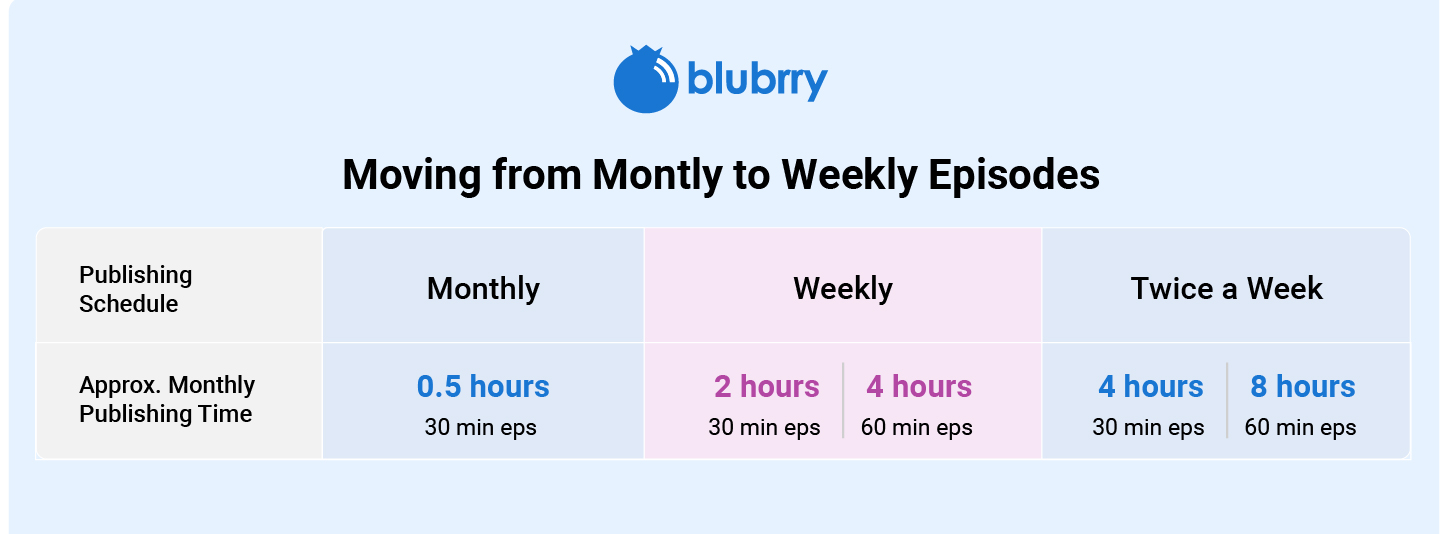
    Imagine you start with one 30-minute episode each month.

    That’s about 30 minutes of content per month.

    Then you decide to publish every week. Now you’re publishing roughly 2 hours of content each month.

    If those weekly episodes eventually become 60-minute interviews, you’re at roughly 4 hours per month.

    Publishing Schedule Episode Length Approx. Monthly Publishing Time
    Monthly 30 minutes 0.5 hours
    Weekly 30 minutes 2 hours
    Weekly 60 minutes 4 hours
    Twice a week 60 minutes 8 hours

    These are simple estimates, but they give you a useful way to think about your hosting needs.

    The question isn’t just “How often do I publish?”

    It’s:

    “How much content am I publishing each month?”

    Adding Bonus Episodes

    Your regular schedule isn’t always your entire publishing schedule.

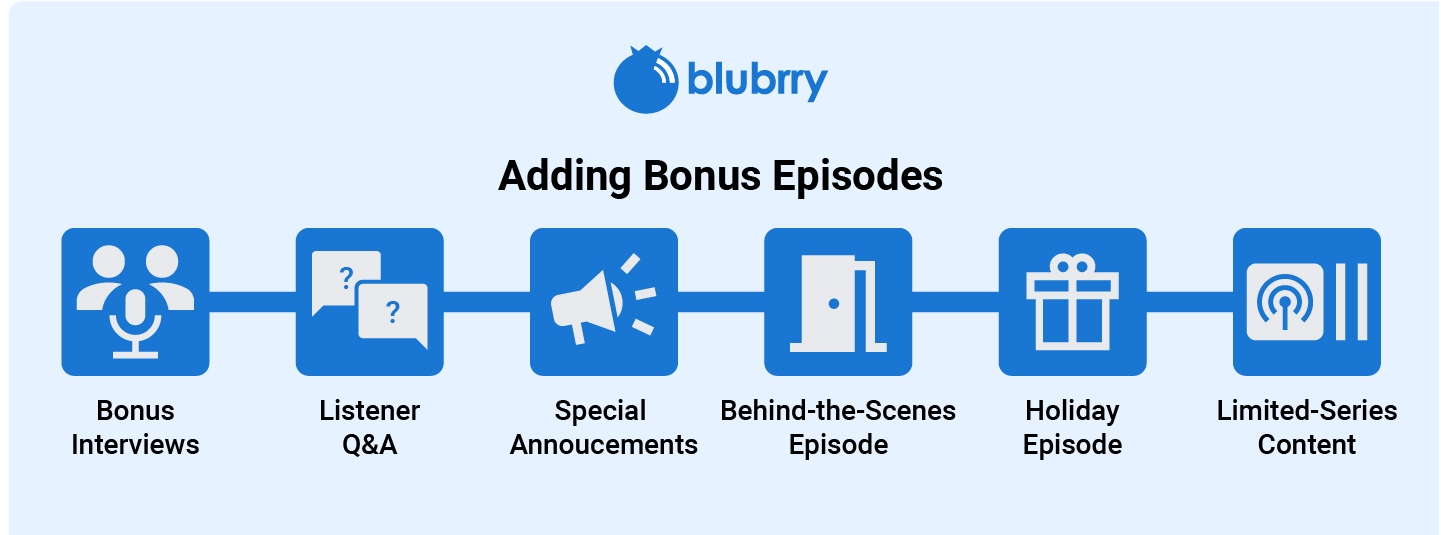
    You might normally publish once a week but occasionally add:

    • Bonus interviews
    • Listener Q&As
    • Special announcements
    • Behind-the-scenes episodes
    • Holiday episodes
    • Limited-series content

    Those extra episodes add to your monthly publishing time.

    You don’t necessarily need to change your hosting plan every time you publish a bonus episode. But if bonus content becomes a regular part of your podcast, it’s worth including it when you estimate how much content you publish each month.

    A little breathing room can make it easier to experiment without worrying about your hosting limits.

    Taking a Seasonal Break

    Not every podcast publishes year-round.

    Some shows work in seasons, with several episodes followed by a planned break.

    You might publish for three months, take the summer off, and return in the fall. Or you might simply pause for a few weeks before starting your next batch of episodes.

    A break doesn’t necessarily mean your hosting needs disappear.

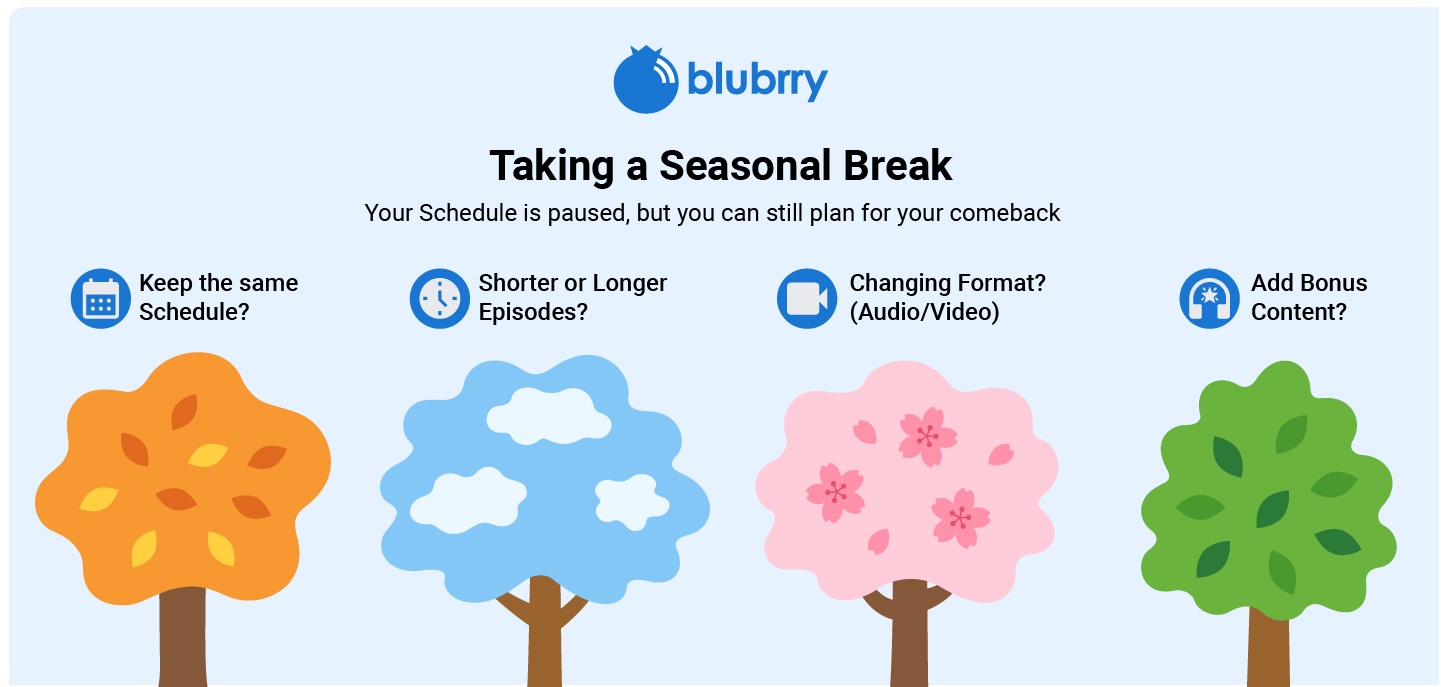
    It can actually be a good time to look at your podcast as a whole and ask:

    • Will I return to the same publishing schedule?
    • Will my episodes be longer?
    • Am I changing the format?
    • Will I add bonus content?
    • Am I planning to introduce video?

    Your schedule may be paused, but your plans for the next season can still be changing.

    Publishing Longer Interviews

    Publishing frequency is only part of the equation.

    Episode length matters, too.

    A podcast publishing four 30-minute episodes per month has very different publishing needs from one publishing four 90-minute interviews.

    Long-form interviews can be a great format, especially when your guests have plenty to say. But if your average episode length keeps increasing, your monthly publishing time increases with it.

    That’s why it’s useful to check your average episode length from time to time.

    You don’t need to predict exactly how long every future episode will be. Just look at what you’re actually publishing and plan accordingly.

    Adding Video to Your Podcast

    Another major change for podcasters is moving from audio-only content to audio and video.

    You may have started with a microphone and an audio editor. Later, you decide to record your interviews on camera, publish video versions of your episodes, or bring existing video content into your podcast.

    Adding video can become another part of your regular publishing workflow.

    Blubrry supports both audio and video podcast publishing, so you can expand your format as your podcast evolves.

    If you’re already creating video content, Vid2Pod can also help turn YouTube videos into podcast episodes, giving you another way to bring existing content into your podcast workflow.

    The important thing is that you don’t have to decide between audio and video forever. Your podcast can evolve as your content strategy evolves.

    How Much Hosting Time Do You Actually Need?

    When your schedule changes, start with the basics.

    Look at a typical month and estimate:

    Number of episodes × average episode length = approximate monthly publishing time

    For example:

    4 weekly episodes × 45 minutes = 3 hours per month

    Then consider anything else you regularly publish, such as bonus episodes or special content.

    If you’re adding video, factor that into your publishing plans as well.

    You don’t need to make the calculation complicated. The goal is simply to have a realistic idea of how much content you’re publishing.

    Don’t Choose a Plan Based Only on Your Current Schedule

    It’s important to choose a plan that fits what you’re doing today.

    But it can also help to think about what you’re likely to do next.

    If you’re publishing one short episode a month now, you probably don’t need a plan designed for a high-volume podcast.

    But if you’re already planning to move to weekly episodes, add longer interviews, or introduce video, those changes are worth considering before choosing your plan.

    Think about your realistic next step, not an imaginary five-year plan.

    Your Podcast Can Change Without Your Workflow Becoming Complicated

    Changing your publishing schedule doesn’t have to mean rebuilding your entire podcast workflow.

    Keep a few simple things in mind:

    Track your publishing time

    Know roughly how much content you’re publishing each month.

    Watch your episode length

    If your 30-minute episodes are becoming 60- or 90-minute conversations, your hosting needs are changing.

    Account for bonus content

    Extra episodes count toward your overall publishing volume.

    Plan for format changes

    If you’re considering video, make sure your hosting setup supports where you want your podcast to go.

    Give yourself some room

    You don’t need the biggest plan available, but having a little flexibility can make future changes easier.

    The goal is not to over-plan your podcast.

    It’s to avoid being caught off guard when your podcast grows or changes direction.

    A Quick Checklist

    If your podcast schedule is changing, ask yourself:

    • How many episodes am I publishing each month?
    • What’s my average episode length?
    • Am I adding bonus or special episodes?
    • Am I taking a seasonal break?
    • Are my interviews getting longer?
    • Am I adding video?
    • Could I start another show?
    • Does my current hosting plan give me enough publishing time?

    These questions don’t take long to answer, but they can help you make a much more informed hosting decision.

    Your Podcast Will Change. Your Hosting Can Change With It.

    There isn’t one perfect publishing schedule for every podcast.

    Some creators publish once a month. Others publish several times a week. Some take seasonal breaks, while others publish year-round. Some stick with audio, while others eventually add video.

    Your podcast is allowed to change.

    Your hosting plan should be flexible enough to change with it.

    Blubrry’s time-based hosting plans make choosing a plan simpler by focusing on how much content you publish each month.

    Instead of trying to estimate complicated storage requirements, start with one straightforward question:

    How many hours of content do I publish each month?

    From there, you can choose the plan that makes sense for your podcast today and adjust as your publishing needs evolve.

    Find the Hosting Plan That Fits Your Podcast

    Your podcast schedule isn’t set in stone and your hosting plan doesn’t have to be either.

    Whether you’re moving from monthly to weekly episodes, adding bonus content, publishing longer interviews, taking seasonal breaks, or expanding into video, it’s worth making sure your hosting setup can support the way you want to create.

    Review Blubrry’s time-based hosting plans and find the option that fits the way you publish.

  • The Podcast Publishing Checklist: Is Your Hosting Setup Ready for What You Want to Create?

    The Podcast Publishing Checklist: Is Your Hosting Setup Ready for What You Want to Create?

    Starting a podcast is one thing. Keeping it going as your ideas, schedule, and audience grow is another.

    A hosting plan that works perfectly when you publish one short episode every other week might not be the right fit once you start releasing longer episodes, adding video, launching bonus content, or managing multiple shows.

    That’s why it’s worth thinking about not just what you publish today, but how you expect your podcasting workflow to grow.

    For creators managing multiple podcasts, teams, or more complex publishing needs, Pro Hosting can provide the additional flexibility needed to manage a larger podcast operation without having to juggle separate hosting setups for every show.

    The goal isn’t to choose the biggest hosting plan available. It’s to choose a setup that matches the way you actually publish—and gives you enough room to grow without making your workflow unnecessarily complicated.

    1. How Often Are You Planning to Publish?

    Your publishing schedule is one of the biggest factors to consider.

    Are you planning to release:

    • One episode a month?
    • A weekly show?
    • Multiple episodes every week?
    • Regular bonus episodes between your main releases?

    Publishing frequency matters because every episode uses part of your available publishing time.

    For example, a weekly podcast with 30-minute episodes uses roughly:

    30 minutes × 4 episodes = 2 hours per month

    But if you publish twice a week, that same format becomes:

    30 minutes × 8 episodes = 4 hours per month

    And that’s before adding bonus episodes, trailers, or special releases.

    Your checklist:

    • Decide how many episodes you expect to publish each month.
    • Estimate your average episode length.
    • Add extra time for bonus episodes or special releases.
    • Make sure your hosting plan gives you enough publishing time for your schedule.

    Planning for your typical month—not just your first month—can help you avoid outgrowing your plan too quickly.

    2. How Long Are Your Episodes?

    Not every podcast needs the same amount of publishing time.

    A 20-minute weekly interview show has very different hosting needs from a two-hour weekly conversation.

    Consider your average episode length and how often you publish.

    For example:

    Publishing Schedule Episode Length Approx. Monthly Time
    Weekly 30 minutes 2 hours
    Weekly 60 minutes 4 hours
    Twice weekly 30 minutes 4 hours
    Twice weekly 60 minutes 8 hours
    Weekly 90 minutes 6 hours

    These are estimates, but they give you a useful starting point when comparing hosting plans.

    Your checklist:

    • Estimate your average episode length.
    • Calculate your expected monthly publishing time.
    • Leave some room for longer episodes.
    • Account for bonus content and special releases.

    If your episode length changes frequently, having some extra room in your plan can make your publishing workflow much easier.

    3. Are You Publishing Audio, Video, or Both?

    Podcasting isn’t limited to audio anymore.

    Many creators are recording video alongside their podcast and publishing their shows in multiple formats. Others are starting with audio and planning to add video later.

    If video is part of your plans, make sure your hosting setup supports the type of publishing you want to do.

    With Blubrry, hosting plans support both audio and video podcast publishing, giving creators the flexibility to build their shows around the formats that make sense for them.

    You can also use tools such as Vid2Pod to turn existing video content into podcast episodes.

    Your checklist:

    • Decide whether you’re publishing audio only.
    • Consider whether you’ll add video later.
    • Check whether your hosting plan supports your desired format.
    • Consider how video fits into your existing production workflow.

    You don’t have to publish video just because it’s available. But if it’s part of your future plans, it’s better to choose a hosting setup that won’t force you to rethink your workflow later.

    4. Will You Publish Bonus or Special Episodes?

    Your main publishing schedule isn’t always the whole story.

    You might eventually want to publish:

    • Bonus episodes
    • Trailer episodes
    • Q&A episodes
    • Limited-series content
    • Behind-the-scenes recordings
    • Seasonal specials
    • Guest episodes
    • Replays or extended conversations

    These episodes can quickly add up.

    A plan that gives you exactly enough time for your regular schedule may leave little room for experimentation.

    Your checklist:

    • Estimate your regular monthly publishing time.
    • Add time for bonus content.
    • Consider seasonal or limited-series episodes.
    • Leave room to experiment with new formats.

    If you know you’ll be creating additional content, include it in your hosting plan from the beginning.

    5. Are You Planning to Run More Than One Show?

    One podcast can eventually turn into two—or three.

    Maybe you want to launch a second show. Maybe your company has several podcasts. Or perhaps you’re working with a team that manages multiple programs.

    Your hosting setup should make it practical to manage your publishing workflow as your podcast operation grows.

    Your checklist:

    • Are you managing one show or multiple shows?
    • Will other team members need access?
    • Do you need to separate different podcast projects?
    • Could you launch another show in the future?

    Thinking about this early can save you from having to rebuild your workflow later.

    6. What Features Will You Need as Your Podcast Grows?

    Hosting isn’t just about getting an episode online.

    As your podcast develops, you may need more tools to understand your audience, manage your content, publish consistently, and grow your show.

    Ask yourself what you’ll actually need six or twelve months from now.

    You may eventually want:

    • More publishing time
    • Audio and video support
    • Podcast analytics
    • Listener insights
    • Episode performance comparisons
    • Audience trends over time
    • Podcast website options
    • Monetization tools
    • Additional publishing or production tools
    • Support when something goes wrong

    The right hosting setup should support your workflow—not get in the way of it.

    7. Don’t Just Plan for Your First Episode

    One of the easiest mistakes new podcasters make is choosing a hosting plan based entirely on what they need today.

    Your first few episodes might be short.

    You might only publish once a month.

    You might have no plans for video.

    But what happens if your podcast takes off?

    What if you decide to publish every week? Add video? Bring on guests? Start a second show? Release bonus episodes?

    Your hosting needs can change quickly.

    That’s why the best plan isn’t necessarily the cheapest plan. It’s the one that gives you the right amount of room for the way you actually plan to publish.

    The Podcast Publishing Checklist

    Before choosing your hosting plan, run through these questions:

    Publishing

    • How many episodes will I publish each month?
    • How long will my typical episodes be?
    • Will my publishing schedule change?

    Content

    • Will I publish bonus episodes?
    • Will I create trailers or special episodes?
    • Am I planning a limited series?

    Format

    • Am I publishing audio?
    • Will I publish video?
    • Could I add video later?

    Growth

    • Will I launch additional shows?
    • Will I need more publishing time as my audience grows?
    • What analytics or audience insights will I need?

    Workflow

    • Will other people help manage my podcast?
    • What tools will I need as my production process becomes more involved?
    • Does my hosting plan give me enough room to grow?

    Is Your Hosting Plan Ready?

    Your podcast hosting plan should fit the podcast you’re actually trying to build.

    If you’re publishing occasionally, you may not need a large amount of publishing time. If you’re publishing long episodes every week, producing video, adding bonus content, or managing multiple shows, you’ll want to make sure your plan can keep up.

    The good news is that you don’t have to guess.

    Take a look at your expected publishing schedule, estimate how much content you’ll produce each month, and compare that with the features and publishing time available in each plan.

    Ready to Find the Right Fit?

    Take a look at Blubrry’s podcast hosting plans and find an option that matches how you publish today—and where you want your podcast to go next.

    Review Blubrry’s Hosting Plans →

    Your podcast may start with one episode.

    Your hosting setup should be ready for everything that comes after it.

  • Choosing the Right Blubrry Hosting Plan Based on How You Publish

    Choosing the Right Blubrry Hosting Plan Based on How You Publish

    One of the first questions new podcasters ask is, “What microphone should I buy?”
    Right alongside it is another question that can be just as confusing:

    “Which podcast hosting plan is right for me?”

    There are plenty of things to figure out when you’re getting a podcast off the ground—what to record with, how often to publish, how long your episodes will be, and where to host them.

    Choosing a hosting plan shouldn’t add another layer of confusion.

    That’s why Blubrry made its hosting plans simpler. Instead of trying to understand complicated storage limits or estimate how much space your files will take up, you can choose a plan based on how much content you actually publish each month.

    If you know how often you plan to publish and roughly how long your episodes will be, you already have a much easier way to find the right fit.

    Whether you’re creating an audio-only show, a video podcast, or a little of both, you can choose a plan that matches your publishing schedule today and upgrade whenever your podcast grows.

    Here’s how to figure out which plan is right for you.

    Start With Your Publishing Schedule

    The easiest way to choose a hosting plan is to answer two simple questions:

    • How long is each episode?
    • How many episodes do you publish each month?

    Multiply those together and you’ll have a good estimate of your monthly publishing time.

    For example:

    • Four 30-minute episodes = 2 hours per month
    • Two 60-minute episodes = 2 hours per month
    • One 90-minute episode = 1.5 hours per month
    • Eight 45-minute episodes = 6 hours per month

    You don’t need to calculate file sizes or worry about compression.

    Simply estimate your monthly publishing time.

    If You’re Just Starting a Podcast

    Many new podcasters publish one or two episodes each month while they find their rhythm.

    If that’s you, one of our entry-level plans will likely be the perfect fit.

    These plans are designed for creators launching:

    • Personal podcasts
    • Hobby shows
    • Business podcasts
    • Passion projects
    • Interview series

    You get everything you need to start publishing without paying for more publishing time than you’ll actually use.

    Weekly Podcasters

    Weekly publishing is one of the most common schedules in podcasting.

    If you’re releasing a new episode every week, estimate your average episode length and multiply it by four.

    Examples:

    • Weekly 30-minute show → about 2 hours per month
    • Weekly 45-minute show → about 3 hours per month
    • Weekly 60-minute show → about 4 hours per month

    Choosing a plan that gives you a little extra room can be helpful if you occasionally publish longer episodes.

    Video Podcasts Count Too

    More creators are adding video to their podcasts, and Blubrry makes it easy to host both audio and video under the same publishing-time model.

    That means you don’t need separate hosting for different formats.

    Whether you publish:

    • Audio only
    • Video only
    • Both audio and video

    your monthly publishing time works the same way.

    If you’re already creating videos for YouTube, you can also use Vid2Pod to turn those videos into podcast episodes for distribution across podcast apps.

    Don’t Forget Bonus Episodes

    Many podcasters publish more than their regular schedule.

    You might release:

    • Bonus episodes
    • Holiday specials
    • Live recordings
    • Listener Q&A episodes
    • Seasonal content

    If these are part of your publishing strategy, include them when estimating your monthly publishing time.

    Choosing a slightly larger plan now can help you avoid running out of publishing time during busy months.

    Running Multiple Shows?

    If you host more than one podcast, don’t estimate each show separately.

    Instead, calculate the total publishing time across all your shows.

    For example:

    Podcast A:

    • Weekly 30 minutes = 2 hours/month

    Podcast B:

    • Weekly 60 minutes = 4 hours/month

    Total publishing time:

    6 hours per month

    As your network grows, you may find that Professional Hosting becomes the better fit.

    When Professional Hosting Makes Sense

    Professional Hosting isn’t simply for podcasts with long episodes.

    It’s designed for creators who need more advanced tools.

    Consider Pro Hosting if you:

    • Manage multiple podcasts
    • Run a podcast network
    • Need unlimited storage
    • Publish high volumes of audio or video
    • Want Dynamic Ad Insertion
    • Need multiple users managing content
    • Want enterprise-level podcast management

    As your podcast grows, your hosting should grow with it.

    Why Publishing Time Makes More Sense

    Podcast file sizes vary more than most people realize.

    Two one-hour episodes may have completely different file sizes depending on:

    • Audio quality
    • Video resolution
    • Editing settings
    • Compression
    • Export format

    That’s why estimating storage has always been confusing.

    Publishing time is much easier to understand.

    You already know how long your episodes are.

    Now your hosting plan reflects that.

    You Can Always Grow

    One of the best things about choosing a hosting plan based on publishing time is that you’re not locked into your first decision.

    As your podcast evolves, you can upgrade to a larger plan whenever your publishing schedule changes.

    Maybe you start with one monthly show.

    A few months later, you launch a second podcast.

    Then you begin publishing video.

    That’s growth—and your hosting plan should be able to grow with you.


    Find the Plan That Fits Your Podcast

    Every podcast is different.

    Some creators publish one episode a month, while others release several episodes every week across multiple shows. And podcasts come in all kinds of genres, from business and news to sports, entertainment, education, religion, and everything in between.

    The right hosting plan isn’t necessarily the biggest one—it’s the one that matches the way you publish today while giving you room to grow tomorrow.

    With Blubrry’s new time-based hosting plans, choosing the right plan is as simple as knowing how much content you publish each month.

    Explore Blubrry’s hosting plans today and find the option that’s built for your podcast.

  • Choosing a Podcast Host in 2026: What Actually Matters?

    Choosing a Podcast Host in 2026: What Actually Matters?

    Choosing a podcast host used to be simple: upload your episodes, generate an RSS feed and publish your show.

    Today, hosting platforms can include analytics, video, websites, monetization, AI tools and more, which makes comparing them more complicated.

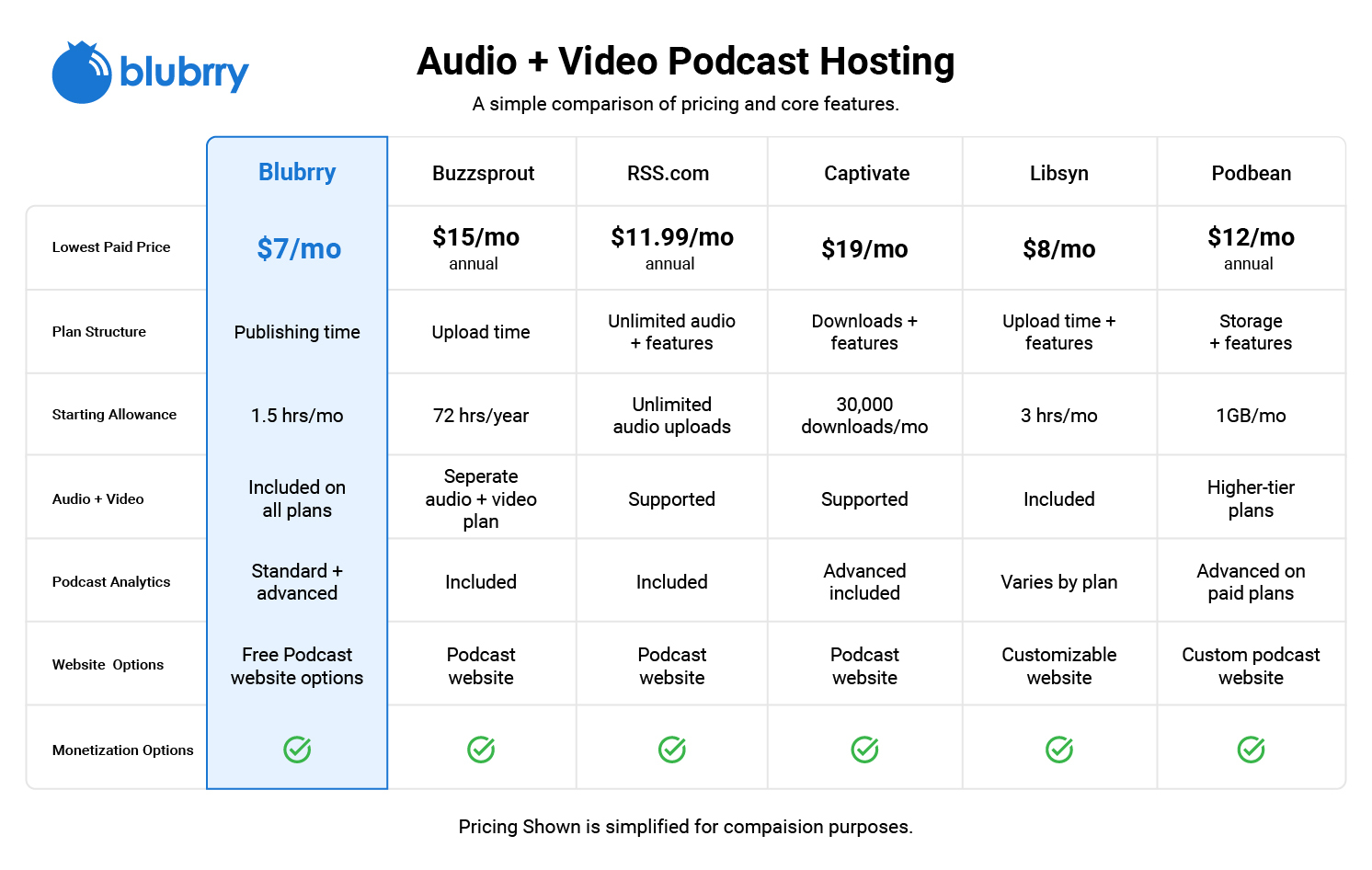
    When looking at Blubrry Podcasting, Buzzsprout, Libsyn, Podbean and other hosts, it’s easy to focus on price or feature lists.

    But the better question is:

    Which podcast host fits the way you actually plan to podcast?

    Here are the most important things to compare.

    1. How Does the Podcast Host Structure Its Plans?

    Podcast hosts structure their plans in different ways. Depending on the provider, limits may be based on storage, upload time, bandwidth, downloads or included features.

    That means two plans with similar prices may work very differently.

    Blubrry: Hosting Based on How Much You Publish

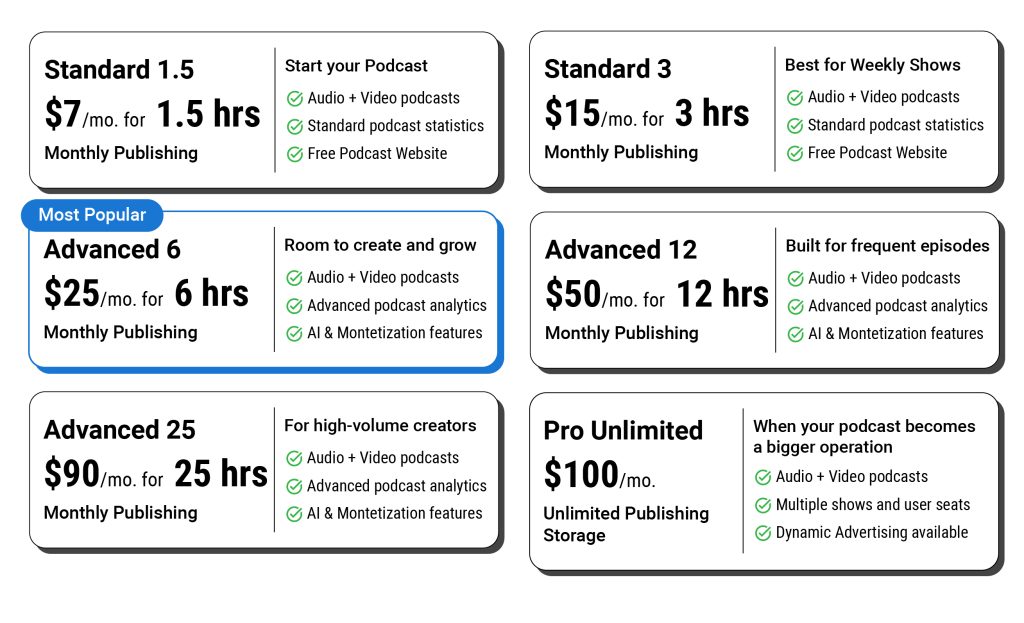
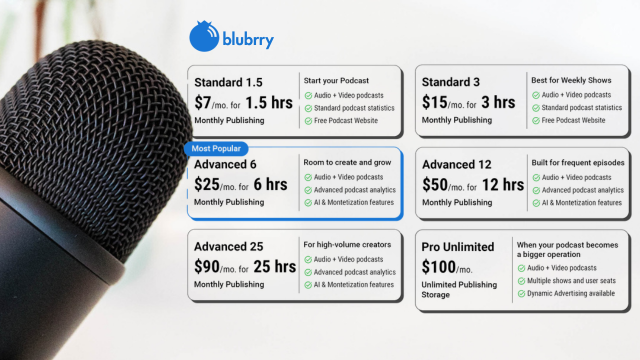
    Blubrry hosting plans are based on monthly publishing time—not megabytes or file size.

    For example:

    • 1.5 hours per month — $7
    • 3 hours per month — $15
    • Additional plans offer more monthly publishing time for creators who produce longer or more frequent content.

    Your monthly time can be used for audio or video, making it easier to choose a plan based on how much content you actually publish.

    Instead of estimating file sizes, the question becomes much simpler:

    How many hours of content do you publish each month?

    2. Does the Host Support How You Want to Publish?

    There was a time when podcasting meant recording an MP3, uploading it, and calling it a day. Those days are long gone.

    Today, creators are publishing audio, video, YouTube clips, private podcasts, bonus episodes, and entire podcast networks. That’s why choosing a host isn’t just about getting your RSS feed online anymore.

    Others are publishing:

    • Audio podcasts
    • Video podcasts
    • YouTube content
    • Multiple shows
    • Short-form and long-form content
    • Private or premium content

    There is no single correct way to podcast.

    What matters is whether your hosting platform supports the way you want to create.

    A podcaster starting with audio today may decide to experiment with video later.

    A solo creator may eventually launch a second show.

    A business may need multiple team members managing content.

    You should not choose a host only for the podcast you have today.

    Think about what you may reasonably want to do next.

    Audio and Video With Blubrry

    Blubrry hosting plans support both audio and video podcast publishing.

    Creators who are already producing video content for YouTube can also use Vid2Pod, a publishing method available with Blubrry hosting that helps turn existing YouTube videos into podcast episodes for distribution through podcast listening platforms.

    You can choose the format that makes sense for your content without feeling like video is required to have a successful podcast.

    Apple

    Blubrry also supports HLS (HTTP Live Streaming) for Apple Podcasts video delivery, providing adaptive streaming that automatically adjusts video quality based on the listener’s connection and device. This creates a smoother viewing experience while meeting Apple’s preferred video streaming requirements.

    3. What Kind of Podcast Analytics Do You Actually Need?

    Almost every podcast host offers some form of statistics.

    The important question is what those statistics tell you.

    A new podcaster may initially want to know:

    “How many people listened?”

    As a podcast grows, the questions often become more detailed.

    Where are people listening?

    Which episodes perform best?

    Are there meaningful audience trends?

    How does performance change over time?

    Which data can I confidently use when talking with advertisers, sponsors or stakeholders?

    Analytics become especially important when a podcast is connected to a business, organization or monetization strategy.

    Blubrry’s Approach to Podcast Statistics

    Podcast analytics have been a major part of Blubrry’s platform for years.

    Blubrry provides podcast statistics designed to help creators better understand audience activity and podcast performance, with more advanced analytics available for podcasters who need deeper reporting.

    For some creators, basic statistics may be enough.

    For others, analytics become one of the most important parts of their podcast infrastructure.

    Know which type of podcaster you are before choosing a platform.

    IAB

    4. How Much Control Do You Want Over Your Podcast?

    This is one of the most overlooked questions when comparing podcast hosts.

    Your podcast is more than a collection of audio files.

    Over time, it can include:

    • Your RSS feed
    • Your website
    • Your episode archive
    • Your audience
    • Your analytics
    • Your search presence
    • Your monetization
    • Your publishing workflow

    Think about how much control you want over those pieces.

    Some creators prefer having everything contained within one simple platform.

    Others want greater flexibility to connect their podcast hosting with their own website, publishing tools and broader digital presence.

    Neither approach is automatically right or wrong.

    But they are different.

    Ownership Has Always Been Important at Blubrry

    Since the early days of podcasting, we’ve believed creators should own their podcast, not rent it.

    That’s why we’ve invested in tools like PowerPress, podcast websites, detailed analytics, and flexible RSS management. They’re designed to give you control over how and where your podcast grows, instead of locking you into a single ecosystem.

    5. What Happens When Your Podcast Changes?

    Most podcasters don’t outgrow their microphone first, they outgrow their hosting.

    The show you launch today probably won’t look the same a year from now.

    Maybe you’ll start publishing video. Maybe you’ll launch a second show. Maybe your hobby podcast becomes part of your business.

    Good hosting should make those changes easier, not force you to start over.

    You might go from:

    One show → Multiple podcasts

    Audio only → Audio and video

    Basic statistics → Advanced analytics

    Solo creator → Multiple team members

    Hobby project → Business asset

    Publishing episodes → Monetizing an audience

    That does not mean every podcaster needs the most advanced hosting plan from day one.

    You probably do not.

    But it is worth understanding what options will be available if your needs change.

    Look at more than the least expensive plan.

    Look at the entire platform.

    6. What Kind of Support Is Available?

    Support is not always the first thing people think about when shopping for podcast hosting.

    Until something goes wrong.

    Maybe your RSS feed is not updating correctly.

    An episode is not appearing where you expected.

    You are moving an established podcast from another host.

    You have a question about Apple Podcasts, Spotify or another distribution platform.

    Suddenly, support matters quite a bit.

    When comparing hosting providers, look at:

    • What support channels are available?
    • Can you reach an actual person?
    • Does the support team understand podcasting?
    • Is educational help available when you need it?

    Blubrry’s support team includes people with hands-on podcasting experience who regularly help creators work through publishing, RSS, distribution, statistics and other podcasting questions.

    Sometimes the most important feature of a hosting platform is the person who can help you when something does not work as expected.

    7. Look Beyond the Monthly Price

    Everyone compares the monthly price first.

    That’s understandable.

    But after years of helping podcasters move their shows from other platforms, we’ve learned that price is rarely the reason people switch.

    More often it’s because they’ve hit a limit, need better analytics, want to publish video, or simply need support from someone who understands podcasting.

    Ask:

    What publishing limits apply?

    Is audio and video supported?

    What analytics are included?

    Does the plan include a podcast website?

    Are AI or publishing tools included?

    What happens if I need more publishing capacity?

    What support is available?

    Can the platform accommodate multiple shows or team members later?

    Most importantly:

    Does the platform fit the way I want to build my podcast?

    That question is much more useful than simply asking which host has the longest feature list.

    Blubrry vs. Other Podcast Hosting Platforms

    Podcast hosts are built with different priorities.

    Some platforms emphasize a streamlined experience for quickly starting a show.

    Others offer large ecosystems of creator tools.

    Some have been serving podcasters for many years and support a wide variety of publishing needs.

    Blubrry’s approach centers around giving podcasters the infrastructure to publish, measure and manage their content while maintaining flexibility and control over their broader podcast presence.

    That includes:

    • Time-based hosting options based on how much you publish
    • Audio and video podcast support
    • Podcast analytics
    • Podcast website options
    • WordPress integration with PowerPress
    • AI podcast tools
    • Monetization opportunities
    • Vid2Pod publishing
    • Options for individual creators, businesses, teams and networks
    • Support from people who understand podcasting

    The right podcast host ultimately depends on what matters most to you.

    Think Beyond Episode One

    There is no universal “best” podcast host for every podcaster.

    And that is probably a good thing.

    A hobby podcaster publishing once a month may have completely different priorities from a company producing several shows.

    Someone recording their first episode has different needs from a podcast network managing years of content.

    The goal should not be to find the platform with the most features.

    It should be to find the platform whose features, pricing structure and philosophy match the way you want to podcast.

    Think about what you need today.

    But also think about what happens next.

    Your next format.

    Your next 100 episodes.

    Your next show.

    Your growing audience.

    Your business.

    Your podcast host is part of the infrastructure supporting all of it.

    Choose accordingly.

    Ready to Explore Blubrry Podcast Hosting?

    Blubrry offers podcast hosting options for creators publishing everything from a few episodes each month to high-volume shows and podcast networks.

    Choose a plan based on how much you publish, with tools for audio and video podcasting, analytics, websites, monetization and more.

    Explore Blubrry Podcast Hosting Plans


  • Why Standard Hosting is the Smartest Way to Launch Your Podcast

    Why Standard Hosting is the Smartest Way to Launch Your Podcast

    Blubrry Gives New Podcasters Everything They Need — Without the Overwhelm

    When you’re just getting started in podcasting, the path forward can feel like a maze of microphones, metrics, and monthly costs. At Blubrry, we believe launching your show should be exciting, not stressful.

    That’s why our Standard Hosting plan, complete with our Standard Statistics, is the perfect low-risk, budget-friendly starting point for new podcasters and hobbyists alike.

    Think of it as your launchpad: all the essential tools, none of the noise.

    Blubrry’s Standard Hosting gives you everything you need to publish, distribute, and manage your podcast with ease. There’s no need to worry about a steep learning curve — especially if you’re using PowerPress, our free WordPress plugin. You’ll be able to publish directly from your website, own your brand, and distribute your episodes to all major podcast directories like Apple Podcasts and Spotify.

    But the real magic is this: no distractions, no upsells you don’t need, and no analytics rabbit hole pulling you away from your creative flow.

    Standard Stats: Smart, Streamlined, and Sufficient

    When it comes to measuring your podcast’s performance, many beginners assume they need every chart and graph available. But if you’re just launching — or you’re podcasting for fun, community, or side projects — you might not want to bother with pro-level analytics.

    With Blubrry’s Standard Stats, you get exactly what matters most:

    • Total downloads
    • Downloads per episode
    • Top-performing episodes
    • Geographic data
    • Directory breakdown (such as Apple Podcasts and Spotify)

    It’s enough to show where your listeners are coming from, what content resonates, and how your audience is growing, without burying you in data. Plus, your stats are IAB-certified, meaning they’re accurate and industry-standard. That makes a difference when you’re ready to grow, pitch a sponsor, or celebrate milestones like your 100th download.

    Grow at Your Own Pace

    You might start your show as a creative outlet or personal project, and Blubrry’s Standard plan lets you do just that, affordably and flexibly. When you’re ready to upgrade to more advanced analytics, monetization or professional options, you can. Until then, you have what you need to build confidence and community on your terms.

    And remember: you can always test the waters without long-term commitment. Blubrry offers no-fuss monthly plans, so you’re never locked in. Try it for a month. See how it feels. Fall in love with podcasting.

    A Platform That Grows With You

    Blubrry’s Standard Hosting isn’t just a “starter” option—it’s a complete solution designed for those who want quality, support, and simplicity from day one. With top-tier customer support, seamless publishing, and foundational stats, you’ll have peace of mind knowing you’re podcasting the right way, without breaking the bank or overcomplicating the process.

    So whether you’re chasing a lifelong dream, testing a new idea, or simply sharing your voice for fun, Blubrry’s Standard Hosting is here to make your start smooth, supported, and sustainable.

    Ready to launch your podcast the simple way?

    Explore Standard Hosting at we-moved-the-blog-to-this-site-when-we-made-a-new-website.blubrry.com/.

  • 3 Reasons to Host Your Podcast With Blubrry

    3 Reasons to Host Your Podcast With Blubrry

    There are a plethora of podcast hosting companies out there today. Which, honestly, gets us excited. It means that there are more and more people getting into podcasting as a way to share their unique stories and perspectives with the world. It also excites us because—even as new entrants pop up—our podcast hosting platform continues to be second to none. Sure, there are some who offer everything for “free” and some who put their branding all over your hard work. Not Blubrry Podcasting. We believe you should own your brand, which is why we’ve built one of the most robust, flexible podcasting platforms available. With that in mind, here are 4 reasons to host your podcast with Blubrry:

    1. Video Podcast or Audio Podcast? Both! Honestly, storage space is storage space, and bandwidth is bandwidth, regardless of the file format. So, with Blubrry Podcast Hosting, you don’t need to decide ahead of time if you want to do audio podcasting, video podcasting, or a little of each. You can just focus on sharing your views with your audience in whichever format, at whatever time you feel is right. Video this week, audio next? Cool. And, as always, if you have any questions, our support team is only an email, phone call, or video chat away.
    2. Know your audience better than any other podcasting platform. Blubrry is the first and only podcast hosting company to have an IAB Tech Lab certified podcast stats platform. It’s really kind of a big deal because it means that your stats are on a platform that is certified to the highest standards in the industry. This means you can trust the numbers and your advertisers can trust the numbers. Even better? Blubrry now also offers partial download reporting to help you better understand how much of your content your audience is consuming, and if or when they tune out in an episode.
    3. A free podcast website. Yeah. Actually free, actually yours. With Blubrry WordPress Website, you get the power of one of the most widely used podcasting plugins for WordPress. For free. Blubrry WordPress Website makes it ridiculously easy to customize your website to make sure it’s on-brand for your podcast, plus it has all the robust functionality for publishing and syndicating that has made it the go-to for podcasters for more than a decade.

    Well, there you have it: 3 reasons to host your podcast with Blubrry Podcast Hosting. Granted, there are about a bazillion other reasons, but who has time to read all that? You’ve got a podcast to produce.

  • PodBean problems? Get 30 days free podcasting at Blubrry

    We heard from you – a lot – and so we checked it out ourselves: PodBean.com has had service problems for the past couple of days. We understand that those of you hosting your podcasts through PodBean want to get back online, like, now if not sooner, so Blubrry is giving you 30 free days hosting to sort out the situation. Reach us at support@rawvoice.com. Warning, though, once you get a taste of Blubrry, you might not want to go back – and that’s fine with us, too! 😉

  • Blubrry Services Help Site

    blubrryDid you know you can check out the Blubrry help site when you have questions on a feature or service?

    Our Support site is growing steadily and features written information and demo videos to assist members of our community and our customers. We want you to be able to more effectively use our products while lowering the number of support tickets. Some of the videos and help topics are short and snappy and some of them are long and detailed. All are highly informative.

    Don’t see a topic covered? Let us know and we will fill the void. We will even be posting training topics by top leaders in the podcasting space that will help you build and grow your podcast.

    Be sure to subscribe to Podcast Insider as well so that you get all of the topics we cover delivered directly to your media player!

  • Podango Pulls the Plug

    In a not so surprising move, considering what we have learned over the past five days, Podango has shut down their podcasting services. Unfortunately, we are no longer able to transition anymore podcasters from Podango.

    Their website is offline and media files are no longer available for download. The only service Podango is offering their customers at this point is feed redirection. Sadly, this means nothing if the podcaster didn’t move their feed before the beginning of the year.

    Beyond shocking is that this company would give 5 days notice to its customers during the holidays, arguably the busiest time of the year for all of us, to move their podcasts. To migrate a show properly, 3-4 weeks are needed to let your audience know of the changes and for services such as iTunes to propagate the new feed URLs. They’ve effectively destroyed a large number of podcasts simply by not providing their customers enough time.

    I will have more commentary on this later. At the moment I am highly disappointed in what has transpired, not only with the sudden service shut down but with email correspondence we shared with Podango.