Tag: Hosting

  • Why Standard Hosting is the Smartest Way to Launch Your Podcast

    Why Standard Hosting is the Smartest Way to Launch Your Podcast

    Blubrry Gives New Podcasters Everything They Need — Without the Overwhelm

    When you’re just getting started in podcasting, the path forward can feel like a maze of microphones, metrics, and monthly costs. At Blubrry, we believe launching your show should be exciting, not stressful.

    That’s why our Standard Hosting plan, complete with our Standard Statistics, is the perfect low-risk, budget-friendly starting point for new podcasters and hobbyists alike.

    Think of it as your launchpad: all the essential tools, none of the noise.

    Blubrry’s Standard Hosting gives you everything you need to publish, distribute, and manage your podcast with ease. There’s no need to worry about a steep learning curve — especially if you’re using PowerPress, our free WordPress plugin. You’ll be able to publish directly from your website, own your brand, and distribute your episodes to all major podcast directories like Apple Podcasts and Spotify.

    But the real magic is this: no distractions, no upsells you don’t need, and no analytics rabbit hole pulling you away from your creative flow.

    Standard Stats: Smart, Streamlined, and Sufficient

    When it comes to measuring your podcast’s performance, many beginners assume they need every chart and graph available. But if you’re just launching — or you’re podcasting for fun, community, or side projects — you might not want to bother with pro-level analytics.

    With Blubrry’s Standard Stats, you get exactly what matters most:

    • Total downloads
    • Downloads per episode
    • Top-performing episodes
    • Geographic data
    • Directory breakdown (such as Apple Podcasts and Spotify)

    It’s enough to show where your listeners are coming from, what content resonates, and how your audience is growing, without burying you in data. Plus, your stats are IAB-certified, meaning they’re accurate and industry-standard. That makes a difference when you’re ready to grow, pitch a sponsor, or celebrate milestones like your 100th download.

    Grow at Your Own Pace

    You might start your show as a creative outlet or personal project, and Blubrry’s Standard plan lets you do just that, affordably and flexibly. When you’re ready to upgrade to more advanced analytics, monetization or professional options, you can. Until then, you have what you need to build confidence and community on your terms.

    And remember: you can always test the waters without long-term commitment. Blubrry offers no-fuss monthly plans, so you’re never locked in. Try it for a month. See how it feels. Fall in love with podcasting.

    A Platform That Grows With You

    Blubrry’s Standard Hosting isn’t just a “starter” option—it’s a complete solution designed for those who want quality, support, and simplicity from day one. With top-tier customer support, seamless publishing, and foundational stats, you’ll have peace of mind knowing you’re podcasting the right way, without breaking the bank or overcomplicating the process.

    So whether you’re chasing a lifelong dream, testing a new idea, or simply sharing your voice for fun, Blubrry’s Standard Hosting is here to make your start smooth, supported, and sustainable.

    Ready to launch your podcast the simple way?

    Explore Standard Hosting at we-moved-the-blog-to-this-site-when-we-made-a-new-website.blubrry.com/.
  • Pro Hosting Now Available Via AWS Marketplace

    Pro Hosting Now Available Via AWS Marketplace

    Familiar with the cloud? Well, we’re the first podcast provider to offer podcast hosting through the cloud. We’re available on Amazon Web Services, so anyone using their Marketplace can easily purchase and integrate Blubrry into their system.

    Our Professional Hosting level is now available in the Amazon Web Services Marketplace, and if you’re not familiar with their platform, it offers thousands of software, services and vendors that run on AWS. Podcast hosting already serves files via the internet already, so it’s a match made in cloud heaven.

    For the first time, AWS developers can quickly integrate podcasting with their services. Blubrry includes many features for developers including a full and robust RestFUL API with oAuth2 authentication allowing customers to publish podcast episodes, pull podcast download and play statistics, and navigate the podcast directory. API calls include the ability to upload and publish podcast media files as well as publish podcast episodes with rich HTML formatted episode show notes.

    What was once a long decision making process, including testing and multiple meetings, is now a breeze, knowing that our service already works in an AWS environment. A win-win situation for Blubrry and podcasters.

    This doesn’t mean you have to be an AWS user to purchase our professional level hosting, that hasn’t changed a bit. For those unaware of our higher level plan, take a look at what’s included:

    • Unlimited storage (1TB in base cost)
    • Unlimited bandwidth (1TB monthly in base cost)
    • And for that extra bandwidth, pennies on the dollar
    • Network plugin
    • Dynamic advertising insertion
    • Multiple podcasts all managed in one account

    And all of the standard professional hosting features remain included in this offering, so there is no downside to purchasing through AWS. To get started, head to our listing on AWS Marketplace.

  • Two Free Podcast Hosting Services Shut Down – Your Podcast 017

    Two Free Podcast Hosting Services Shut Down – Your Podcast 017

    Podiant and Opinion, two free podcast hosting companies shut down recently. Should you do a transcript of your show? There are many positives and negatives of written transcripts is for your podcast. Advertising in podcasting is rising and becoming more relevant for all types of podcasters. Podcasters should be aware and begin preparing for advertising ahead of time. Lastly, there is no way to know how many people are subscribed to your show. All of this is discussed on today’s episode of Your Podcast with Todd Cochrane and Mike Dell.
    Thanks for listening to the show and please subscribe at PowerPressPodcast.com.

    We love our PowerPress users, please leave us a review.

    News

    Topics

    Support

    • Who are my subscribers? Why nobody can tell you that other than your listeners.
    • Having a podcast PAGE on your site and why that is just extra work. Use the blog roll instead. Blogging and podcasting are very, very similar. Your blog posts should be with your podcast posts (assuming they are on a similar topic.)
    • Upgrading and downgrading podcast hosting every month; Blubrry has many customers doing this. The only way to do this where it’s not costing you more is to upgrade 2 days prior to the next payment date.

    To ask questions or to comment on the show, contact Todd and Mike here: yourpodcast@blubrry.com

  • Set Up A FREE Optimized WordPress Site For Your Podcast in Just Five Minutes With WordPress Sites

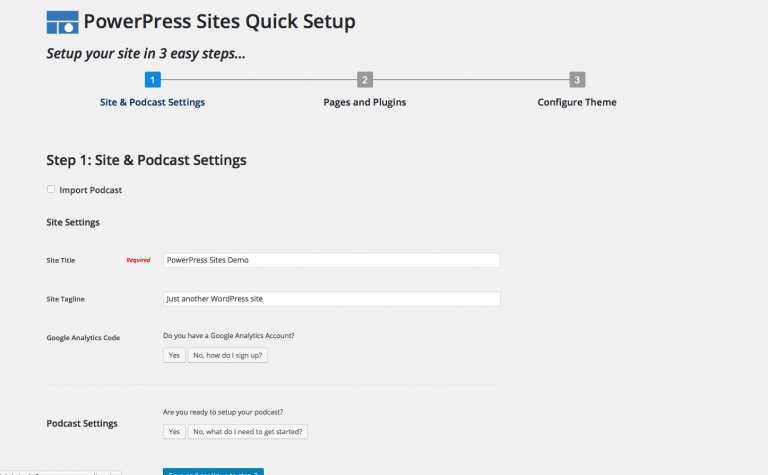
    Is technology the only thing standing between you and launching – or improving – your podcast ? Maybe you aren’t sure of the best way to set up a podcast theme, are stymied by how to best optimize your site for social, or just aren’t great with design. No more hurdles: the new WordPress Sites is attractive, easy-to-use, and comprehensive.

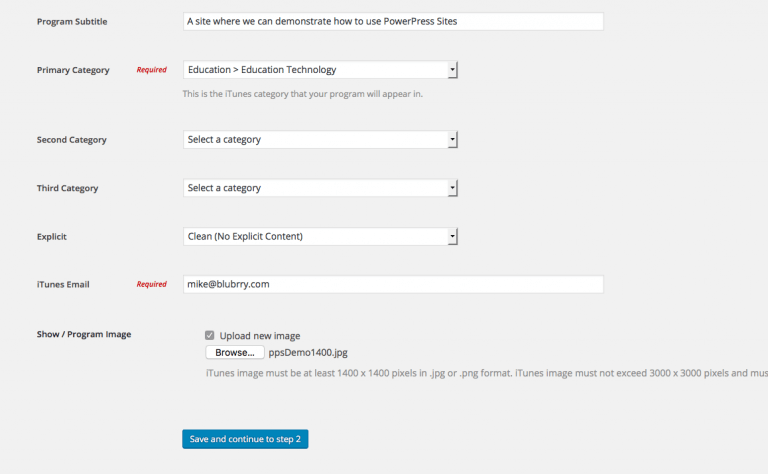
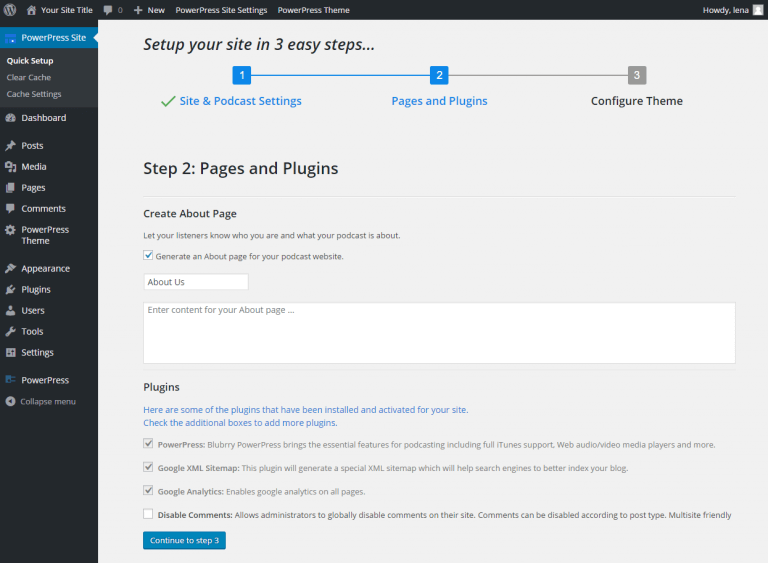
    A FREE Basic WordPress Sites account includes a managed WordPress site, podcast media hosting, and professional podcast statistics in one place. It’s a complete package, offering everything you need to build and grow your show and accurately measure your results. And best yet, you can have your new podcast site up and running in five minutes – tops. 

    Easy as 1…

    powerpress sites 1

    2…

    powerpress sites 4

    3!

    powerpress sites 5

    No more stalling! Follow our Quick Start guide to launch your site in no time. We’ll take care of the behind-the-scenes so you can focus on creating great content and connecting with your audience.

  • PowerPress Wonder Why?

    PowerPress did not just happen, it came to be because of  a vision to give Podcasters better tools so they can focus on creating content letting PowerPress and our tools do the heavy lifting. Support the team that is supporting you! I show you the power of how we continue to power your podcast with hosting and podcast publishing as easy as 1,2,3.

    Become a Customer Today and Support the PowerPress Team

  • Introducing the Blubrry API

    We are proud to announce the availability of the new Blubrry API. The Blubrry API extends our commitment to the community by allowing 3rd party applications and web sites to work with our services.

    The new Blubrry API allows developers to build  applications to interface with our media hosting and statistics services. Applications can delete, upload and list media files as well as retrieve media statistics information.

    The Blubrry API is a hybrid of the RESTful implementation found at Twitter and WebDAV. More technical details may be found on the Blubrry Help site under the section titled Blubrry API.

  • Blubrry Uploader makes a ‘drag’ something pretty cool

    Media UploaderWe know we’re tools . . . in a good way. That’s why you come to us. We’re always looking out for you and bringing you the most advanced applications in podcasting. That’s why you know that when we say the Blubrry Uploader Blog Posting Tool, the latest innovation for our hosting clients, is a drag . . . we mean it in a good way. It’s pretty self explanatory, really, and the tool itself  is way easy to install just:
    • Click this link for the media uploader
    • Hit “Run” (not to be confused with hit n’ run)
    • Agree to the terms (we know you’ll read every word)
    • Enter your Blubrry username and password, and there ya go!
    Our new Windows application allows you to upload media to your Blubrry hosting account  by just dragging and dropping. Pretty cool, eh? Let us know how you like it!  After all, at RawVoice, we continue to make all aspects of podcasting easier and we’re proud to be your favorite podcasting tool.
  • Podango Podcasters Last Hail Mary

    I hate using football terms but Podango podcasters have one last chance to save their show from complete and utter demis.

    Podango Podcasters: If you have a copy of your RSS Feed and media, we will setup an FTP account for you to upload your media to host with us.

    Our offer of free 30 days of hosting remains even though we cannot fully migrate you directly from Podango.com.

    Send email to cio@rawvoice.com if you are willing to up your media and receive 30 days of free hosting.

  • Podango Podcasters 30 Free Days of Media Hosting

    Podango.com is now officially offline. Unfortunately, can no longer migrate your media from your feed. If you are still seeking a hosting solution, please contact us: http://www.blubrry.com/contact.php

    Original post:

    Hey, yeah, we heard. The online video and audio network Podango might be done before the end of this year. The loss of Podango's services and innovative capabilities are a real blow to our tight-knit new media community and the team at Blubrry honors the accomplishments and commitment of Podango since it's inception in 2006.

    Podango President Douglas Smith has encouraged podcasters to immediately seek new hosting services to ensure they are not negatively impacted by the loss of Podango. We at Blubrry respect that immensely and have tools in place to automate the transfer process should you choose to host your media at we-moved-the-blog-to-this-site-when-we-made-a-new-website.blubrry.com/.

    Actually, we've made it not only easy, but free. In addition to offering Podango podcasters an automated process to transfer files from Podango to the Blubrry network, we are giving Podango podcasters 30 days of free hosting. This will give you time to continue your show while you consider your hosting options. You are under no obligation to continue hosting with Blubrry: during the 30 day period you can move your shows to another provider at any time. Sure, we hope you'll continue hosting with Blubrry, but the immediate need is to keep your podcasts online, uninterrupted.

    Here are the instructions to move your show and media files to the Blubrry network

    Updated: 12–31–08 0100 EST

    Update: Podango RSS feeds have become unstable we are now not recommending people move to feedburner until after the feed has been imported into Blubrry. We also recommend saving a copy of your RSS feed to your hard drive as a backup.

    1st Create an account on blubrry, if you have not done so yet.

    2nd Add your podcast to Blubrry by submitting your feed on our add podcast page: www.blubrry.com/addpodcast.php Note: You are not purchasing hosting yet, please ignore the message at the top of the page.

    3rd Once your podcast is submitted and all of your posts have been imported, go to the manage account page by clicking the ‘manage account’ link found at the top right corner. Navigate to the ‘Content’ page and then click the link titled “Free Hosting for 30 days”. Fill out the form, select the plan you would like after your 30 day trial is over, and then click ‘Sign Up’.

    4th Be patient! We will start migrating your data as soon as possible. Migration times vary depending on the size and number of files queued. Please give us a couple of hours to move your media.

    5th (Optional and recommend) You can setup a personal domain that will point to your custom home page. This will allow your show to reside at yourdomain.com

    Podango Podcasters, while we are sad to see Podango shut down, we have tried to make this switch as painless as possible for you. Circumstances require you do the minimum of Steps 1–3 immediately to ensure your media remains on-line after December 31, 2008.

    The Blubrry team is made up of Podcasters and we understand the challenges you are facing in this stressful time. You are under no obligation to host with us beyond the 30 days we are offering free. We simply wanted to you an opportunity to move your content before time runs out.

    We look forward to your feedback

    Tips:

    1. Provide an email in your next blog post for facts to contact you.
    2. Explain in detail what is happening to your audience in your next episode.