
Blog

  • Meet us in L.A. to further your digital media empire

    Architect Frank Lloyd Wright once said if you tip the world over on its side, everything loose will land in Los Angeles. Is the world tipping? Must be because we’re pretty excited about landing in L.A. and seeing you folks at BlogWorld & New Media Expo Nov. 3-5 at the Los Angeles Convention Center. Know why? Because, not only do we want to get caught up with y’all, we’ve got some amazing structures in place that are going to make your lives easier and build a more profitable and interactive digital media foundation for your shows.

    Take our tour and explore:

    • Creating your own podcast. We will be running a podcast recording station, so you can come try it out and show the world what you’ve got. You’ll need to sign up! Here’s how: Email us at contact@rawvoice.com to schedule your time.
    • The soon-to-be-launched CueToo and about how to make money with premium content.
    • Version 3.0 of PowerPress and a feast of new features.

    We will be announcing, a brand-new way to help monetize your media. Shshshhhhh! It’s a secret. We will announce it in a big way a few days before the show. But we will say we’re 100 percent certain that:

    • media buyers are gonna want to see it.
    • media companies/creators are immediately going to want to implement it.
    • the rest of ya are just gonna dig it.

    Oh, did I mention we are speaking and you will want to hear what we have to say? We will be talking about “Optimizing a WordPress Website for Podcasting.” You’ll walk away with:

    1. Next steps to raise engagement on your website.

    2. Knowing what elements should be on your website to grow your audience.

    3. A full list of podcasting dos and don’ts.

    We’ve had a lot of construction under way the past year and we know you’ll want to check out all the new “rooms” we have to offer. Have questions? Contact us at ceo [at] rawvoice.com.
  • The loss of a quiet revolutionary

    We at RawVoice and Blubrry join the rest of the country and the globe in mourning the death of entrepreneur, inventor and visionary founder of Apple Inc., Steve Jobs. He was a quiet revolutionary, without whom we would not have seen the technological advances we enjoy today. At RawVoice and Blubrry, our business would not be what it is without Apple and the iPod, iPad, iPhone and other outstanding advances. Our thoughts and our condolences are with his family.

    Our CEO, Todd Cochrane, weighs in on the loss on Geek News Central.

  • Number of podcasts showing up in iTunes or Feed

    I only see 10 of my podcast episodes in iTunes, why?

    We get this question about 1-2 a week. The answer is simple, there’s a setting for that.

    iTunes displays what it sees in the feed you submitted to them. Your feed by default will display only 10 items (blog posts/podcast episodes) due to a setting in WordPress. To change the number of items per feed, go to your WordPress admin, to the “Settings” section and select “Reading”. For the option labeled “Syndication feeds show the most recent”, enter the value you desire.

    If you are using the podcast specific feeds provided by PowerPress, you can also set the number of items per feed in the PowerPress settings. When editing a podcast channel or podcast category in PowerPress settings, select the “Feed” tab, and go to the section titled “Show the most recent”. You can leave this setting blank to use the WordPress global default, or you can specify your own number for this specific podcast feed.

    Keep in mind that the items per feed cannot be infinite. The number of items per feed should not be too large that way feed readers and services such as iTunes/FeedBurner can pull them without complaining about the file size. We believe that a value between 20-50 is sufficient. If you use a value larger than 50, make sure you open your feed in a web browser then select the option “save as” and save the feed to your computer. Then check the saved file’s size does not exceed 512KB in size.

  • Network News and PowerPress Tips

    In this addition of the Blubrry PowerPress Podcast Community Podcast we cover Network News and PowerPress Tips.

    News:
    Sponsor Updates
    Affiliate Campaigns
    Audience Survey
    Advertising Survey
    Media Statistics

    PowerPress Info:
    Video Performance
    What PowerPress Isn’t
    Why we do not Encourage Feedburner utilization.

  • HTML5 & Audience Surveys

    In this episode I talk about PowerPress and the power of our HTML5 player. I also talk about our newly introduced Audience Surveys.  Many are asking about our recent webinar, I cover that along with a few more administrative issues.

  • HTML5 – Audience Surveys – Blubrry Update

    Todd talks HTML5 using PowerPress Podcast Plugin. Then goes into our new Audience Survey Feature and some Blubrry Updates.

  • Where are PowerPress Settings

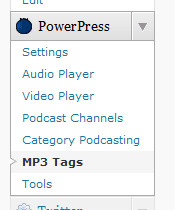
    We get this question at least once a month with new users. Look at the vertical menu system on the left within your wp-admin area, scroll down until you see the section titled “PowerPress”. go ahead and click to expand to see all of the sub menu options of PowerPress.

    Below is a screen shot of what this menu looks like.

    PowerPress menu in WordPress

    The “Podcast Channels” and “Category Podcasting” sections are advanced features that are turned off by default. If you want these options, go to the PowerPress “Settings” page, scroll to the bottom to the section titled “Advanced Options” and turn on the options you want.

    MP3 Tags is a feature only available to paid Blubrry Hosting customers, as the tags are written to the media files as part of our service.

    Our media hosting service integrates seamlessly in WordPress with our PowerPress plugin, plans start at $12/month. Learn more here: Blubrry Podcast Media Hosting.


  • Using The Podcast Channel Feature

    One of the most powerful features of the PowerPress Podcast Plugin for WordPress is the ability to make custom podcast channels. I find the channels life savers, as I have 2 other host that have their own shows on my site.

    Doing 2 separate shows myself in both Audio and Video, requires that I have a total of 4 rss feeds for just my two shows. 1 Audio and 1 Video feed for each show.

    I found that my audience would subscribe to either the Audio or the Video feed of my show, but not both feeds more often than not. So ultimately you are giving your listeners and viewers a choice of content formats.

    But here are the three things you really need to know about creating more podcast channels.

    Example 1: You want to distribute both an mp3 and an mp4 version of your podcast. Use the default podcast channel for your mp3 media and create a custom channel for your mp4 media.

    Example 2: You have a video podcast with multiple file formats. Use the default podcast channel for the main media that you want to appear on your blog (e.g. m4v). Create additional channels for the remaining formats and sizes (e.g. wmv, mov, mpeg).

    Example 3: You create two versions of your podcast, a 20 minute summary and a full 2 hour episode. Use the default channel for your 20 minute summary episodes and create a new custom channel for your full length episodes.

    If you are part of one of our communities keep your eyes open for our newsletter as they all contain critical information that will help grow your show.

    Todd…

  • Are you Advertiser Ready?

    RawVoice has hired a full time sales manager and we want to make sure that all shows that works with us fully understand what they need to have in place in order to be considered for an advertising campaign. To often shows have great intentions yet when it comes time to put their shows on a proposal we are not able due to oversights by the content creator.  In this presentation, I walk you through the steps you need to take to be ready to be considered for an advertising campaign.

    I have also posted some supporting articles for content creators hosting their media at the following sites. Mevio, Podbean, Libsyn, Podomatic, Blog Talk Radio.


  • Blubrry Teams with Media Distributor Lookee TV

    The Blubrry digital media community is proud to announce it’s partnership with the Lookee TV, a 4.3 LCD Wi-Fi enabled Internet TV and radio player. The Lookee TV players, coming to an electronics store near you, will allow audiences to directly gain access to Blubrry’s most popular media content.

    Blubrry is home to more than 8,000 shows from across the universe and allows audiences to create a custom playlist of favorite shows via the MyCast(R) feature. With this partnership, viewers can enjoy great independently produced digital media shows from categories such as music, gaming and comedy to health, science and education.

    Digital media content creators who wish to be viewed on LookieTV are encouraged to contact the Blubrry community parent company RawVoice.com for opportunities to be seen and heard on Lookee TV players across the globe.

    Lookee TV features:

    • More than 1,400 channels on more than 30,000 radio stations and podcasts from all over the world.
    • A TV-out function to turn your home television into Internet TV.
    • The ability to partner and work with any online source of video and audio.
    • Built in media player, digital picture slideshow, FM radio, dual alarm clock and more.

    Plus a great deal more.

    Blubrry digital media community has led the way in fulfilling digital media distribution needs since 2004, enabling content creators to publish audio and video or blog content channels and manage users. To find out more about Blubrry, go to we-moved-the-blog-to-this-site-when-we-made-a-new-website.blubrry.com/ or call 1.877.729.8642.